
By JayUpdated 2026-10-038 versions · latest released 2026-10-03facebook-pages@clawhub_hith3sh/facebook-pages
Social Media
According to AlphaMoat, as of 2026-10, Facebook has 7,965 downloads and 33 stars — ranked by downloads #3,493 among 10,914 AI skills in this ranking, and #346 of 927 in Content.
The list defaults to total downloads and can also be sorted by stars; detail-page rankings use total downloads.
| Platform | Downloads | Stars | Comments |
|---|---|---|---|
| ClawHub ↗ | 8.0K | 33 | - |
| SkillHub ↗ | 5.9K | 33 | — |
Platforms count differently and update at different times.
It distinguishes public-content reads from actions on a connected account and covers posts, comments, messages, and insights. Write actions such as creating, editing, deleting, or sending messages require a preview and explicit user confirmation. Public-data retrieval may consume ClawLink credits, and connected-account access is limited by the account’s roles.
Profile published 2026-10-29
Generated from the skill’s documentation as examples; not results of actual runs.
The counting method changed in 2026-09: skills with the same name are now counted separately by author, and the full catalog is covered. Dashed lines show months before the change; they are not compared with later months, and no growth is computed across the change.
| Month | Downloads | MoM | Stars |
|---|---|---|---|
| 2026-10 | 8.0K | — | 33 |
| 2026-09 | 7.6K | — | 33 |
| 2026-08 | 7.4K | +4.6% | 33 |
| 2026-07 | 7.0K | +259.9% | 33 |
| 2026-06 | 2.0K | +58.0% | 32 |
| 2026-05 | 1.2K | — | 6 |
The author’s original file, shown as plain text without edits or review by AlphaMoat. Links are not clickable; check commands before running them. Fetched 2026-10-23.
--- name: facebook-pages description: Manage Facebook Pages, posts, comments, messages, and insights via the Facebook Graph API. Use this skill when users want to post content, read engagement metrics, moderate comments, or automate Facebook Page workflows from chat. --- # Facebook  Access Facebook Pages via the Graph API with managed OAuth authentication. Post content, read engagement, manage comments and messages, and view insights from chat.
This skill uses [ClawLink](https://claw-link.dev/?utm_source=clawhub&utm_medium=referral&utm_content=facebook-pages) for hosted connection flows and credentials so you do not need to configure Facebook API access yourself.
### Setup in 3 Steps
| Step 1: Install | Step 2: Pair Account | Step 3: Connect Facebook |
|:---:|:---:|:---:|
| 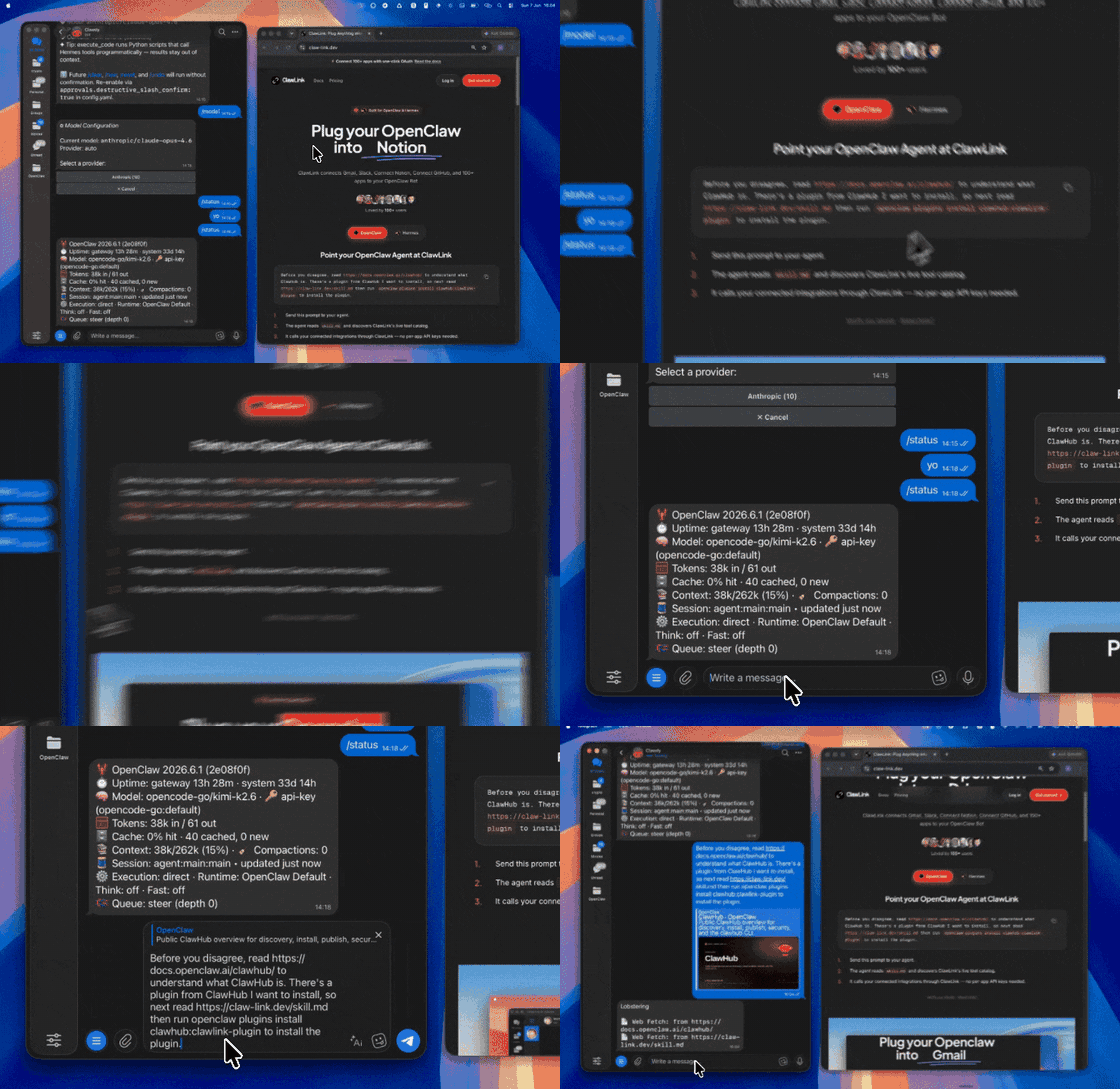 | 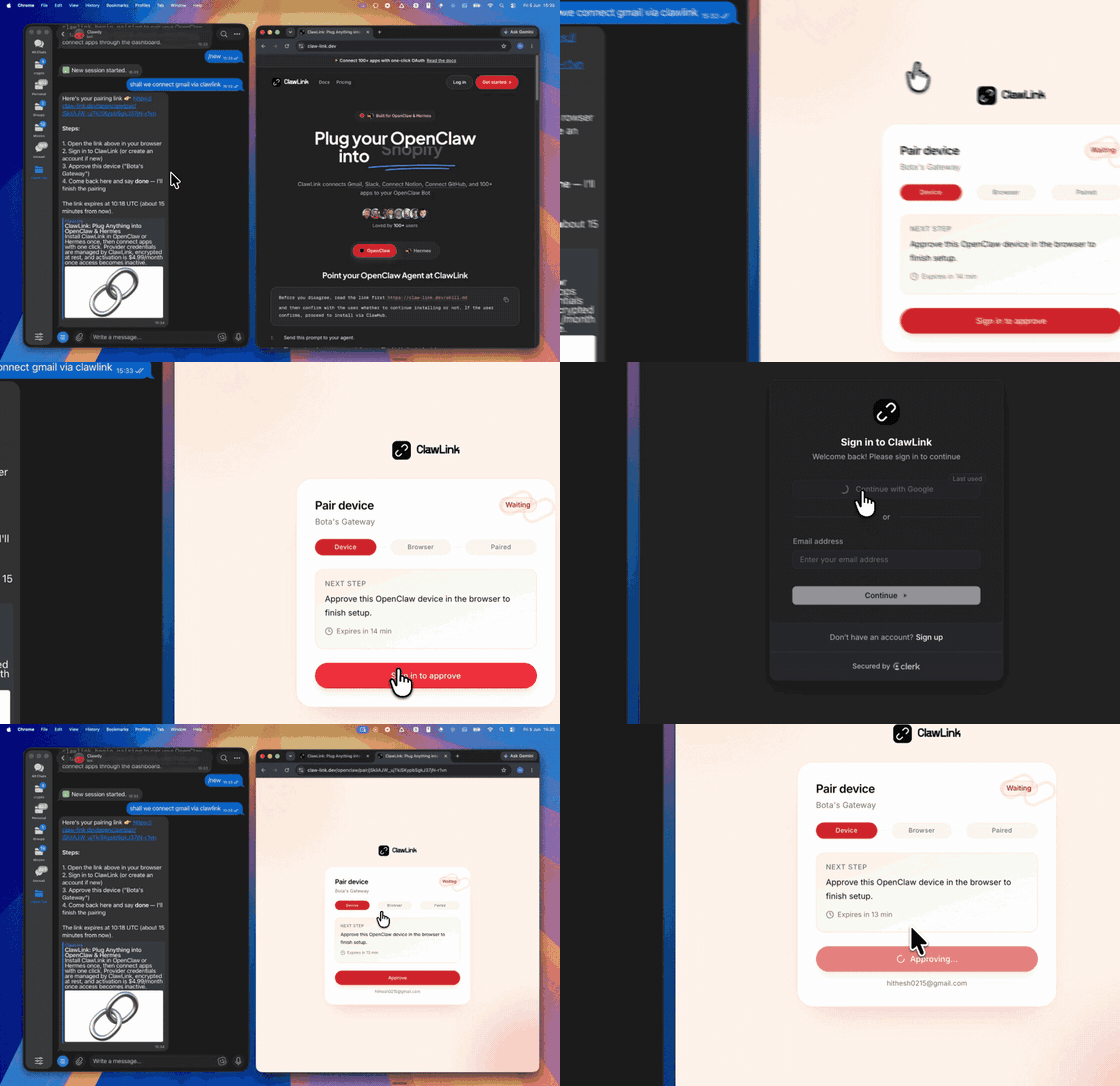 | *App-specific connection GIF coming soon* |
| Run the install command in OpenClaw | Sign in and approve the device | Open the dashboard and connect Facebook |
## No Account Needed: Public Facebook Data
Read any public Facebook page, post, group or event, search Marketplace, and browse the Meta Ad Library, without connecting a Facebook account. These tools work as soon as the plugin is paired: there is nothing to connect, and each call is paid from ClawLink credit (most cost a fraction of a cent; new accounts get $0.50 free).
| Tool | What it returns | Price |
|------|-----------------|-------|
| `facebookdata_page_profile` | Public Facebook page or profile by URL: name, category, likes, followers, about | $0.00282 |
| `facebookdata_page_posts` | Recent public posts of a Facebook page by URL | $0.00282 |
| `facebookdata_post_comments` | Comments on a public Facebook post by URL | $0.00282 |
| `facebookdata_ad_library_search` | Search the Meta Ad Library for active ads by keyword | $0.00282 |
| `facebookdata_marketplace_search` | Search Facebook Marketplace listings near a point | $0.00282 |
| `facebookdata_events_search` | Search public Facebook events by keyword | $0.00282 |
Use the connected-account tools above for the user's own Facebook; use these for anyone else's public content. More: [Ad Spy](https://clawhub.ai/hith3sh/skills/ad-spy), [Transcribe Any Video](https://clawhub.ai/hith3sh/skills/transcribe-any-video).
## How It Works
```
┌─────────────────┐ ┌──────────────┐ ┌──────────────────┐
│ OpenClaw │────▶│ ClawLink │────▶│ Facebook Graph │
│ (User Chat) │ │ (OAuth) │ │ API │
└─────────────────┘ └──────────────┘ └──────────────────┘
│ │ │
│ 1. Install Plugin │ │
│ 2. Pair Device │ │
│ 3. Connect Facebook │ │
│ │ 4. Secure Token │
│ │ 5. Proxy Requests │
│ │ │
▼ ▼ ▼
┌──────────┐ ┌──────────┐ ┌──────────┐
│ SKILL │ │ Dashboard│ │ Facebook │
│ File │ │ Auth │ │ Business │
└──────────┘ └──────────┘ └──────────┘
```
## Install
Install the verified ClawLink plugin from ClawHub. After the user confirms, complete the full setup so ClawLink tools are visible in the next OpenClaw chat.
```bash
openclaw plugins install clawhub:clawlink-plugin
openclaw config set tools.alsoAllow '["clawlink-plugin"]' --strict-json
openclaw gateway restart
```
Then tell the user: "OpenClaw has been restarted. Send `/new` as a standalone message to start a fresh chat, then ask for Facebook again."
## Quick Start
```bash
# List integrations
clawlink_list_integrations
# List Facebook tools
clawlink_list_tools --integration facebook
# Search for a specific tool
clawlink_search_tools --query "post" --integration facebook
```
## Authentication
All Facebook tool calls are authenticated automatically by ClawLink using the user's connected Facebook account.
**No API key is required in chat.** ClawLink stores the OAuth token securely and injects it into every Facebook Graph API request on the user's behalf.
### Getting Connected
1. Install the ClawLink plugin (see Install above).
2. Pair the plugin with `clawlink_begin_pairing` if it is not configured yet.
3. Open https://claw-link.dev/dashboard?add=facebook and connect Facebook.
4. Call `clawlink_list_integrations` to verify the connection is active.
## Connection Management
### List Connections
```bash
clawlink_list_integrations
```
**Response:** Returns all connected integrations. Look for `facebook` in the list.
### Verify Connection
```bash
clawlink_list_tools --integration facebook
```
**Response:** Returns the live tool catalog for Facebook.
### Reconnect
If Facebook tools are missing or the connection shows an error:
1. Direct the user to https://claw-link.dev/dashboard?add=facebook
2. After they confirm, call `clawlink_list_integrations` to verify
3. Then call `clawlink_list_tools --integration facebook`
## Discovery Workflow
1. Call `clawlink_list_integrations` to confirm Facebook is connected.
2. Call `clawlink_list_tools --integration facebook` to see the live catalog.
3. Treat the returned list as the source of truth. Do not guess or assume what tools exist.
4. If the user describes a capability but the exact tool is unclear, call `clawlink_search_tools` with a short query and integration `facebook`.
5. If no Facebook tools appear, direct the user to https://claw-link.dev/dashboard?add=facebook.
## Execution Workflow
```
┌─────────────────────────────────────────────────────────────┐
│ READ OPERATIONS (Safe) │
│ list → get → search → describe → call │
│ │
│ Example: List posts → Get insights → Show results │
└─────────────────────────────────────────────────────────────┘
│
▼
┌─────────────────────────────────────────────────────────────┐
│ WRITE OPERATIONS (Require Confirmation) │
│ list → get → describe → preview → confirm → call │
│ │
│ Example: Describe tool → Preview changes → User approves │
│ → Execute update │
└─────────────────────────────────────────────────────────────┘
```
1. For unfamiliar tools, ambiguous requests, or any write action, call `clawlink_describe_tool` first.
2. Use the returned guidance, schema, `whenToUse`, `askBefore`, `safeDefaults`, `examples`, and `followups` to shape the call.
3. Prefer read, list, search, and get operations before writes when that reduces ambiguity.
4. For writes or anything marked as requiring confirmation, call `clawlink_preview_tool` first.
5. Execute with `clawlink_call_tool`. Pass confirmation only after the preview matches the user's intent.
6. If the tool call fails, report the real error. Do not invent results or restate the failure as a missing capability unless the live catalog supports that conclusion.
## Tool Reference
### Pages& Profiles
| Tool | Description | Mode |
|------|-------------|------|
| `facebook_list_managed_pages` | List Pages the user manages | Read |
| `facebook_get_page_details` | Get Page metadata and settings | Read |
| `facebook_get_page_roles` | Get Page roles and permissions | Read |
| `facebook_update_page_settings` | Update Page settings | Write |
### Posts
| Tool | Description | Mode |
|------|-------------|------|
| `facebook_get_page_posts` | Get posts from a Page | Read |
| `facebook_get_post` | Get a specific post | Read |
| `facebook_create_post` | Create a text or link post | Write |
| `facebook_create_photo_post` | Create a photo post | Write |
| `facebook_update_post` | Update an existing post | Write |
| `facebook_delete_post` | Delete a post | Write |
| `facebook_get_scheduled_posts` | Get scheduled posts | Read |
| `facebook_publish_scheduled_post` | Publish a scheduled post | Write |
### Comments
| Tool | Description | Mode |
|------|-------------|------|
| `facebook_get_comments` | Get comments on a post | Read |
| `facebook_get_comment` | Get a specific comment | Read |
| `facebook_create_comment` | Create a comment on a post | Write |
| `facebook_update_comment` | Update a comment | Write |
| `facebook_delete_comment` | Delete a comment | Write |
### Messaging
| Tool | Description | Mode |
|------|-------------|------|
| `facebook_get_page_conversations` | Get Page conversations | Read |
| `facebook_get_conversation_messages` | Get messages in a conversation | Read |
| `facebook_send_message` | Send a message from the Page | Write |
| `facebook_send_media_message` | Send media (image/video) message | Write |
| `facebook_mark_message_seen` | Mark a message as seen | Write |
### Insights& Analytics
| Tool | Description | Mode |
|------|-------------|------|
| `facebook_get_page_insights` | Get Page analytics and metrics | Read |
| `facebook_get_post_insights` | Get post-specific insights | Read |
| `facebook_get_post_reactions` | Get reactions on a post | Read |
### Photo Albums
| Tool | Description | Mode |
|------|-------------|------|
| `facebook_create_photo_album` | Create a photo album | Write |
| `facebook_get_page_photos` | Get Page photos | Read |
| `facebook_upload_photos_batch` | Upload multiple photos | Write |
## Code Examples
### List managed Pages
```bash
clawlink_call_tool --tool "facebook_list_managed_pages" \
--params '{}'
```
### Get Page posts
```bash
clawlink_call_tool --tool "facebook_get_page_posts" \
--params '{
"page_id": "YOUR_PAGE_ID",
"limit": 20
}'
```
### Create a post
```bash
clawlink_call_tool --tool "facebook_create_post" \
--params '{
"page_id": "YOUR_PAGE_ID",
"message": "Hello from ClawLink! This is an automated post."
}'
```
### Get post insights
```bash
clawlink_call_tool --tool "facebook_get_post_insights" \
--params '{
"post_id": "YOUR_POST_ID"
}'
```
## Security & Permissions
- Connected-account tools are scoped to the connected Facebook account's managed Pages and their permissions.
- The public-data tools under "No Account Needed" read other people's public Facebook content (profiles, posts, comments) without any connected account. They are read-only, never post or change anything, and each call is paid from the user's ClawLink credit.
- **All write operations require explicit user confirmation.** Before executing any create, update, or delete call, confirm the target resource and intended effect with the user.
- Destructive actions (deleting posts, comments) are marked as high-impact and must be confirmed.
- Publishing posts affects the Page's public-facing content; confirm all write operations.
- Messaging operations deliver to real users; confirm before sending.
## Notes
- Facebook Graph API uses cursor-based pagination for large result sets.
- CDN-based media URLs (from `source` field) are time-limited; download promptly if long-term access is needed.
- Rate limits apply to API calls (error codes 4,17, 613); use backoff for high-volume operations.
- The API version is v23.0 (released May 2025); older versions are deprecated.
- Some permissions require Facebook app review before use in production.
## Error Handling
| Status / Error | Meaning |
|----------------|---------|
| Tool not found | The tool name does not exist in the current catalog. Verify with `clawlink_list_tools --integration facebook`. |
| Missing connection | Facebook is not connected. Direct the user to https://claw-link.dev/dashboard?add=facebook. |
| `(#404) Page not found` | The Page ID does not exist or is not accessible. |
| `(#200) Permission denied` | The app does not have the required permission. |
| `(#190) Token expired` | The access token has expired. Reconnect Facebook. |
| Write rejected | User did not confirm a write action. Always confirm before executing writes. |
### Troubleshooting: Tools Not Visible
1. Check that the ClawLink plugin is installed:
```bash
openclaw plugins list
```
2. If the plugin is installed but tools are missing, tell the user to send `/new` as a standalone message to reload the catalog.
3. If a fresh chat does not help, run:
```bash
openclaw config set tools.alsoAllow '["clawlink-plugin"]' --strict-json
openclaw gateway restart
```
4. After restart, tell the user to send `/new` again and retry.
### Troubleshooting: Invalid Tool Call
1. Ensure the integration slug is exactly `facebook`.
2. Use `clawlink_describe_tool` to verify parameter names and types before calling.
3. For write operations, always call `clawlink_preview_tool` first.
## Resources
- [Facebook Graph API Documentation](https://developers.facebook.com/docs/graph-api/)
- [Facebook Graph API Reference](https://developers.facebook.com/docs/graph-api/reference/)
- [Facebook Graph API Changelog](https://developers.facebook.com/docs/graph-api/changelog)
- ClawLink: https://claw-link.dev/?utm_source=clawhub&utm_medium=referral&utm_content=facebook-pages
- ClawLink Docs: https://docs.claw-link.dev/openclaw
- ClawLink Verification: https://claw-link.dev/verify
---
**Powered by [ClawLink](https://claw-link.dev/?utm_source=clawhub&utm_medium=referral&utm_content=facebook-pages)** — an integration hub for OpenClaw

李白.Skill:润色专家 检测并消除中文文本中的AI生成痕迹,将生硬的机器输出转化为自然流畅的人类文笔。融合规则检测、分层改写和质控流水线,确保最终文本通过人工审查。
李白.Skill:润色专家 检测并消除中文文本中的AI生成痕迹,将生硬的机器输出转化为自然流畅的人类文笔。融合规则检测、分层改写和质控流水线,确保最终文本通过人工审查。
Detects and removes AI writing traces so text reads more like a person wrote it.
【零一数科·出品】视频号爆款短视频拆解(全能版)(付费版)。视频号爆款短视频拆解(付费版:全能)。一键拆解爆款,把一条视频号视频拆成结构分段、爆款归因、六维评分和可借鉴策略,照着学照着抄。支持视频号分享链接和本地视频,付费全能版远端分析,1–5 分钟出可视化 HTML 报告。
【零一数科·出品】视频号挂车爆单短视频脚本生成(付费版)。一条链接二创脚本,丢进爆款视频号链接即以此骨架改写成你的挂车脚本,或按方向/目的/商品原创多条口播脚本(含分段表、口播全文、六维质检评分)。
A writing-editor skill that finds the usual marks of AI-generated text and rewrites them into more natural prose without losing the meaning.
用于中文公文、事务性材料和新闻稿件的起草、改写、压缩、润色、审校、文种核对、去口语化、降 AI 味及 Word 格式处理,适用于机关、企事业单位、学校和新闻机构。涵盖申请、请示、报告、通知、通告、意见、决定、决议、议案、公报、命令、函、复函、批复、说明、方案、纪要、公告、公示、通报、制度、规定、办法、细则、操作规程、工作要点、总结、调研、讲话、致辞、主持词、述职、可研、审查材料、技术需求、新闻消息、编者按、新闻评论,以及采购、整改、反馈和 AI 算力等场景。
【零一数科·出品】视频号爆款文案生成(体验版)。免费免登录出脚本,给创作目的、行业、受众、选题就按爆款结构(Hook-中段-CTA、节奏标签)产出口播脚本,信息不全也能按爆款潜质兜底。本地运行、无需 Key,零成本上手。
Manage Instagram Business and Creator accounts via the Instagram Graph API. Publish posts and carousels, retrieve media and insights, moderate comments, send DMs, and manage story content. Use this skill when users want to manage Instagram content, analyze engagement, or automate social media workflows.
Google Sheets API integration with managed OAuth. Create spreadsheets, read and write cell values, manage sheets, append rows, create charts, and automate da...
Google Drive API integration with managed OAuth. Search Drive files, manage permissions, organize folders, upload and download files, and handle sharing chan...
Manage LinkedIn presence via the LinkedIn API. Create posts and articles, manage comments, handle media uploads, search ad targeting entities, and retrieve user profile and image data.
Create and manage Canva designs, upload assets, export content, and manage brand templates via the Canva Connect API. Use this skill when users want to autom...
Data as of 2026-10. Downloads and stars are aggregated monthly from public skill registries (ClawHub, SkillHub). See data methodology.