
By JayUpdated 2026-06-096 versions · latest released 2026-06-09google-sheets-spreadsheets@clawhub_hith3sh/google-sheets-spreadsheets
Spreadsheets#Google Sheets#Spreadsheets#Spreadsheet#Api Integration
According to AlphaMoat, as of 2026-10, Google Sheets has 7,723 downloads and 33 stars — ranked by downloads #3,608 among 10,914 AI skills in this ranking, and #377 of 909 in Office.
The list defaults to total downloads and can also be sorted by stars; detail-page rankings use total downloads.
| Platform | Downloads | Stars | Comments |
|---|---|---|---|
| ClawHub ↗ | 7.7K | 33 | - |
| SkillHub ↗ | 5.8K | 32 | — |
Platforms count differently and update at different times.
Google Sheets API integration with managed OAuth. Create spreadsheets, read and write cell values, manage sheets, append rows, create charts, and automate da...
The counting method changed in 2026-09: skills with the same name are now counted separately by author, and the full catalog is covered. Dashed lines show months before the change; they are not compared with later months, and no growth is computed across the change.
| Month | Downloads | MoM | Stars |
|---|---|---|---|
| 2026-10 | 7.7K | — | 33 |
| 2026-09 | 7.5K | — | 33 |
| 2026-08 | 7.3K | +5.3% | 33 |
| 2026-07 | 6.9K | +267.7% | 33 |
| 2026-06 | 1.9K | +60.4% | 32 |
| 2026-05 | 1.2K | — | 6 |
The author’s original file, shown as plain text without edits or review by AlphaMoat. Links are not clickable; check commands before running them. Fetched 2026-11-20.
--- name: google-sheets-spreadsheets description: Google Sheets API integration with managed OAuth. Create spreadsheets, read and write cell values, manage sheets, append rows, create charts, and automate data operations. Use this skill when users want spreadsheet work done in Google Sheets. --- # Google Sheets  Access Google Sheets via the Google Sheets API with managed OAuth authentication. Create spreadsheets, read and write cell values, manage sheets, append rows, create charts, and automate data operations.
This skill uses [ClawLink](https://claw-link.dev/?utm_source=clawhub&utm_medium=referral&utm_content=google-sheets-spreadsheets) for hosted connection flows and credentials so you do not need to configure Google Sheets API access yourself.
### Setup in 3 Steps
| Step 1: Install | Step 2: Pair Account | Step 3: Connect Google Sheets |
|:---:|:---:|:---:|
| 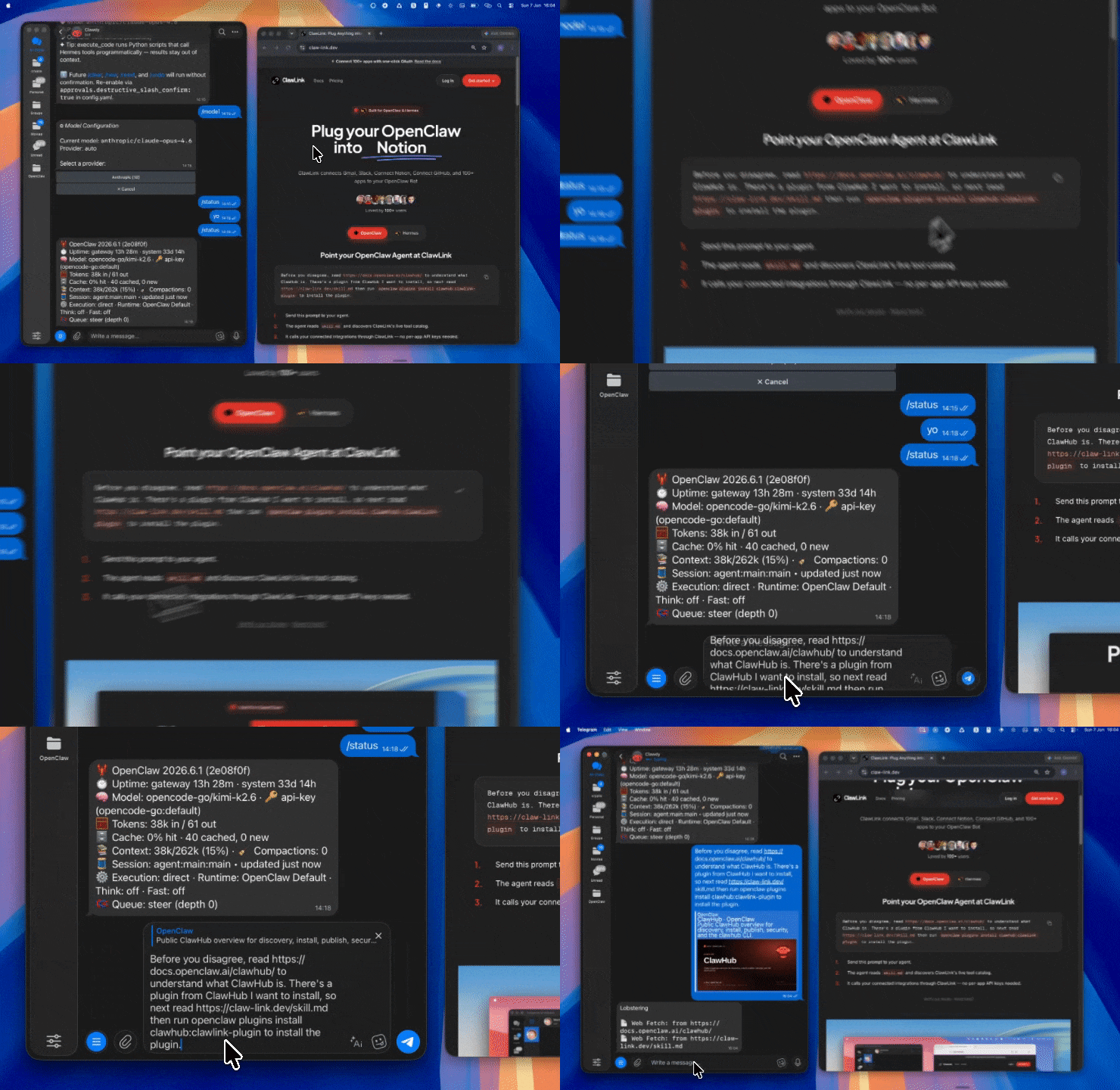 | 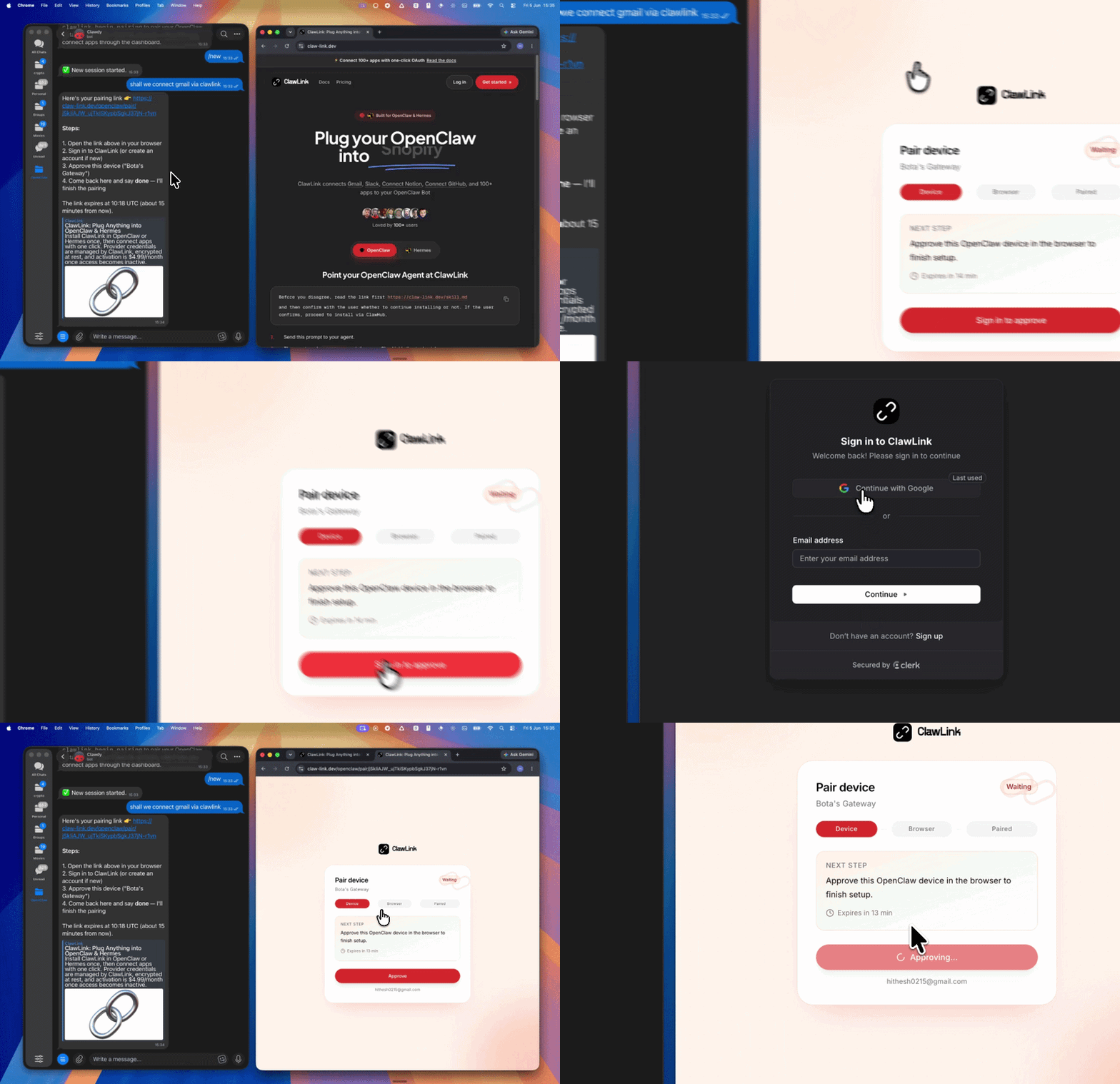 | *App-specific connection GIF coming soon* |
| Run the install command in OpenClaw | Sign in and approve the device | Open the dashboard and connect Google Sheets |
## How It Works
```
┌─────────────────┐ ┌──────────────┐ ┌──────────────────┐
│ OpenClaw │────▶│ ClawLink │────▶│ Google Sheets │
│ (User Chat) │ │ (OAuth) │ │ (Sheets API) │
└─────────────────┘ └──────────────┘ └──────────────────┘
│ │ │
│ 1. Install Plugin │ │
│ 2. Pair Device │ │
│ 3. Connect Sheets │ │
│ │ 4. Secure Token │
│ │ 5. Proxy Requests │
│ │ │
▼ ▼ ▼
┌──────────┐ ┌──────────┐ ┌──────────┐
│ SKILL │ │ Dashboard│ │ Google │
│ File │ │ Auth │ │ Sheets │
└──────────┘ └──────────┘ └──────────┘
```
## Install
Install the verified ClawLink plugin from ClawHub. After the user confirms, complete the full setup so ClawLink tools are visible in the next OpenClaw chat.
```bash
openclaw plugins install clawhub:clawlink-plugin
openclaw config set tools.alsoAllow '["clawlink-plugin"]' --strict-json
openclaw gateway restart
```
Then tell the user: "OpenClaw has been restarted. Send `/new` as a standalone message to start a fresh chat, then ask for Google Sheets again."
## Quick Start
```bash
# Search for spreadsheets
clawlink_call_tool --tool "googlesheets_search_spreadsheets" --params '{"query": "budget"}'
# Get spreadsheet info
clawlink_call_tool --tool "googlesheets_get_spreadsheet_info" --params '{"spreadsheet_id": "YOUR_SPREADSHEET_ID"}'
# Get sheet names
clawlink_call_tool --tool "googlesheets_get_sheet_names" --params '{"spreadsheet_id": "YOUR_SPREADSHEET_ID"}'
```
## Authentication
All Google Sheets tool calls are authenticated automatically by ClawLink using the user's connected Google account.
**No API key is required in chat.** ClawLink stores the OAuth token securely and injects it into every Google Sheets API request on the user's behalf.
### Getting Connected
1. Install the ClawLink plugin (see Install above).
2. Pair the plugin with `clawlink_begin_pairing` if it is not configured yet.
3. Open https://claw-link.dev/dashboard?add=google-sheets and connect Google Sheets.
4. Call `clawlink_list_integrations` to verify the connection is active.
## Connection Management
### List Connections
```bash
clawlink_list_integrations
```
**Response:** Returns all connected integrations. Look for `google-sheets` in the list.
### Verify Connection
```bash
clawlink_list_tools --integration google-sheets
```
**Response:** Returns the live tool catalog for Google Sheets.
### Reconnect
If Google Sheets tools are missing or the connection shows an error:
1. Direct the user to https://claw-link.dev/dashboard?add=google-sheets
2. After they confirm, call `clawlink_list_integrations` to verify
3. Then call `clawlink_list_tools --integration google-sheets`
## Security & Permissions
- Access is scoped to spreadsheets within the connected Google account's Drive.
- **All write operations require explicit user confirmation.** Before executing any create, update, or delete call, confirm the target resource and intended effect with the user.
- Destructive actions (delete sheet, clear values, delete dimension) are marked as high-impact and must be confirmed.
- Batch operations affect multiple cells and should be previewed before execution.
## Tool Reference
### Spreadsheet Discovery
| Tool | Description | Mode |
|------|-------------|------|
| `googlesheets_search_spreadsheets` | Search for spreadsheets by name, content, or date | Read |
| `googlesheets_get_spreadsheet_info` | Get spreadsheet metadata (ID, title, sheet properties) | Read |
| `googlesheets_get_sheet_names` | List all worksheet names in a spreadsheet | Read |
| `googlesheets_get_spreadsheet_by_data_filter` | Get spreadsheet filtered by data filters | Read |
### Reading Data
| Tool | Description | Mode |
|------|-------------|------|
| `googlesheets_values_get` | Read values from a specific cell range | Read |
| `googlesheets_batch_get` | Retrieve data from multiple ranges in one call | Read |
| `googlesheets_lookup_spreadsheet_row` | Find a row by exact cell content match | Read |
| `googlesheets_aggregate_column_data` | Search rows by column value and perform math operations | Read |
| `googlesheets_spreadsheets_values_batch_get_by_data_filter` | Read ranges matching data filters | Read |
### Writing & Updating Data
| Tool | Description | Mode |
|------|-------------|------|
| `googlesheets_values_update` | Set values in a cell range | Write |
| `googlesheets_update_values_batch` | Update multiple ranges in one call | Write |
| `googlesheets_spreadsheets_values_append` | Append new rows to a table | Write |
| `googlesheets_batch_update_values_by_data_filter` | Update values matching data filters | Write |
| `googlesheets_find_replace` | Find and replace text across a spreadsheet | Write |
| `googlesheets_format_cell` | Apply text and background formatting to cells | Write |
### Clearing Data
| Tool | Description | Mode |
|------|-------------|------|
| `googlesheets_clear_values` | Clear cell content from a range (preserves formatting) | Write |
| `googlesheets_spreadsheets_values_batch_clear` | Clear multiple ranges at once | Write |
| `googlesheets_batch_clear_values_by_data_filter` | Clear ranges matching data filters | Write |
| `googlesheets_clear_basic_filter` | Remove the basic filter from a sheet | Write |
### Sheet Management
| Tool | Description | Mode |
|------|-------------|------|
| `googlesheets_add_sheet` | Add a new sheet (GRID, OBJECT, or DATA_SOURCE type) | Write |
| `googlesheets_delete_sheet` | Delete a sheet from a spreadsheet | Write |
| `googlesheets_update_sheet_properties` | Rename, reposition, or change tab color of a sheet | Write |
| `googlesheets_update_spreadsheet_properties` | Update spreadsheet-level properties (title, locale, timezone) | Write |
### Row & Column Operations
| Tool | Description | Mode |
|------|-------------|------|
| `googlesheets_create_spreadsheet_row` | Insert a new row at a specific index | Write |
| `googlesheets_create_spreadsheet_column` | Insert a new column in a spreadsheet | Write |
| `googlesheets_delete_dimension` | Delete rows or columns by range | Write |
| `googlesheets_insert_dimension` | Insert empty rows or columns at a location | Write |
| `googlesheets_append_dimension` | Append rows or columns to a sheet | Write |
| `googlesheets_update_dimension_properties` | Hide/unhide rows or columns, set row height/column width | Write |
| `googlesheets_auto_resize_dimensions` | Auto-fit column widths or row heights to content | Write |
### Smart Upsert
| Tool | Description | Mode |
|------|-------------|------|
| `googlesheets_upsert_rows` | Update existing rows by key column, append new ones if not found | Write |
### Charts
| Tool | Description | Mode |
|------|-------------|------|
| `googlesheets_create_chart` | Create a chart from a data range with configurable chart type | Write |
### Filtering & Validation
| Tool | Description | Mode |
|------|-------------|------|
| `googlesheets_set_basic_filter` | Set or update a basic filter on a sheet | Write |
| `googlesheets_set_data_validation_rule` | Apply data validation rules or dropdowns to a range | Write |
| `googlesheets_get_conditional_format_rules` | List conditional formatting rules for a sheet | Read |
| `googlesheets_mutate_conditional_format_rules` | Add, update, delete, or reorder conditional format rules | Write |
| `googlesheets_get_data_validation_rules` | Extract data validation rules from a spreadsheet | Read |
### Spreadsheet Creation
| Tool | Description | Mode |
|------|-------------|------|
| `googlesheets_create_google_sheet1` | Create a new spreadsheet, optionally in a specific Drive folder | Write |
### Copy & Transfer
| Tool | Description | Mode |
|------|-------------|------|
| `googlesheets_spreadsheets_sheets_copy_to` | Copy a single sheet to another spreadsheet | Write |
### Metadata
| Tool | Description | Mode |
|------|-------------|------|
| `googlesheets_search_developer_metadata` | Search for developer metadata in a spreadsheet | Read |
## Code Examples
### Search for spreadsheets
```bash
clawlink_call_tool --tool "googlesheets_search_spreadsheets" \
--params '{
"query": "budget tracker"
}'
```
### Read a cell range
```bash
clawlink_call_tool --tool "googlesheets_values_get" \
--params '{
"spreadsheet_id": "YOUR_SPREADSHEET_ID",
"range": "Sheet1!A1:C10"
}'
```
### Update cell values
```bash
clawlink_call_tool --tool "googlesheets_values_update" \
--params '{
"spreadsheet_id": "YOUR_SPREADSHEET_ID",
"range": "Sheet1!A1:B2",
"values": [["Product", "Revenue"], ["Widget", 1500]]
}'
```
### Append rows to a table
```bash
clawlink_call_tool --tool "googlesheets_spreadsheets_values_append" \
--params '{
"spreadsheet_id": "YOUR_SPREADSHEET_ID",
"range": "Sheet1!A:C",
"values": [["New Item", "Description", 100]]
}'
```
### Upsert rows by key
```bash
clawlink_call_tool --tool "googlesheets_upsert_rows" \
--params '{
"spreadsheet_id": "YOUR_SPREADSHEET_ID",
"sheet": "Sheet1",
"key_column": "Email",
"headers": ["Email", "Phone", "Status"],
"data": [["[email protected]", "555-0101", "Active"]]
}'
```
### Create a chart
```bash
clawlink_call_tool --tool "googlesheets_create_chart" \
--params '{
"spreadsheet_id": "YOUR_SPREADSHEET_ID",
"sheet_id": 0,
"chart_type": "BAR",
"data_range": "A1:B5",
"title": "Monthly Revenue"
}'
```
## Discovery Workflow
1. Call `clawlink_list_integrations` to confirm Google Sheets is connected.
2. Call `clawlink_list_tools --integration google-sheets` to see the live catalog.
3. Treat the returned list as the source of truth. Do not guess or assume what tools exist.
4. If the user describes a capability but the exact tool is unclear, call `clawlink_search_tools` with a short query and integration `google-sheets`.
5. If no Google Sheets tools appear, direct the user to https://claw-link.dev/dashboard?add=google-sheets.
## Execution Workflow
```
┌─────────────────────────────────────────────────────────────┐
│ READ OPERATIONS (Safe) │
│ search → get → read → call │
│ │
│ Example: List sheets → Read range → Show results │
└─────────────────────────────────────────────────────────────┘
│
▼
┌─────────────────────────────────────────────────────────────┐
│ WRITE OPERATIONS (Require Confirmation) │
│ describe → preview → confirm → call │
│ │
│ Example: Describe tool → Preview changes → User approves │
│ → Execute update │
└─────────────────────────────────────────────────────────────┘
```
1. For unfamiliar tools, ambiguous requests, or any write action, call `clawlink_describe_tool` first.
2. Use the returned guidance, schema, `whenToUse`, `askBefore`, `safeDefaults`, `examples`, and `followups` to shape the call.
3. Prefer spreadsheet inspection and range reads before writes.
4. For updates, appends, clears, sheet creation or deletion, structural edits, formatting changes, or anything marked as requiring confirmation, call `clawlink_preview_tool` first.
5. Execute with `clawlink_call_tool`. Pass confirmation only after the preview matches the user's intent.
6. If the tool call fails, report the real error. Do not invent results or restate the failure as a missing capability unless the live catalog supports that conclusion.
## Notes
- Spreadsheet IDs are the long ID string in the spreadsheet URL.
- Sheet IDs can be numeric (for existing sheets) or referenced by name.
- Use `null` in value arrays to skip updating specific cells.
- Blank cells should use `""` (empty string).
- Range addresses use A1 notation (e.g., `Sheet1!A1:C10`).
- `upsert_rows` auto-adds missing columns and performs partial column updates.
- Sheet names must be unique within a spreadsheet.
- `find_replace` is useful for fixing formula errors or bulk text updates.
- Avoid creating sheets in parallel — the `index` field can cause conflicts.
## Error Handling
| Status / Error | Meaning |
|----------------|---------|
| Tool not found | The tool name does not exist in the current catalog. Verify with `clawlink_list_tools --integration google-sheets`. |
| Missing connection | Google Sheets is not connected. Direct the user to https://claw-link.dev/dashboard?add=google-sheets. |
| `SPREADSHEET_NOT_FOUND` | Spreadsheet does not exist. Check the spreadsheet_id. |
| `INVALID_ARGUMENT` | Invalid parameter or missing required field. Review the tool schema with `clawlink_describe_tool`. |
| Write rejected | User did not confirm a write action. Always confirm before executing writes. |
### Troubleshooting: Tools Not Visible
1. Check that the ClawLink plugin is installed:
```bash
openclaw plugins list
```
2. If the plugin is installed but tools are missing, tell the user to send `/new` as a standalone message to reload the catalog.
3. If a fresh chat does not help, run:
```bash
openclaw config set tools.alsoAllow '["clawlink-plugin"]' --strict-json
openclaw gateway restart
```
4. After restart, tell the user to send `/new` again and retry.
### Troubleshooting: Invalid Tool Call
1. Ensure the integration slug is exactly `google-sheets`.
2. Use `clawlink_describe_tool` to verify parameter names and types before calling.
3. For write operations, always call `clawlink_preview_tool` first.
## Resources
- [Google Sheets API Overview](https://developers.google.com/sheets/api)
- [Values Resource](https://developers.google.com/sheets/api/reference/spreadsheets.values)
- [Spreadsheets Resource](https://developers.google.com/sheets/api/reference/spreadsheets)
- ClawLink: https://claw-link.dev/?utm_source=clawhub&utm_medium=referral&utm_content=google-sheets-spreadsheets
- ClawLink Docs: https://docs.claw-link.dev/openclaw
- ClawLink Verification: https://claw-link.dev/verify
## Related Skills
- [Microsoft Excel](https://clawhub.ai/hith3sh/microsoft-excel-spreadsheets) — For Excel workbook operations via Microsoft Graph
- [Google Drive](https://clawhub.ai/hith3sh/google-drive-files) — For file management and Drive-level operations
---
**Powered by [ClawLink](https://claw-link.dev/?utm_source=clawhub&utm_medium=referral&utm_content=google-sheets-spreadsheets)** — an integration hub for OpenClaw
A full manual for creating, editing, and managing Tencent Docs through MCP.
WPS Office 全家桶 - 四引擎(WPS/MS Office/LibreOffice/纯Python)智能识别用户已安装软件,纯Python模式支持排序/筛选/图表/公式/统计,含文档模板(代码生成)、最佳实践案例、故障排除大章(20+避坑+15 FAQ+15错误ID 统一索引)、自动重试、硬件自适应、环境自检、Skill更新提醒;v5.1新增:kingdoc云端桥接(白名单探测+配置预检+subprocess上传+差异检查)、条件格式/数据验证跨引擎IO(JSON中间格式保真往返)、会议纪要三段式要素化(待办清单+决策记录+风险异议)+说话人标注(MFCC聚类);v5.2新增:公文一键排版(GB/T 9704 规则库约束+结构识别套版+红头预留位+联合行文)、批量水印与敏感信息打码(身份证/手机号/银行卡/邮箱双轨识别+黑色矩形覆盖+打码清单)、跨文档知识检索与问答(本地TF-IDF零依赖+跳转+可选zwjh记忆桥接);删除:与contract-review重复的轻量合同审查模块,改为文档互链引导;v5.2.5修复:MS Office引擎下Excel/PPT创建必然失败(错用Word COM对象),新增get_ms_excel/get_ms_ppt及三槽位统一释放release_ms,MS Office路径透传filepath参数;v5.3.5修复:SKILL.md frontmatter 修复 tags 块序列误混入联系方式行导致标准 YAML 解析失败;v5.4.0新增:留存型功能——定时任务与报告中心(schedule_register 升级为三平台统一调度层 schtasks/cron/launchd,错过策略 skip/run_once,注册表 JSON 可导出导入;新建 report_center.py 报告中心,templates/reports/*.json 参数化模板 + ECharts 单文件 HTML 输出(图表内联、无服务端、双击即开);report_generator 升级支持 --format html;wps.py CLI 统一埋点 SQLite,自动供 report_center 生成周度使用摘要附在报告末尾;watch.py 职责收窄为纯事件采集);v5.3.0新增:统一CLI入口 wps(registry.json注册表分发,office --app/--action 与 convert 子命令、--list 一屏列出全部命令,薄路由层不改脚本内部逻辑)、全命令 --json 机器可读输出(固定 ok/error_id/elapsed/data 四字段,对齐 E001-E015,wps_error.py 新增 emit_json 统一出口)、_worker 启动优化(wps_pure 改惰性加载,pywin32/python-docx/openpyxl 经核查已惰性导入,ENGINE_CACHE 进程级单例复用,COM 释放统一走 release_ms 三槽位)、转换三入口合并为 convert(format_converter/md_converter/wps_docx_to_ppt 内部按目标格式路由,旧脚本保留为兼容别名并提示新命令,v6.0.0 移除)
A skill that generates PPT decks from a topic and style.
体制内资深办公室主任+管理学博士,自学编程开发的智能公文写作Skill,让所有办公室同仁少掉头发、少加无用的班,材料一稿过关,省下的时间留给自己、享受生活!————————我们能给你带来的核心价值:1、颠覆传统写作:逻辑建模38类公文全链条,特有模板化引导问答模式,分分钟省心生成高质量大稿。--------2、替你“向上管理”:独有审稿人画像机制,文稿一键结构性修改,精准匹配审稿人画像,过稿率提升至少10倍!----------3、杜绝AI编造:缺失的数字、文号、人名、日期一律用[待补]标注,绝不杜撰,守住公文底线。-----------4、算法格式托底:数十万全量智控知识库+6500行前沿核心控制代码,格式精准对齐GB/T 9704,出稿零失误。——————————————————本skill历史版本开放了5%知识库的免费试用版,下载即可使用,但需注意:知识库有著作权,仅用于个人使用,不可用于其他任何目的。有兴趣的可以试试。——————————————————————单次付费版skill已发布,2元一次使用全量知识库。具体在发布者“熵衍信息”主页skill里。
WPS Office 全家桶 - 四引擎(WPS/MS Office/LibreOffice/纯Python)智能识别用户已安装软件,纯Python模式支持排序/筛选/图表/公式/统计,含文档模板(代码生成)、最佳实践案例、故障排除大章(20+避坑+15 FAQ+15错误ID 统一索引)、自动重试、硬件自适应、环境自检、Skill更新提醒;v5.0新增:定时任务注册管理(schtasks/crontab)、目录轮询监听(YAML规则+大文件分片)、使用统计与稳定性中心(SQLite埋点+引擎健康+引擎偏好)、COM三步自愈(regsvr32→修复安装→手动指引)、对话式数据查询(NL2SQL式意图解析+查询计划+连续追问)、multi-agent编排引擎桥接(白名单探测+流水线模板注册)
WPS/MS Office/LibreOffice/纯Python 四引擎智能办公全家桶:文档/表格/PPT/公文/会议纪要一体化。
通过 Tencent Docs Open API 以 curl + jq 创建、读取、列出、搜索和管理腾讯文档的自动化工作流,覆盖在线文档、在线表格、幻灯片、思维导图、流程图、智能表格与收集表七种类型,支持读取元数据与单元格区域、上传图片、创建副本,并对重命名/移动/删除等写操作强制先经用户确认。Use when the user 提到腾讯文档 / Tencent Docs / docs.qq.com、粘贴 docs.qq.com 链接,或想在其腾讯文档空间中创建、读取、整理文档时使用。Triggers include 腾讯文档、在线文档、在线表格、思维导图、流程图、智能表格、收集表。如需文案写作完整工作流套件,淘宝搜索「AI灵匣」店铺获取完整版。
The official skill for working with Kdocs cloud documents through kdocs-cli.
Manage Instagram Business and Creator accounts via the Instagram Graph API. Publish posts and carousels, retrieve media and insights, moderate comments, send DMs, and manage story content. Use this skill when users want to manage Instagram content, analyze engagement, or automate social media workflows.
Facebook Pages is a skill guide for accessing Facebook Page tools through ClawLink-managed OAuth.
Google Drive API integration with managed OAuth. Search Drive files, manage permissions, organize folders, upload and download files, and handle sharing chan...
Manage LinkedIn presence via the LinkedIn API. Create posts and articles, manage comments, handle media uploads, search ad targeting entities, and retrieve user profile and image data.
Create and manage Canva designs, upload assets, export content, and manage brand templates via the Canva Connect API. Use this skill when users want to autom...
Data as of 2026-10. Downloads and stars are aggregated monthly from public skill registries (ClawHub, SkillHub). See data methodology.