
作者:Jay更新日 2026-06-09全 6 バージョン · 最新版の公開日 2026-06-09figma-design@clawhub_hith3sh/figma-design
画像編集ビジュアル素材#Rest Api
AlphaMoatによると、2026-10時点でFigmaのダウンロード数は7,614、スター数は33で、累計ダウンロード数で今回のランキング対象AIスキル10,914件中3,681位、デザイン・メディアでは1,116件中481位です。
一覧の初期表示は累計ダウンロード数順で、スター数順にも並べ替えできます。詳細ページの順位は累計ダウンロード数で計算しています。
| プラットフォーム | ダウンロード数 | スター数 | コメント |
|---|---|---|---|
| ClawHub ↗ | 7614 | 32 | - |
| SkillHub ↗ | 6123 | 33 | — |
プラットフォームごとに集計方法と集計時点が異なります。
Read files, manage comments, extract design tokens, download images, and create webhooks in Figma via the Figma REST API. Use this skill when users want to i...
2026-09 から集計方法を変更し、同名スキルを作者ごとに分けて集計し、全スキルを対象にしました。破線は変更前の月で、変更後のデータとは直接比較せず、変更をまたぐ増減も計算していません。
| 月 | ダウンロード数 | 前月比 | スター数 |
|---|---|---|---|
| 2026-10 | 7614 | — | 33 |
| 2026-09 | 7394 | — | 33 |
| 2026-08 | 7190 | +4.2% | 33 |
| 2026-07 | 6899 | +262.2% | 33 |
| 2026-06 | 1905 | +59.9% | 32 |
| 2026-05 | 1191 | — | 6 |
作者が公開した元のファイルをテキストのまま表示しています。AlphaMoat による編集や審査はしていません。リンクはクリックできません。コマンドは内容を確認してから実行してください。取得日 2026-11-20。
--- name: figma-design description: Read files, manage comments, extract design tokens, download images, and create webhooks in Figma via the Figma REST API. Use this skill when users want to inspect Figma designs, export assets, manage file comments and reactions, extract design tokens for Tailwind CSS, or set up Figma webhooks for file event notifications. --- # Figma  Access Figma via the Figma API with OAuth authentication. Read files, manage comments, extract design tokens, download images, and create webhooks for file event notifications.
This skill uses [ClawLink](https://claw-link.dev/?utm_source=clawhub&utm_medium=referral&utm_content=figma-design) for hosted connection flows and credentials so you do not need to configure Figma API access yourself.
### Setup in 3 Steps
| Step 1: Install | Step 2: Pair Account | Step 3: Connect Figma |
|:---:|:---:|:---:|
| 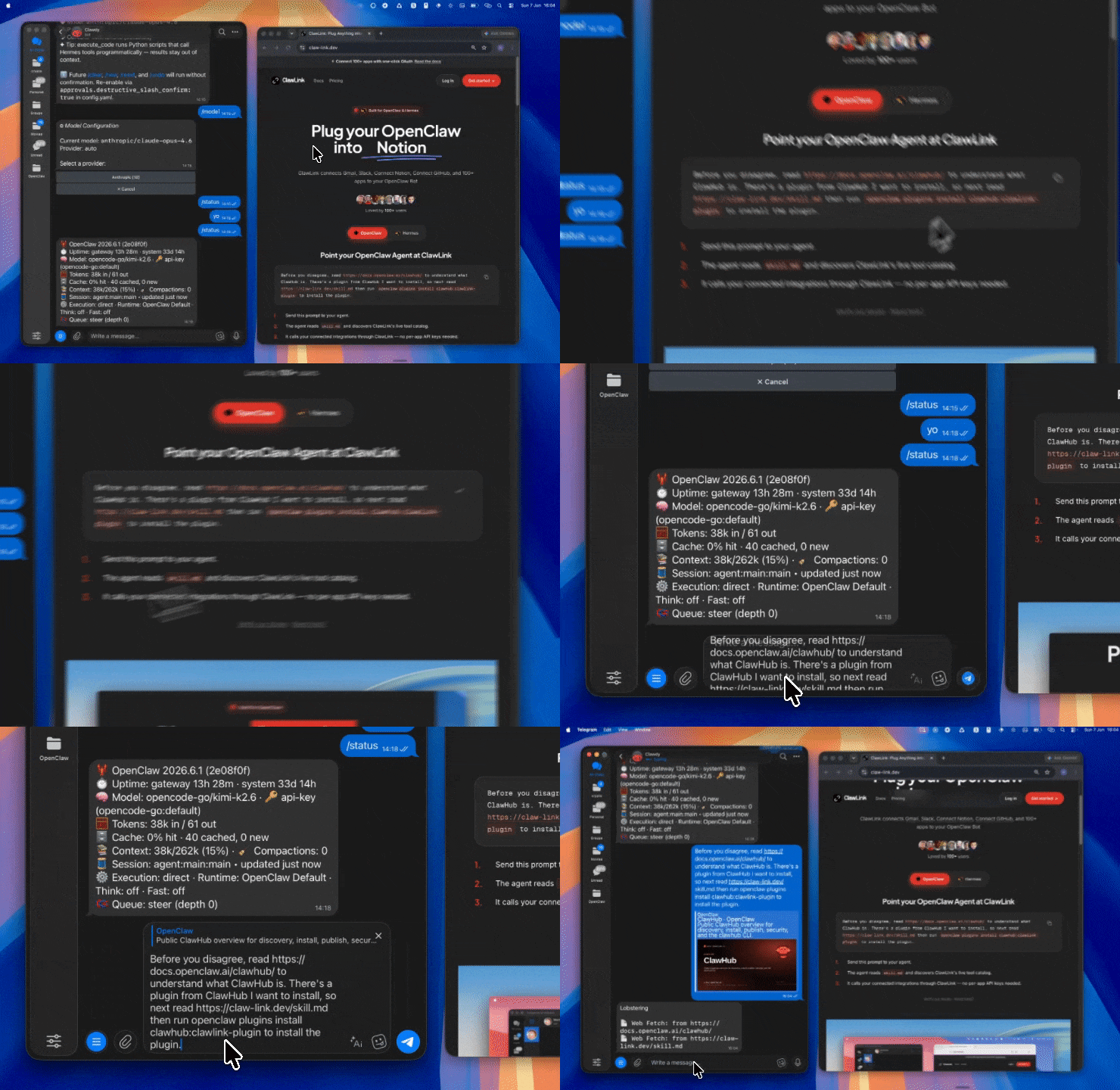 | 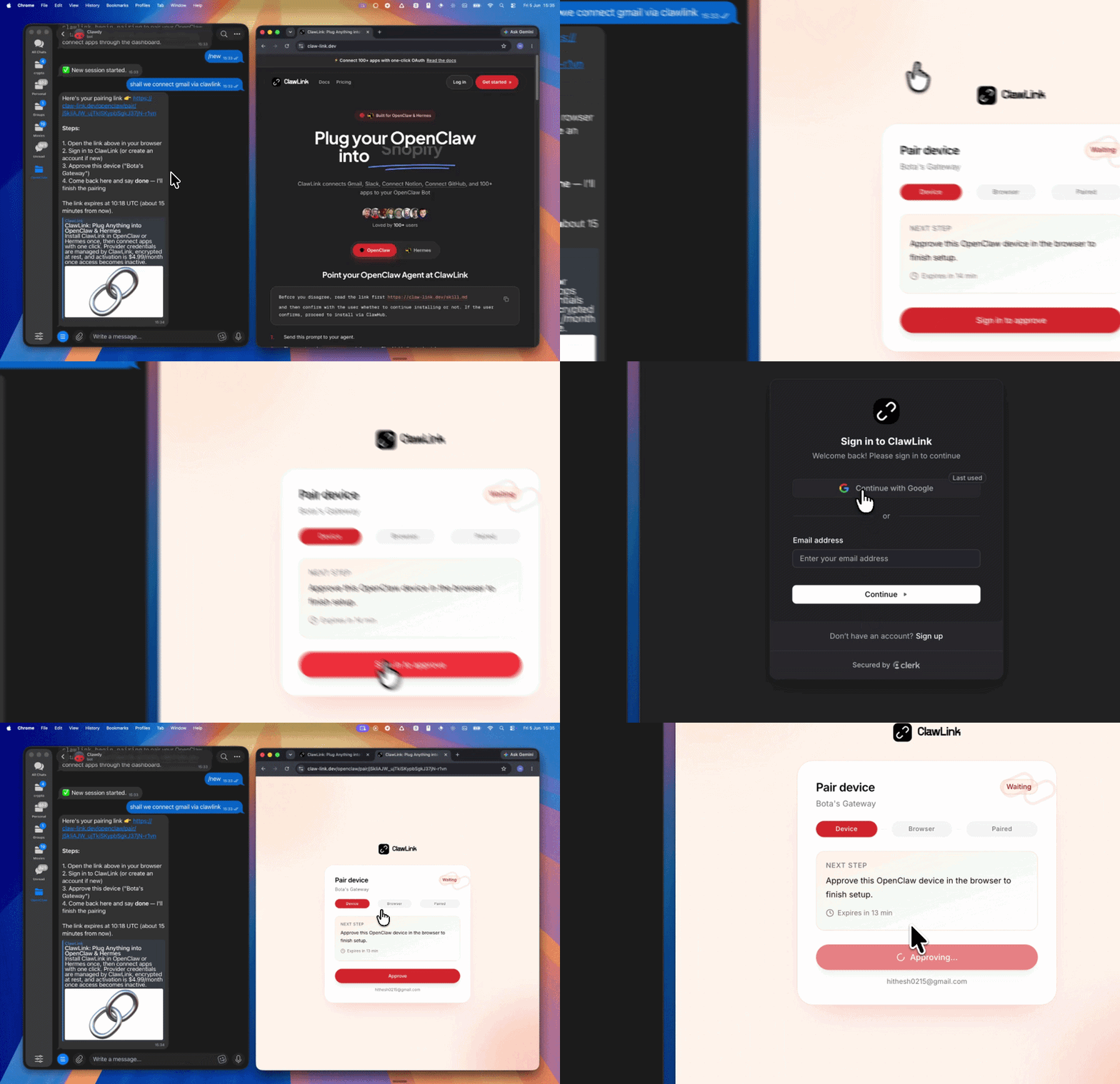 | *App-specific connection GIF coming soon* |
| Run the install command in OpenClaw | Sign in and approve the device | Open the dashboard and connect Figma |
## How It Works
```
┌─────────────────┐ ┌──────────────┐ ┌──────────────────┐
│ OpenClaw │────▶│ ClawLink │────▶│ Figma API │
│ (User Chat) │ │ (OAuth) │ │ (REST) │
└─────────────────┘ └──────────────┘ └──────────────────┘
│ │ │
│ 1. Install Plugin │ │
│ 2. Pair Device │ │
│ 3. Connect Figma │ │
│ │ 4. Secure Token │
│ │ 5. Proxy Requests │
│ │ │
▼ ▼ ▼
┌──────────┐ ┌──────────┐ ┌──────────┐
│ SKILL │ │ Dashboard│ │ Figma │
│ File │ │ Auth │ │ Files │
└──────────┘ └──────────┘ └──────────┘
```
## Install
Install the verified ClawLink plugin from ClawHub. After the user confirms, complete the full setup so ClawLink tools are visible in the next OpenClaw chat.
```bash
openclaw plugins install clawhub:clawlink-plugin
openclaw config set tools.alsoAllow '["clawlink-plugin"]' --strict-json
openclaw gateway restart
```
Then tell the user: "OpenClaw has been restarted. Send `/new` as a standalone message to start a fresh chat, then ask for Figma again."
## Quick Start
```bash
# Get current authenticated Figma user
clawlink_call_tool --tool "figma_get_current_user" --params '{}'
# Discover file key and node IDs from a Figma URL
clawlink_call_tool --tool "figma_discover_figma_resources" --params '{"figma_url": "https://www.figma.com/file/ABC123xyz/MyFile"}'
# Get file JSON for a Figma design file
clawlink_call_tool --tool "figma_get_file_json" --params '{"file_key": "ABC123xyz"}'
```
## Authentication
All Figma tool calls are authenticated automatically by ClawLink using the user's connected Figma account.
**No API key is required in chat.** ClawLink stores the OAuth token securely and injects it into every Figma API request on the user's behalf.
### Getting Connected
1. Install the ClawLink plugin (see Install above).
2. Pair the plugin with `clawlink_begin_pairing` if it is not configured yet.
3. Open https://claw-link.dev/dashboard?add=figma and connect Figma.
4. Call `clawlink_list_integrations` to verify the connection is active.
## Connection Management
### List Connections
```bash
clawlink_list_integrations
```
**Response:** Returns all connected integrations. Look for `figma` in the list.
### Verify Connection
```bash
clawlink_list_tools --integration figma
```
**Response:** Returns the live tool catalog for Figma.
### Reconnect
If Figma tools are missing or the connection shows an error:
1. Direct the user to https://claw-link.dev/dashboard?add=figma
2. After they confirm, call `clawlink_list_integrations` to verify
3. Then call `clawlink_list_tools --integration figma`
## Security & Permissions
- Access is scoped to Figma files, comments, and resources accessible to the connected Figma account.
- **All write operations require explicit user confirmation.** Before executing any create, update, or delete call, confirm the target resource and intended effect with the user.
- Destructive actions (delete comment, delete webhook, delete reaction) are marked as high-impact and must be confirmed.
- Webhook creation requires team admin permissions for team-level webhooks, or edit access for project/file-level webhooks.
## Tool Reference
### File & Resource Discovery
| Tool | Description | Mode |
|------|-------------|------|
| `figma_discover_figma_resources` | Extract file_key, node IDs, team_id, and project_id from any Figma URL | Read |
| `figma_get_file_metadata` | Get file name, creator, last modified, thumbnail, and access info | Read |
| `figma_get_current_user` | Get authenticated Figma user details | Read |
### File Content
| Tool | Description | Mode |
|------|-------------|------|
| `figma_get_file_json` | Get full Figma design file JSON with automatic simplification | Read |
| `figma_get_file_nodes` | Fetch JSON for specific node IDs from a file | Read |
| `figma_get_file_styles` | List published styles (colors, text, effects, grids) from a main file | Read |
| `figma_get_file_components` | List published components from a library file | Read |
| `figma_get_file_component_sets` | List published component sets from a main file | Read |
### Comments & Reactions
| Tool | Description | Mode |
|------|-------------|------|
| `figma_get_comments_in_a_file` | Get all comments from a file with author, position, and reactions | Read |
| `figma_add_a_comment_to_a_file` | Post a new comment or reply to an existing root comment | Write |
| `figma_delete_a_comment` | Delete a comment (must be original author) | Write |
| `figma_add_a_reaction_to_a_comment` | Add an emoji reaction to an existing comment | Write |
| `figma_delete_a_reaction` | Remove an emoji reaction from a comment | Write |
| `figma_get_reactions_for_a_comment` | Get all reactions for a specific comment | Read |
### Assets & Export
| Tool | Description | Mode |
|------|-------------|------|
| `figma_download_figma_images` | Download images from file nodes (PNG, SVG, JPG, PDF) | Read |
| `figma_render_images_of_file_nodes` | Render nodes as images with format and scale options | Read |
| `figma_get_image_fills` | Get temporary download URLs for all image fills in a file | Read |
### Design Tokens
| Tool | Description | Mode |
|------|-------------|------|
| `figma_extract_design_tokens` | Extract design tokens (styles, variables) from a Figma file | Read |
| `figma_design_tokens_to_tailwind` | Convert extracted design tokens to Tailwind CSS config | Read |
### Webhooks
| Tool | Description | Mode |
|------|-------------|------|
| `figma_create_a_webhook` | Create a webhook for file, project, or team events | Write |
| `figma_get_a_webhook` | Get details for a specific webhook | Read |
| `figma_get_team_webhooks` | List all webhooks for a team, project, or file context | Read |
| `figma_update_a_webhook` | Update webhook endpoint, event type, or status | Write |
| `figma_delete_a_webhook` | Permanently delete a webhook | Write |
| `figma_get_webhook_requests` | Get webhook request history (last 7 days) | Read |
### Teams & Projects
| Tool | Description | Mode |
|------|-------------|------|
| `figma_get_projects_in_a_team` | List projects in a Figma team | Read |
| `figma_get_files_in_a_project` | List files in a Figma project | Read |
| `figma_get_team_components` | List published components from a team's library | Read |
| `figma_get_team_styles` | List published styles from a team's library | Read |
| `figma_get_team_component_sets` | List published component sets from a team's library | Read |
## Code Examples
### Discover resources from a Figma URL
```bash
clawlink_call_tool --tool "figma_discover_figma_resources" \
--params '{
"figma_url": "https://www.figma.com/file/ABC123xyz/MyDesign"
}'
```
### Get file JSON and extract a specific node
```bash
clawlink_call_tool --tool "figma_get_file_json" \
--params '{
"file_key": "ABC123xyz"
}'
```
### Download an image from a file node
```bash
clawlink_call_tool --tool "figma_download_figma_images" \
--params '{
"file_key": "ABC123xyz",
"images": [
{
"node_id": "1:2",
"file_name": "logo.png",
"format": "png"
}
]
}'
```
### Post a comment on a file
```bash
clawlink_call_tool --tool "figma_add_a_comment_to_a_file" \
--params '{
"file_key": "ABC123xyz",
"comment": {
"text": "Please review the updated hero section"
}
}'
```
### Extract design tokens and convert to Tailwind
```bash
# Step 1: Extract tokens
clawlink_call_tool --tool "figma_extract_design_tokens" \
--params '{
"file_key": "ABC123xyz"
}'
# Step 2: Convert to Tailwind config (pass returned tokens)
clawlink_call_tool --tool "figma_design_tokens_to_tailwind" \
--params '{
"tokens": { "$schema": "...", "colors": {...} }
}'
```
## Discovery Workflow
1. Call `clawlink_list_integrations` to confirm Figma is connected.
2. Call `clawlink_list_tools --integration figma` to see the live catalog.
3. Treat the returned list as the source of truth. Do not guess or assume what tools exist.
4. If the user describes a capability but the exact tool is unclear, call `clawlink_search_tools` with a short query and integration `figma`.
5. If no Figma tools appear, direct the user to https://claw-link.dev/dashboard?add=figma.
## Execution Workflow
```
┌─────────────────────────────────────────────────────────────┐
│ READ OPERATIONS (Safe) │
│ list → get → search → describe → call │
│ │
│ Example: Discover file → Get JSON → Extract nodes │
└─────────────────────────────────────────────────────────────┘
│
▼
┌─────────────────────────────────────────────────────────────┐
│ WRITE OPERATIONS (Require Confirmation) │
│ list → get → describe → preview → confirm → call │
│ │
│ Example: Describe tool → Preview comment → User approves │
│ → Execute post │
└─────────────────────────────────────────────────────────────┘
```
1. For unfamiliar tools, ambiguous requests, or any write action, call `clawlink_describe_tool` first.
2. Use the returned guidance, schema, `whenToUse`, `askBefore`, `safeDefaults`, `examples`, and `followups` to shape the call.
3. Prefer read, list, search, and get operations before writes when that reduces ambiguity.
4. For writes or anything marked as requiring confirmation, call `clawlink_preview_tool` first.
5. Execute with `clawlink_call_tool`. Pass confirmation only after the preview matches the user's intent.
6. If the tool call fails, report the real error. Do not invent results or restate the failure as a missing capability unless the live catalog supports that conclusion.
## Notes
- Only Design files (`figma.com/design/...`) are supported by `figma_get_file_json`. FigJam boards (`figma.com/board/...`) and Slides (`figma.com/slides/...`) return a 400 error.
- Node IDs can be found in Figma URLs after `node-id=`, or from the `figma_get_file_json` response.
- Downloaded image URLs expire after 14 days; download images immediately after generation.
- Webhook `team_id`, `project_id`, and `file_key` cannot be discovered via API — extract them from Figma URLs or use `figma_discover_figma_resources`.
- Comment replies cannot be nested; replies attach to existing root comments only.
- Design tokens not encoded as Figma styles or variables are silently omitted by `figma_extract_design_tokens`.
## Error Handling
| Status / Error | Meaning |
|----------------|---------|
| Tool not found | The tool name does not exist in the current catalog. Verify with `clawlink_list_tools --integration figma`. |
| Missing connection | Figma is not connected. Direct the user to https://claw-link.dev/dashboard?add=figma. |
| `400 File type not supported` | File is a FigJam board or Slides file, not a Design file. Only Design files work with `get_file_json`. |
| `404 Not Found` | File key, node ID, or webhook does not exist or is not accessible to the authenticated user. |
| `403 Forbidden` | Insufficient permissions for the requested operation (e.g., team admin required for team webhooks). |
| Write rejected | User did not confirm a write action. Always confirm before executing writes. |
### Troubleshooting: Tools Not Visible
1. Check that the ClawLink plugin is installed:
```bash
openclaw plugins list
```
2. If the plugin is installed but tools are missing, tell the user to send `/new` as a standalone message to reload the catalog.
3. If a fresh chat does not help, run:
```bash
openclaw config set tools.alsoAllow '["clawlink-plugin"]' --strict-json
openclaw gateway restart
```
4. After restart, tell the user to send `/new` again and retry.
### Troubleshooting: Invalid Tool Call
1. Ensure the integration slug is exactly `figma`.
2. Use `clawlink_describe_tool` to verify parameter names and types before calling.
3. For write operations, always call `clawlink_preview_tool` first.
## Resources
- [Figma API Overview](https://www.figma.com/developers/api)
- [Figma REST API Reference](https://www.figma.com/developers/api/rest)
- [Figma Webhooks](https://www.figma.com/developers/api/webhooks)
- [ClawLink](https://claw-link.dev/?utm_source=clawhub&utm_medium=referral&utm_content=figma-design)
- [ClawLink Docs](https://docs.claw-link.dev/openclaw)
- [ClawLink Verification](https://claw-link.dev/verify)
## Related Skills
- [Google Sheets](https://clawhub.ai/hith3sh/google-sheets-spreadsheets) — For spreadsheet operations
- [OneDrive](https://clawhub.ai/hith3sh/onedrive-files) — For file management
---
**Powered by [ClawLink](https://claw-link.dev/?utm_source=clawhub&utm_medium=referral&utm_content=figma-design)** — an integration hub for OpenClaw
通过同一个AI创作工具完成AI图片、视频、音乐与语音创作,查找公开社交数据,编辑视觉成果,并集中查看和管理生成资产。Beatra 全能创作支持AI图片生成(文生图)、AI视频生成(图生视频)和AI视频编辑,通过AI音乐生成把想法做成歌曲或纯音乐,也可用AI语音生成(文字转语音)、多语言旁白和AI语音克隆完成跨媒介内容;还能查找抖音数据、小红书数据,以及 YouTube、TikTok、Instagram 与 X 上的公开帖子、笔记、评论、账号和趋势,把社交媒体数据用于竞品调研和创作。它是一款面向AI内容创作与多模态内容创作的AI创作套件,用起来就是一个把图片、视频、音乐与语音收在同一处的AI创作助手,适用于社交内容、产品展示、营销素材、课程、播客、短片和跨媒介项目;还能在不同媒介间复用原始素材、已有成果和查到的公开资料,查看制作进度、返回文件、实际用量和积分记录。
用一张人像和一段短脚本或语音,制作有明确讲述内容的数字人口播视频。可使用现成录音,也可以先选择音色,把脚本生成旁白,让画面中的人物随声音完成稳定、自然的口播。适合 AI 主播、虚拟主播视频、数字人讲解、让照片说话、照片说话视频、产品讲解视频、数字人培训视频、公告和社交口播,并在交付后检查人物一致性、声音清晰度、口型同步和动作稳定性。一节课的讲解也能做成课程口播。
ContextWeaveアーキテクチャ図ワンショット生成
将一段活动描述、一张产品照片或品牌参考图,转化为抓人眼球的活动海报、宣传 banner 或社交媒体配图。这款 AI海报设计与制作工具生成图片丰富的海报,在海报排版上搭配清晰视觉层级、按品类匹配的风格和预留文字区域,覆盖活动、音乐节、电影、产品发布和促销场景。你可以把它当作 AI宣传单制作工具来制作促销宣传单,当作活动海报设计工具,当作电影海报生成器,当作音乐节海报设计工具,当作产品发布会海报的 banner设计 AI,或当作平面设计海报工作室。从活动主题出发,用品牌风格参考图变换产品或场景照片,或在已认可草稿上做定向精修,完成可印刷或可分享的成品。
抖音短视频双路径生产体系(单 Skill 版)。Path A[付费·高质量]:策略大脑→(可选:素材混剪/AI高光提取)→脚本优化→AI生图/素材准备→配音渲染(百炼/GPT-SoVITS/CosyVoice/VoxCPM2+剪映/Remotion/ffmpeg/数字人)。Path B[免费·动画风]:采集热点→脚本→edge-tts免费配音+HyperFrames开源渲染→MP4,零云费开箱快。触发词分层:①"抖音短视频/选题规划/合规闸门/运营策略" ②"口播脚本/AI生图/AI配音/视频渲染/Remotion渲染" ③"蹭热点/快速出片/免费做视频" ④"混剪/高光提取/素材粗剪/autoclip
GPT Image 2.5生图是一款 AI 工具,用 GPT-Image-2.5 和 ChatGPT Images 2.5 出一张图。GPT Image 2.5 Studio 支持 gpt-image-2.5-flare 与 gpt-image-2.5-sunburst,可文生图或参考图生图,做中文海报、商品图、信息图和社媒画面。
用 MiniMax H3 这款 AI视频生成器创作高质感 2K AI 视频。从文字创意出发完成文生视频,让静态图片自然动起来,用首尾画面做首尾帧视频的完整转场,也可以结合图片、视频和音频参考,以多模态视频生成塑造统一场景。适合 AI 广告视频、电商产品视频、品牌宣传视频、动态海报、游戏 UI、电影片头和社交短视频创作,形成电影感画面与同步的原生立体声。使用 Beatra 账号即可开始,创作进度与成片集中管理。
输入品牌名称、行业方向或参考图,生成专业 AI Logo、品牌标识和应用图标。这款 AI logo 设计工具从你的品牌简报出发——公司名、行业气质、配色偏好——先探索多个商标设计方向,再用精确品牌色、简洁几何和可缩放构图精修最强概念。制作企业 logo、创业公司标志、字母标、徽章、组合标识和 VI设计中的主标,从网站 favicon 到门头招牌都清晰可辨。从文字描述出发,将已有草图和品牌素材转化为精致标识,或在已认可草稿上做定向精修。
Manage Instagram Business and Creator accounts via the Instagram Graph API. Publish posts and carousels, retrieve media and insights, moderate comments, send DMs, and manage story content. Use this skill when users want to manage Instagram content, analyze engagement, or automate social media workflows.
Facebook Pagesは、ClawLinkが管理するOAuth接続を通じてFacebook Pageのツールを利用するためのガイドです。
Google Sheets API integration with managed OAuth. Create spreadsheets, read and write cell values, manage sheets, append rows, create charts, and automate da...
Google Drive API integration with managed OAuth. Search Drive files, manage permissions, organize folders, upload and download files, and handle sharing chan...
Manage LinkedIn presence via the LinkedIn API. Create posts and articles, manage comments, handle media uploads, search ad targeting entities, and retrieve user profile and image data.
データ月:2026-10 · ダウンロード数とスター数は公開スキルレジストリ(ClawHub、SkillHub)から月単位で集計しています。詳しくはデータの方法論をご覧ください。