
作者:Jay更新日 2026-06-09全 5 バージョン · 最新版の公開日 2026-06-09gitlab-repos@clawhub_hith3sh/gitlab-repos
Git 補助
AlphaMoatによると、2026-10時点でGitLabのダウンロード数は7,426、スター数は32で、累計ダウンロード数で今回のランキング対象AIスキル10,914件中3,775位、開発では1,069件中307位です。
一覧の初期表示は累計ダウンロード数順で、スター数順にも並べ替えできます。詳細ページの順位は累計ダウンロード数で計算しています。
| プラットフォーム | ダウンロード数 | スター数 | コメント |
|---|---|---|---|
| ClawHub ↗ | 7426 | 32 | - |
| SkillHub ↗ | 5417 | 32 | — |
プラットフォームごとに集計方法と集計時点が異なります。
Work with GitLab projects, issues, merge requests, commits, branches, pipelines, and groups via the GitLab API. Use this skill when users want to list projec...
2026-09 から集計方法を変更し、同名スキルを作者ごとに分けて集計し、全スキルを対象にしました。破線は変更前の月で、変更後のデータとは直接比較せず、変更をまたぐ増減も計算していません。
| 月 | ダウンロード数 | 前月比 | スター数 |
|---|---|---|---|
| 2026-10 | 7426 | — | 32 |
| 2026-09 | 7218 | — | 32 |
| 2026-08 | 7069 | +2.8% | 32 |
| 2026-07 | 6876 | +257.6% | 32 |
| 2026-06 | 1923 | +55.1% | 32 |
| 2026-05 | 1240 | — | 6 |
作者が公開した元のファイルをテキストのまま表示しています。AlphaMoat による編集や審査はしていません。リンクはクリックできません。コマンドは内容を確認してから実行してください。取得日 2026-11-20。
--- name: gitlab-repos description: Work with GitLab projects, issues, merge requests, commits, branches, pipelines, and groups via the GitLab API. Use this skill when users want to list projects and groups, inspect issues and MRs, review commits and pipelines, create or update issues after confirmation, or manage project members and CI/CD pipelines in GitLab. --- # GitLab  Access GitLab via the GitLab API with OAuth authentication. Manage projects, issues, merge requests, commits, branches, pipelines, and groups.
This skill uses [ClawLink](https://claw-link.dev/?utm_source=clawhub&utm_medium=referral&utm_content=gitlab-repos) for hosted connection flows and credentials so you do not need to configure GitLab API access yourself.
### Setup in 3 Steps
| Step 1: Install | Step 2: Pair Account | Step 3: Connect GitLab |
|:---:|:---:|:---:|
| 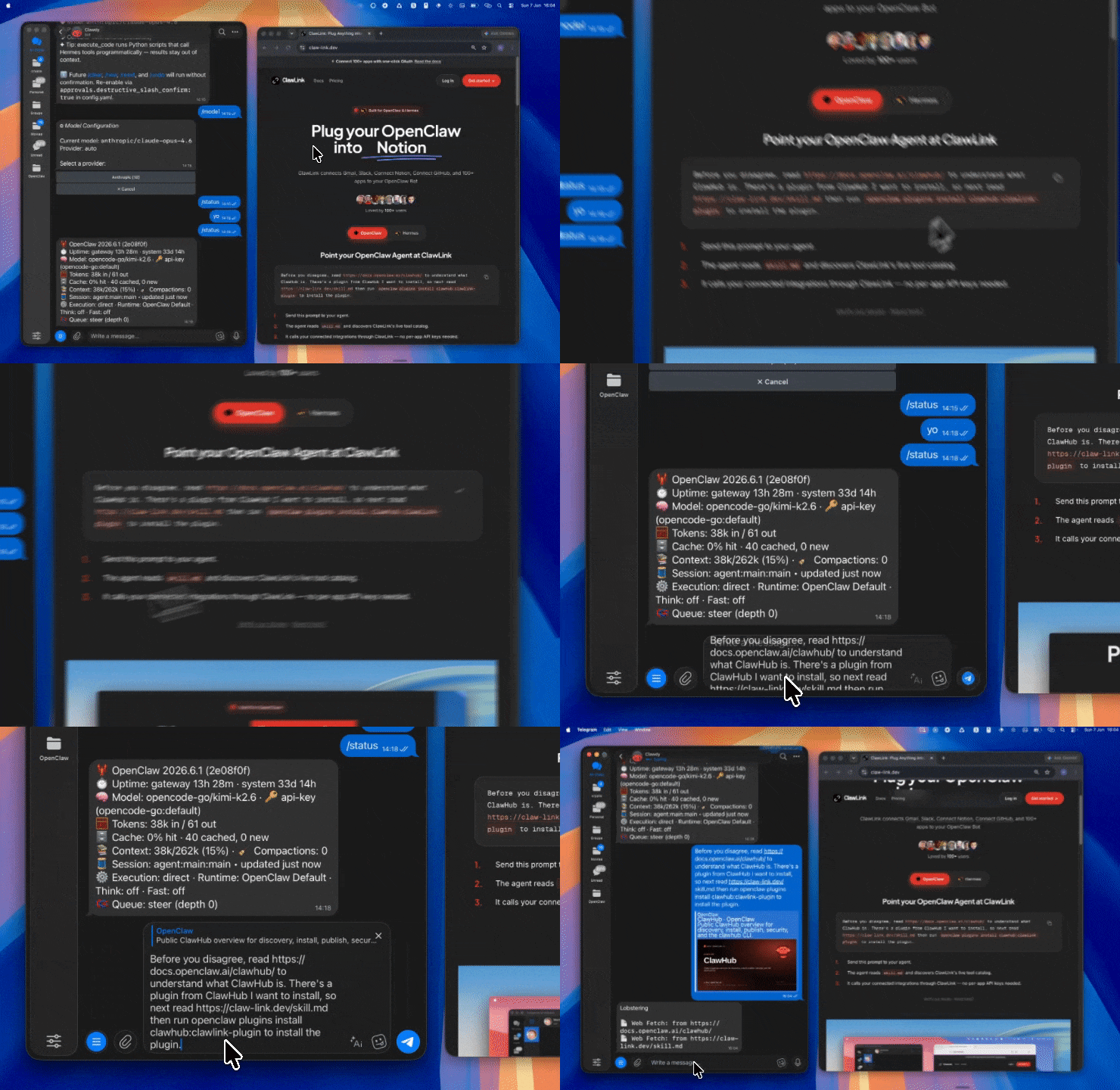 | 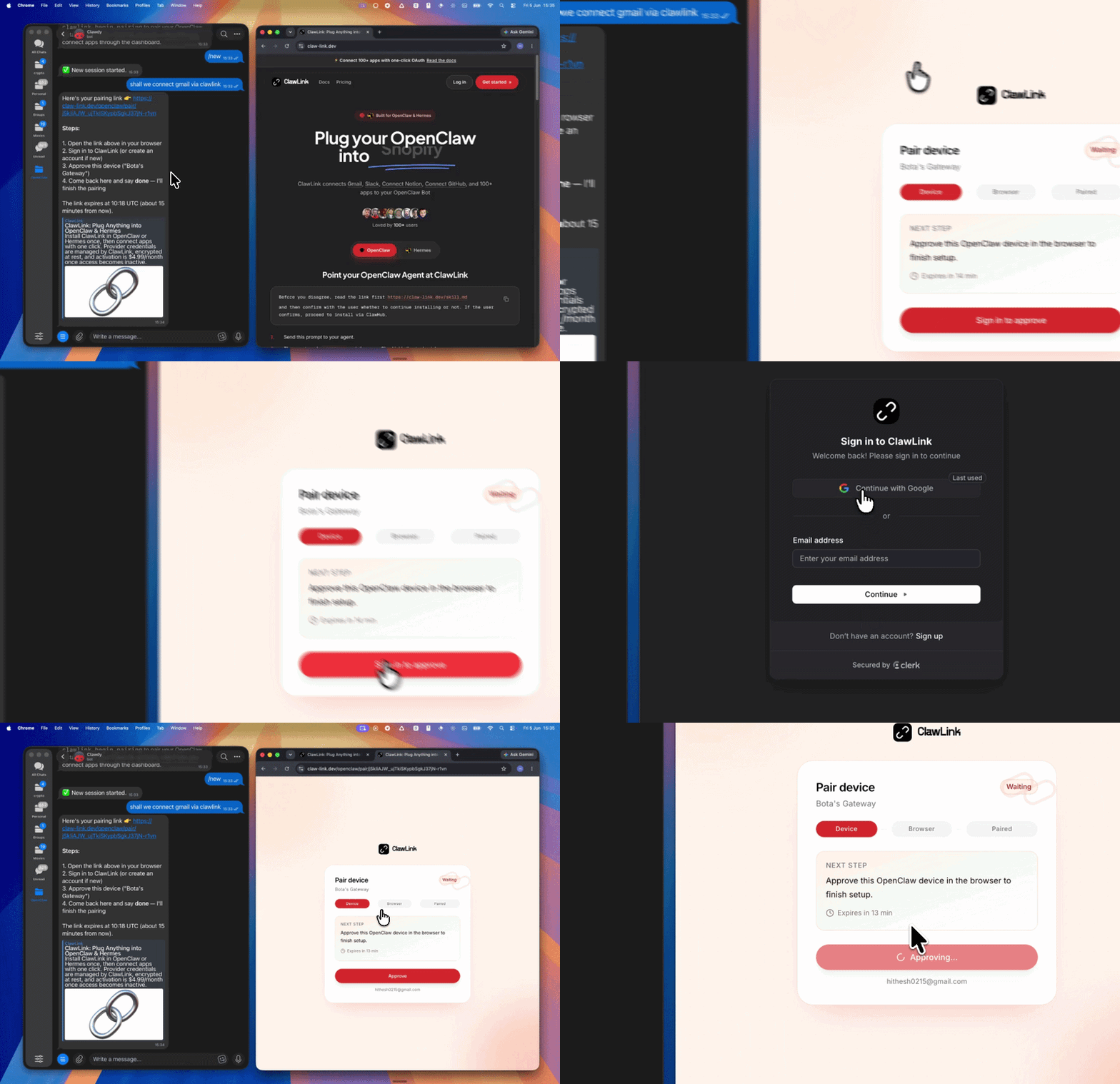 | *App-specific connection GIF coming soon* |
| Run the install command in OpenClaw | Sign in and approve the device | Open the dashboard and connect GitLab |
## How It Works
```
┌─────────────────┐ ┌──────────────┐ ┌──────────────────┐
│ OpenClaw │────▶│ ClawLink │────▶│ GitLab API │
│ (User Chat) │ │ (OAuth) │ │ (REST) │
└─────────────────┘ └──────────────┘ └──────────────────┘
│ │ │
│ 1. Install Plugin │ │
│ 2. Pair Device │ │
│ 3. Connect GitLab │ │
│ │ 4. Secure Token │
│ │ 5. Proxy Requests │
│ │ │
▼ ▼ ▼
┌──────────┐ ┌──────────┐ ┌──────────┐
│ SKILL │ │ Dashboard│ │ GitLab │
│ File │ │ Auth │ │ Projects │
└──────────┘ └──────────┘ └──────────┘
```
## Install
Install the verified ClawLink plugin from ClawHub. After the user confirms, complete the full setup so ClawLink tools are visible in the next OpenClaw chat.
```bash
openclaw plugins install clawhub:clawlink-plugin
openclaw config set tools.alsoAllow '["clawlink-plugin"]' --strict-json
openclaw gateway restart
```
Then tell the user: "OpenClaw has been restarted. Send `/new` as a standalone message to start a fresh chat, then ask for GitLab again."
## Quick Start
```bash
# List projects for the authenticated user
clawlink_call_tool --tool "gitlab_get_projects" --params '{}'
# Get a specific project
clawlink_call_tool --tool "gitlab_get_project" --params '{"id": "owner/repo-name"}'
# List project issues
clawlink_call_tool --tool "gitlab_list_project_issues" --params '{"id": "owner/repo-name", "state": "opened"}'
```
## Authentication
All GitLab tool calls are authenticated automatically by ClawLink using the user's connected GitLab account.
**No API key is required in chat.** ClawLink stores the OAuth token securely and injects it into every GitLab API request on the user's behalf.
### Getting Connected
1. Install the ClawLink plugin (see Install above).
2. Pair the plugin with `clawlink_begin_pairing` if it is not configured yet.
3. Open https://claw-link.dev/dashboard?add=gitlab and connect GitLab.
4. Call `clawlink_list_integrations` to verify the connection is active.
## Connection Management
### List Connections
```bash
clawlink_list_integrations
```
**Response:** Returns all connected integrations. Look for `gitlab` in the list.
### Verify Connection
```bash
clawlink_list_tools --integration gitlab
```
**Response:** Returns the live tool catalog for GitLab.
### Reconnect
If GitLab tools are missing or the connection shows an error:
1. Direct the user to https://claw-link.dev/dashboard?add=gitlab
2. After they confirm, call `clawlink_list_integrations` to verify
3. Then call `clawlink_list_tools --integration gitlab`
## Security & Permissions
- Access is scoped to projects and resources accessible to the connected GitLab account.
- **All write operations require explicit user confirmation.** Before executing any create, update, or delete call, confirm the target resource and intended effect with the user.
- Destructive actions (deleting projects, archiving, removing members) are marked as high-impact and must be confirmed.
- CI/CD pipeline operations affect build and deployment systems — confirm before triggering or canceling.
## Tool Reference
### Projects
| Tool | Description | Mode |
|------|-------------|------|
| `gitlab_get_projects` | List all projects accessible to the authenticated user | Read |
| `gitlab_get_project` | Get project details by ID or path | Read |
| `gitlab_create_project` | Create a new project | Write |
| `gitlab_archive_project` | Archive a project (read-only) | Write |
| `gitlab_delete_project` | Delete a project permanently | Write |
| `gitlab_list_project_pipelines` | List CI/CD pipelines for a project | Read |
### Groups
| Tool | Description | Mode |
|------|-------------|------|
| `gitlab_get_groups` | List all groups | Read |
| `gitlab_get_group` | Get group details | Read |
| `gitlab_create_group` | Create a new group | Write |
| `gitlab_list_group_members` | List direct members of a group | Read |
| `gitlab_list_all_group_members` | List all members (direct, inherited, invited) | Read |
### Issues
| Tool | Description | Mode |
|------|-------------|------|
| `gitlab_list_project_issues` | List issues with filtering (state, labels, assignee) | Read |
| `gitlab_get_project_issue` | Get issue details | Read |
| `gitlab_create_project_issue` | Create a new issue | Write |
| `gitlab_update_project_issue` | Update issue fields (title, description, labels, state) | Write |
### Merge Requests
| Tool | Description | Mode |
|------|-------------|------|
| `gitlab_get_project_merge_requests` | List merge requests | Read |
| `gitlab_get_project_merge_request` | Get MR details | Read |
| `gitlab_get_merge_request_notes` | Get comments on an MR | Read |
### Commits & Branches
| Tool | Description | Mode |
|------|-------------|------|
| `gitlab_list_repository_commits` | List commits in a repository | Read |
| `gitlab_get_single_commit` | Get commit details | Read |
| `gitlab_get_repository_branches` | List branches | Read |
| `gitlab_create_repository_branch` | Create a new branch | Write |
### Members
| Tool | Description | Mode |
|------|-------------|------|
| `gitlab_list_all_project_members` | List all project members | Read |
| `gitlab_import_project_members` | Import members from one project to another | Write |
### User Status
| Tool | Description | Mode |
|------|-------------|------|
| `gitlab_get_user_status` | Get current user's GitLab status | Read |
| `gitlab_set_user_status` | Set current user's status message | Write |
## Code Examples
### List project issues
```bash
clawlink_call_tool --tool "gitlab_list_project_issues" \
--params '{
"id": "owner/repo-name",
"state": "opened",
"per_page": 20
}'
```
### Create a new issue
```bash
clawlink_call_tool --tool "gitlab_create_project_issue" \
--params '{
"id": "owner/repo-name",
"title": "Bug: Login fails on mobile",
"description": "Steps to reproduce: 1. Go to login 2. Enter credentials 3. Error shown",
"labels": ["bug", "priority::high"]
}'
```
### Create a new branch
```bash
clawlink_call_tool --tool "gitlab_create_repository_branch" \
--params '{
"id": "owner/repo-name",
"branch": "feature/new-feature",
"ref": "main"
}'
```
### List pipeline jobs
```bash
clawlink_call_tool --tool "gitlab_list_pipeline_jobs" \
--params '{
"id": "owner/repo-name",
"pipeline_id": 123
}'
```
## Discovery Workflow
1. Call `clawlink_list_integrations` to confirm GitLab is connected.
2. Call `clawlink_list_tools --integration gitlab` to see the live catalog.
3. Treat the returned list as the source of truth. Do not guess or assume what tools exist.
4. If the user describes a capability but the exact tool is unclear, call `clawlink_search_tools` with a short query and integration `gitlab`.
5. If no GitLab tools appear, direct the user to https://claw-link.dev/dashboard?add=gitlab.
## Execution Workflow
```
┌─────────────────────────────────────────────────────────────┐
│ READ OPERATIONS (Safe) │
│ list → get → search → describe → call │
│ │
│ Example: List issues → Get issue → Show details │
└─────────────────────────────────────────────────────────────┘
│
▼
┌─────────────────────────────────────────────────────────────┐
│ WRITE OPERATIONS (Require Confirmation) │
│ list → get → describe → preview → confirm → call │
│ │
│ Example: Describe tool → Preview issue → User approves │
│ → Execute create │
└─────────────────────────────────────────────────────────────┘
```
1. For unfamiliar tools, ambiguous requests, or any write action, call `clawlink_describe_tool` first.
2. Use the returned guidance, schema, `whenToUse`, `askBefore`, `safeDefaults`, `examples`, and `followups` to shape the call.
3. Prefer read, list, search, and get operations before writes when that reduces ambiguity.
4. For writes or anything marked as requiring confirmation, call `clawlink_preview_tool` first.
5. Execute with `clawlink_call_tool`. Pass confirmation only after the preview matches the user's intent.
6. If the tool call fails, report the real error. Do not invent results or restate the failure as a missing capability unless the live catalog supports that conclusion.
## Notes
- GitLab project IDs can be numeric (`12345`) or path-based (`owner/repo-name`).
- GitLab uses scoped labels (`bug`, `priority::high`) rather than simple strings.
- Merge request IIDs are different from issue IIDs — they are numbered separately.
- Pipeline status values: `pending`, `running`, `success`, `failed`, `canceled`, `skipped`.
## Error Handling
| Status / Error | Meaning |
|----------------|---------|
| Tool not found | The tool name does not exist in the current catalog. Verify with `clawlink_list_tools --integration gitlab`. |
| Missing connection | GitLab is not connected. Direct the user to https://claw-link.dev/dashboard?add=gitlab. |
| `404 Not Found` | Project, issue, or MR does not exist. Verify the ID or path. |
| `403 Forbidden` | Insufficient permissions for the requested operation. |
| Write rejected | User did not confirm a write action. Always confirm before executing writes. |
### Troubleshooting: Tools Not Visible
1. Check that the ClawLink plugin is installed:
```bash
openclaw plugins list
```
2. If the plugin is installed but tools are missing, tell the user to send `/new` as a standalone message to reload the catalog.
3. If a fresh chat does not help, run:
```bash
openclaw config set tools.alsoAllow '["clawlink-plugin"]' --strict-json
openclaw gateway restart
```
4. After restart, tell the user to send `/new` again and retry.
### Troubleshooting: Invalid Tool Call
1. Ensure the integration slug is exactly `gitlab`.
2. Use `clawlink_describe_tool` to verify parameter names and types before calling.
3. For write operations, always call `clawlink_preview_tool` first.
## Resources
- [GitLab API Documentation](https://docs.gitlab.com/api/)
- [GitLab REST API](https://docs.gitlab.com/api/rest.html)
- [ClawLink](https://claw-link.dev/?utm_source=clawhub&utm_medium=referral&utm_content=gitlab-repos)
- [ClawLink Docs](https://docs.claw-link.dev/openclaw)
- [ClawLink Verification](https://claw-link.dev/verify)
## Related Skills
- [GitHub Repos](https://clawhub.ai/hith3sh/github-repos) — For GitHub repository management
- [GitHub Triage](https://clawhub.ai/hith3sh/github-triage-workflow) — For GitHub issue triage workflows
---
**Powered by [ClawLink](https://claw-link.dev/?utm_source=clawhub&utm_medium=referral&utm_content=gitlab-repos)** — an integration hub for OpenClaw
【全栈能力】编程大神.Skill:面向复杂真实项目的高阶全栈编程助手。不止生成代码,而是从一句目标接手陌生代码库,拆解需求、补齐实现、追到根因、完成重构、联调前后端,并把结果推进到能运行、能验证、能交付。覆盖 Web、后端、脚本、iOS、安卓、鸿蒙 ArkUI、微信小程序及其他技术栈,支持中英文工程、疑难 Bug、跨模块任务和长任务续做;用构建、日志、真实入口、设备或接口证据说明结果。仅问概念时直接回答,要求落地时持续推进到验收或明确阻塞。
编程专家 Pro:融合编程专家 2.0.3 工程专题与编程大神的鸿蒙 ArkTS/ArkUI、微信小程序和小游戏开发资料。用于项目实现、根因调试、审查、重构、测试、架构性能分析及多端开发验证。支持自然语言和 @专题标识,按任务读取包内知识;只问概念时直接回答。
编程专家.Skill P8级编程助手,25年实战经验技能Skill,全栈:Java/Php网站/软件项目、API设计、Bug诊断、代码生成、代码审查、重构、测试用例、性能基准、技术选型、文档生成、任务拆解、Spec驱动、Karpathy规范、CMS二次开发、前端设计、MySQL/Mariadb、项目知识图谱,以及工程纪律层(根因调试硬闭环、阶段导航、事故复盘/SLO、威胁建模/供应链安全、生产就绪/渐进式发布、AI编码治理、面向Agent代码可读性、LLM应用安全)。支持 @标识 显式调用跳过路由。
编程专家.Skill P8级编程助手,25年实战经验技能Skill,全栈:Java/Php网站/软件项目、API设计、Bug诊断、代码生成、代码审查、重构、测试用例、性能基准、技术选型、文档生成、任务拆解、Spec驱动、Karpathy规范、CMS二次开发、前端设计、MySQL/Mariadb、项目知识图谱,以及工程纪律层(根因调试硬闭环、阶段导航、事故复盘/SLO、威胁建模/供应链安全、生产就绪/渐进式发布、AI编码治理、面向Agent代码可读性、LLM应用安全)。支持 @标识 显式调用跳过路由。
工程专题、鸿蒙与微信小程序开发的集成派生版
编程专家 Pro:融合编程专家 2.0.3 工程专题与编程大神的鸿蒙 ArkTS/ArkUI、微信小程序和小游戏开发资料。用于项目实现、根因调试、审查、重构、测试、架构性能分析及多端开发验证。支持自然语言和 @专题标识,按任务读取包内知识;只问概念时直接回答。
适用场景:全栈编程助手。接到需求先读现有代码和约束,再动手:Java/PHP 开发、接口设计、缺陷定位、代码评审、重构、测试用例、性能排查、技术选型与文档产出,也做 CMS 二次开发、前端页面和 MySQL 调优。每次改动先给方案和影响范围,改完必须跑验证,交付附交接说明。适合要把代码真正跑通、而不是只要片段的场景。写完代码常要配套的造价、法律、工程文档,站内已有现成技能,用「查找技能」按需求找即可。
gh コマンドラインで GitHub の PR チェック、ワークフロー実行、API 照会を扱うスキルです。
Manage Instagram Business and Creator accounts via the Instagram Graph API. Publish posts and carousels, retrieve media and insights, moderate comments, send DMs, and manage story content. Use this skill when users want to manage Instagram content, analyze engagement, or automate social media workflows.
Facebook Pagesは、ClawLinkが管理するOAuth接続を通じてFacebook Pageのツールを利用するためのガイドです。
Google Sheets API integration with managed OAuth. Create spreadsheets, read and write cell values, manage sheets, append rows, create charts, and automate da...
Google Drive API integration with managed OAuth. Search Drive files, manage permissions, organize folders, upload and download files, and handle sharing chan...
Manage LinkedIn presence via the LinkedIn API. Create posts and articles, manage comments, handle media uploads, search ad targeting entities, and retrieve user profile and image data.
データ月:2026-10 · ダウンロード数とスター数は公開スキルレジストリ(ClawHub、SkillHub)から月単位で集計しています。詳しくはデータの方法論をご覧ください。