
作者:Jay更新日 2026-06-09全 6 バージョン · 最新版の公開日 2026-06-09google-analytics-reporting@clawhub_hith3sh/google-analytics-reporting
レポート作成データインサイト指標モニタリング
AlphaMoatによると、2026-10時点でGoogle Analyticsのダウンロード数は7,327、スター数は32で、累計ダウンロード数で今回のランキング対象AIスキル10,914件中3,820位、データ分析では915件中352位です。
一覧の初期表示は累計ダウンロード数順で、スター数順にも並べ替えできます。詳細ページの順位は累計ダウンロード数で計算しています。
| プラットフォーム | ダウンロード数 | スター数 | コメント |
|---|---|---|---|
| ClawHub ↗ | 7327 | 32 | - |
| SkillHub ↗ | 5293 | 32 | — |
プラットフォームごとに集計方法と集計時点が異なります。
Run GA4 reports, inspect properties, list audiences and data streams, and analyze traffic and conversion data via the Google Analytics Data API. Use this ski...
2026-09 から集計方法を変更し、同名スキルを作者ごとに分けて集計し、全スキルを対象にしました。破線は変更前の月で、変更後のデータとは直接比較せず、変更をまたぐ増減も計算していません。
| 月 | ダウンロード数 | 前月比 | スター数 |
|---|---|---|---|
| 2026-10 | 7327 | — | 32 |
| 2026-09 | 7157 | — | 32 |
| 2026-08 | 6996 | +3.5% | 32 |
| 2026-07 | 6760 | +272.0% | 32 |
| 2026-06 | 1817 | +58.8% | 32 |
| 2026-05 | 1144 | — | 6 |
作者が公開した元のファイルをテキストのまま表示しています。AlphaMoat による編集や審査はしていません。リンクはクリックできません。コマンドは内容を確認してから実行してください。取得日 2026-11-20。
--- name: google-analytics-reporting description: Run GA4 reports, inspect properties, list audiences and data streams, and analyze traffic and conversion data via the Google Analytics Data API. Use this skill when users want to list account summaries and properties, run standard or realtime GA4 reports with chosen dimensions and metrics, inspect available fields and compatibility, list audiences, data streams and key events, compare traffic and campaign performance, or create key events after confirmation. --- # Google Analytics  Access Google Analytics via the GA4 Data API with OAuth authentication. Run GA4 reports, inspect properties, list audiences and data streams, and analyze traffic and conversion data.
This skill uses [ClawLink](https://claw-link.dev/?utm_source=clawhub&utm_medium=referral&utm_content=google-analytics-reporting) for hosted connection flows and credentials so you do not need to configure Google Analytics API access yourself.
### Setup in 3 Steps
| Step 1: Install | Step 2: Pair Account | Step 3: Connect Google Analytics |
|:---:|:---:|:---:|
| 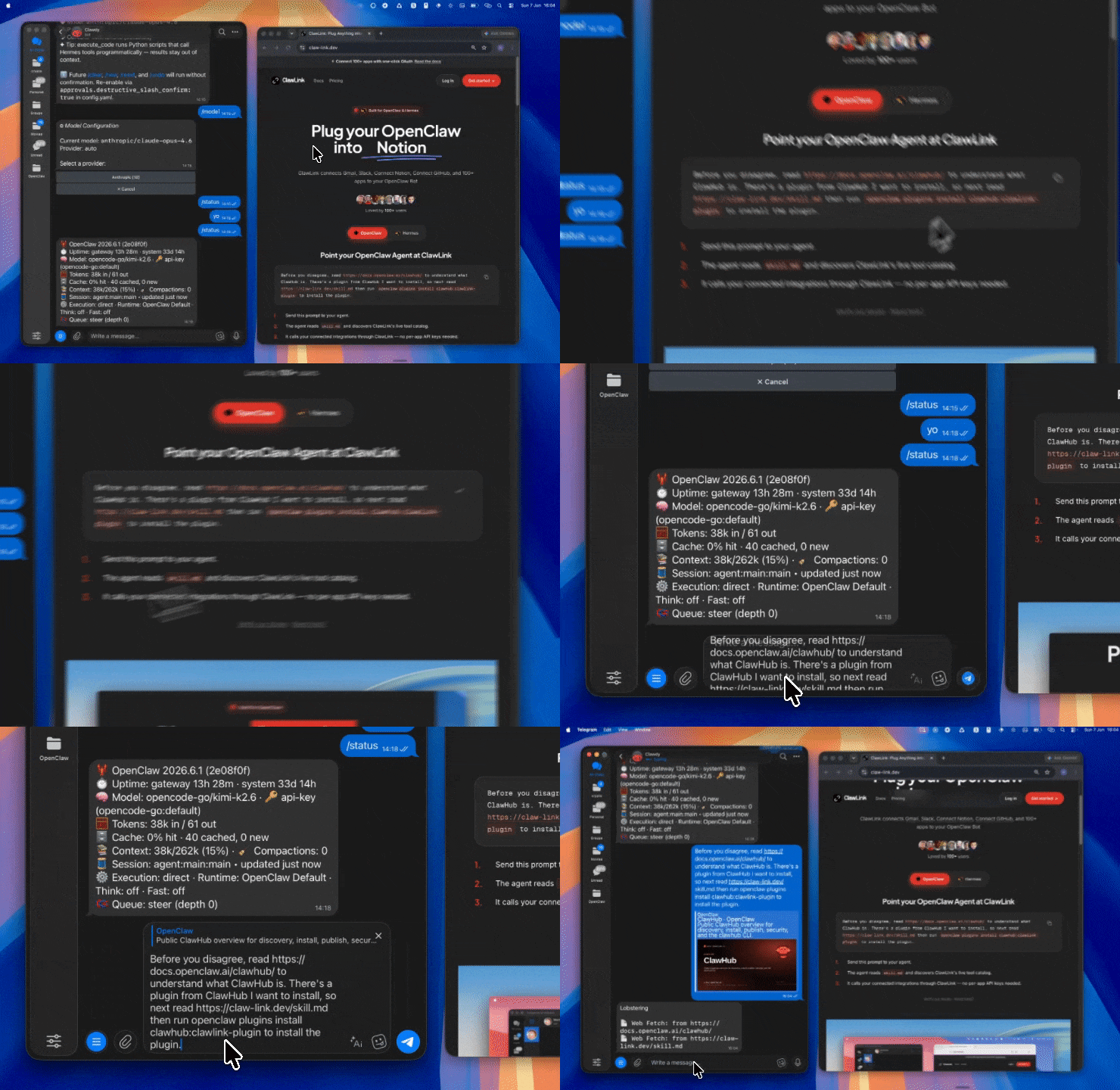 | 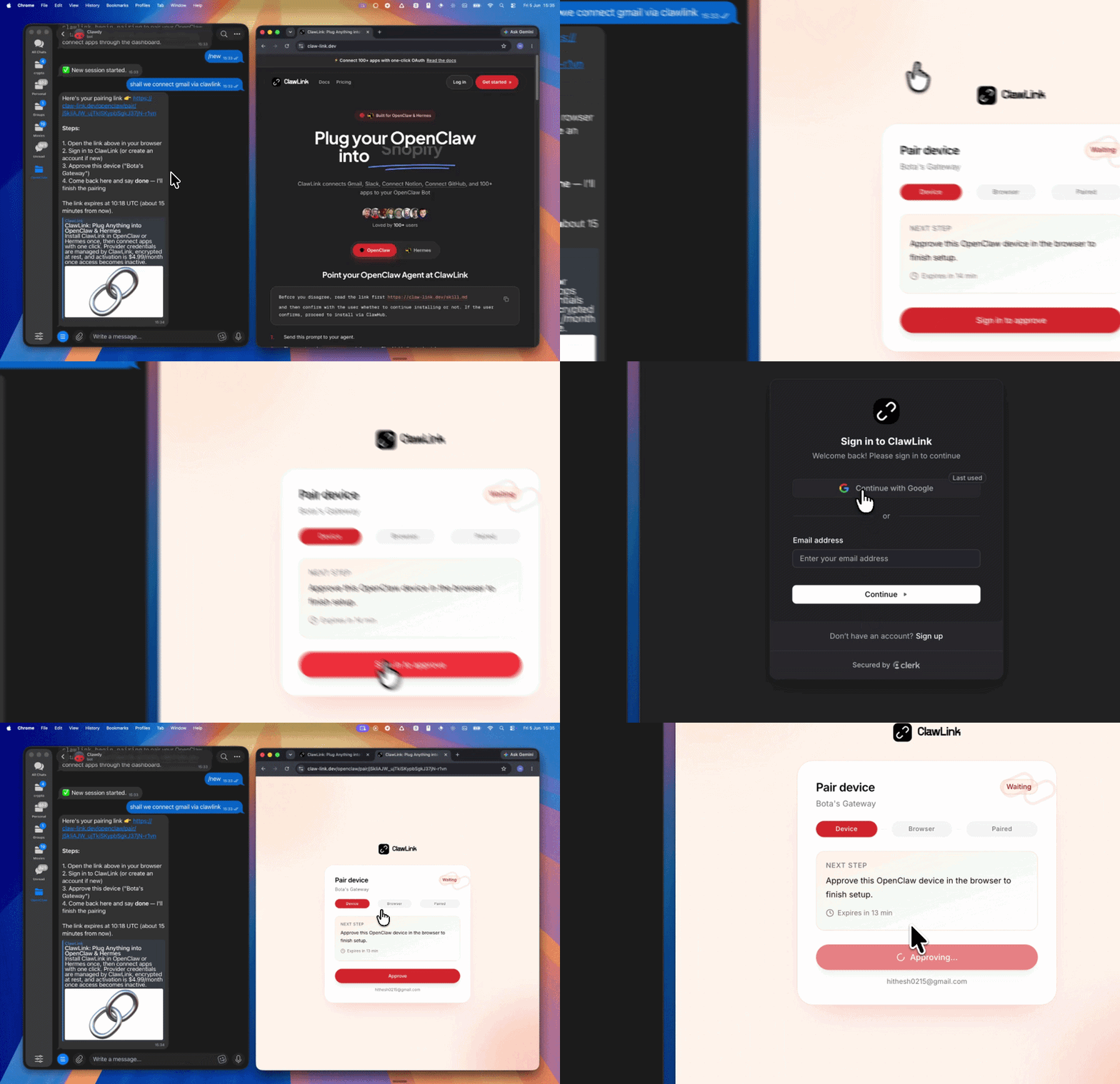 | *App-specific connection GIF coming soon* |
| Run the install command in OpenClaw | Sign in and approve the device | Open the dashboard and connect Google Analytics |
## How It Works
```
┌─────────────────┐ ┌──────────────┐ ┌──────────────────┐
│ OpenClaw │────▶│ ClawLink │────▶│ GA4 Data API │
│ (User Chat) │ │ (OAuth) │ │ (REST) │
└─────────────────┘ └──────────────┘ └──────────────────┘
│ │ │
│ 1. Install Plugin │ │
│ 2. Pair Device │ │
│ 3. Connect Google Analytics │
│ │ 4. Secure Token │
│ │ 5. Proxy Requests │
│ │ │
▼ ▼ ▼
┌──────────┐ ┌──────────┐ ┌──────────┐
│ SKILL │ │ Dashboard│ │ GA4 │
│ File │ │ Auth │ │ Reports │
└──────────┘ └──────────┘ └──────────┘
```
## Install
Install the verified ClawLink plugin from ClawHub. After the user confirms, complete the full setup so ClawLink tools are visible in the next OpenClaw chat.
```bash
openclaw plugins install clawhub:clawlink-plugin
openclaw config set tools.alsoAllow '["clawlink-plugin"]' --strict-json
openclaw gateway restart
```
Then tell the user: "OpenClaw has been restarted. Send `/new` as a standalone message to start a fresh chat, then ask for Google Analytics again."
## Quick Start
```bash
# List accessible accounts and properties
clawlink_call_tool --tool "google_analytics_list_account_summaries" --params '{}'
# Run a basic GA4 report
clawlink_call_tool --tool "google_analytics_run_report" --params '{"property": "properties/123456789", "dimensions": [{"name": "country"}, {"name": "deviceCategory"}], "metrics": [{"name": "sessions"}, {"name": "totalRevenue"}]}'
# Run a realtime report
clawlink_call_tool --tool "google_analytics_run_realtime_report" --params '{"property": "properties/123456789", "dimensions": [{"name": "country"}], "metrics": [{"name": "activeUsers"}]}'
```
## Authentication
All Google Analytics tool calls are authenticated automatically by ClawLink using the user's connected Google account.
**No API key is required in chat.** ClawLink stores the OAuth token securely and injects it into every GA4 API request on the user's behalf.
### Getting Connected
1. Install the ClawLink plugin (see Install above).
2. Pair the plugin with `clawlink_begin_pairing` if it is not configured yet.
3. Open https://claw-link.dev/dashboard?add=google-analytics and connect Google Analytics.
4. Call `clawlink_list_integrations` to verify the connection is active.
## Connection Management
### List Connections
```bash
clawlink_list_integrations
```
**Response:** Returns all connected integrations. Look for `google-analytics` in the list.
### Verify Connection
```bash
clawlink_list_tools --integration google-analytics
```
**Response:** Returns the live tool catalog for Google Analytics.
### Reconnect
If Google Analytics tools are missing or the connection shows an error:
1. Direct the user to https://claw-link.dev/dashboard?add=google-analytics
2. After they confirm, call `clawlink_list_integrations` to verify
3. Then call `clawlink_list_tools --integration google-analytics`
## Security & Permissions
- Access is scoped to GA4 properties accessible to the connected Google account.
- **All write operations require explicit user confirmation.** Before executing any key event creation or property update, confirm the intended effect with the user.
- Reports and analytics queries are read-only and do not modify account data.
## Tool Reference
### Account & Property Discovery
| Tool | Description | Mode |
|------|-------------|------|
| `google_analytics_list_account_summaries` | List all accessible accounts and properties | Read |
| `google_analytics_list_accounts_v1_beta` | List all Google Analytics accounts | Read |
| `google_analytics_list_properties_filtered` | List GA4 properties with filtering | Read |
| `google_analytics_get_property` | Get GA4 property details | Read |
| `google_analytics_get_account` | Get account details | Read |
### Reporting
| Tool | Description | Mode |
|------|-------------|------|
| `google_analytics_run_report` | Run a customized GA4 data report | Read |
| `google_analytics_run_realtime_report` | Run a realtime report (last 30-60 min) | Read |
| `google_analytics_run_pivot_report` | Run a pivot table report | Read |
| `google_analytics_run_funnel_report` | Run a funnel analysis report | Read |
| `google_analytics_batch_run_reports` | Run multiple reports in one batch | Read |
| `google_analytics_check_compatibility` | Check dimension/metric compatibility | Read |
### Metadata & Configuration
| Tool | Description | Mode |
|------|-------------|------|
| `google_analytics_get_metadata` | Get available dimensions, metrics, comparisons | Read |
| `google_analytics_get_property_quotas_snapshot` | Get API quota usage for a property | Read |
| `google_analytics_get_data_retention_settings` | Get data retention configuration | Read |
| `google_analytics_get_attribution_settings` | Get attribution model settings | Read |
| `google_analytics_get_google_signals_settings` | Get Google Signals configuration | Read |
### Audiences & Data Streams
| Tool | Description | Mode |
|------|-------------|------|
| `google_analytics_list_audiences` | List configured audiences | Read |
| `google_analytics_get_audience` | Get audience configuration details | Read |
| `google_analytics_list_data_streams` | List data streams for a property | Read |
| `google_analytics_list_key_events` | List key events (conversions) | Read |
| `google_analytics_get_key_event` | Get key event details | Read |
### Audience Lists
| Tool | Description | Mode |
|------|-------------|------|
| `google_analytics_create_audience_list` | Create an audience list snapshot | Write |
| `google_analytics_create_recurring_audience_list` | Create a recurring audience list | Write |
| `google_analytics_list_audience_lists` | List all audience lists | Read |
| `google_analytics_query_audience_list` | Query audience list results | Read |
### Custom Definitions
| Tool | Description | Mode |
|------|-------------|------|
| `google_analytics_list_custom_dimensions` | List custom dimensions | Read |
| `google_analytics_create_custom_dimension` | Create a custom dimension | Write |
| `google_analytics_list_custom_metrics` | List custom metrics | Read |
| `google_analytics_create_custom_metric` | Create a custom metric | Write |
### Property Management
| Tool | Description | Mode |
|------|-------------|------|
| `google_analytics_update_property` | Update property settings | Write |
| `google_analytics_create_rollup_property` | Create a roll-up property | Write |
## Code Examples
### Run a basic traffic report
```bash
clawlink_call_tool --tool "google_analytics_run_report" \
--params '{
"property": "properties/123456789",
"dimensions": [{"name": "date"}, {"name": "country"}, {"name": "deviceCategory"}],
"metrics": [{"name": "sessions"}, {"name": "totalUsers"}, {"name": "bounceRate"}],
"dateRanges": [{"startDate": "30daysAgo", "endDate": "today"}]
}'
```
### Run a realtime report
```bash
clawlink_call_tool --tool "google_analytics_run_realtime_report" \
--params '{
"property": "properties/123456789",
"dimensions": [{"name": "country"}, {"name": "city"}],
"metrics": [{"name": "activeUsers"}]
}'
```
### List key events
```bash
clawlink_call_tool --tool "google_analytics_list_key_events" \
--params '{
"property": "properties/123456789"
}'
```
### Check dimension/metric compatibility
```bash
clawlink_call_tool --tool "google_analytics_check_compatibility" \
--params '{
"property": "properties/123456789",
"dimensions": [{"name": "userAgeBracket"}, {"name": "sessionCampaignName"}],
"metrics": [{"name": "sessions"}]
}'
```
## Discovery Workflow
1. Call `clawlink_list_integrations` to confirm Google Analytics is connected.
2. Call `clawlink_list_tools --integration google-analytics` to see the live catalog.
3. Treat the returned list as the source of truth. Do not guess or assume what tools exist.
4. If the user describes a capability but the exact tool is unclear, call `clawlink_search_tools` with a short query and integration `google-analytics`.
5. If no Google Analytics tools appear, direct the user to https://claw-link.dev/dashboard?add=google-analytics.
## Execution Workflow
```
┌─────────────────────────────────────────────────────────────┐
│ READ OPERATIONS (Safe) │
│ list → get → run_report → check_compatibility │
│ │
│ Example: List properties → Run report → Show results │
└─────────────────────────────────────────────────────────────┘
│
▼
┌─────────────────────────────────────────────────────────────┐
│ WRITE OPERATIONS (Require Confirmation) │
│ describe → preview → confirm → create/update │
│ │
│ Example: Preview key event creation → User confirms │
│ → Execute create │
└─────────────────────────────────────────────────────────────┘
```
1. For unfamiliar tools, ambiguous requests, or any write action, call `clawlink_describe_tool` first.
2. Use the returned guidance, schema, `whenToUse`, `askBefore`, `safeDefaults`, `examples`, and `followups` to shape the call.
3. Prefer listing accounts, properties, metadata, compatibility, and read-only reports before writes.
4. For key event creation, property updates, or anything marked as requiring confirmation, call `clawlink_preview_tool` first, then confirm with the user.
5. Execute with `clawlink_call_tool`. Pass confirmation only after the preview matches the user's intent.
6. If the tool call fails, report the real error. Do not invent results or restate the failure as a missing capability unless the live catalog supports that conclusion.
## Notes
- GA4 property IDs use format `properties/123456789` in API calls.
- Dimension and metric names in GAQL use camelCase (e.g., `date`, `sessionCampaignName`, `totalUsers`).
- GA4 Data API has strict dimension/metric compatibility rules. Not all combinations are valid. Use `check_compatibility` to validate before running complex reports.
- Realtime data covers the last 30-60 minutes and may not be available for all custom dimensions.
- Key events (conversions) are read-only via API — creation and deletion require the Google Analytics UI.
## Error Handling
| Status / Error | Meaning |
|----------------|---------|
| Tool not found | The tool name does not exist in the current catalog. Verify with `clawlink_list_tools --integration google-analytics`. |
| Missing connection | Google Analytics is not connected. Direct the user to https://claw-link.dev/dashboard?add=google-analytics. |
| `400 INVALID_ARGUMENT` | Incompatible dimension/metric combination. Use `check_compatibility` to validate. |
| `403 Forbidden` | Insufficient OAuth scopes or permissions. |
| Write rejected | User did not confirm a write action. Always confirm before executing writes. |
### Troubleshooting: Tools Not Visible
1. Check that the ClawLink plugin is installed:
```bash
openclaw plugins list
```
2. If the plugin is installed but tools are missing, tell the user to send `/new` as a standalone message to reload the catalog.
3. If a fresh chat does not help, run:
```bash
openclaw config set tools.alsoAllow '["clawlink-plugin"]' --strict-json
openclaw gateway restart
```
4. After restart, tell the user to send `/new` again and retry.
### Troubleshooting: Invalid Tool Call
1. Ensure the integration slug is exactly `google-analytics`.
2. Use `clawlink_describe_tool` to verify parameter names and types before calling.
3. For write operations, always call `clawlink_preview_tool` first.
## Resources
- [GA4 Data API Documentation](https://developers.google.com/analytics/devguides/reporting/data/v1)
- [GA4 Dimensions & Metrics](https://developers.google.com/analytics/devguides/reporting/data/v1/api-schema)
- [GA4 Realtime API](https://developers.google.com/analytics/devguides/reporting/realtime/v1)
- [ClawLink](https://claw-link.dev/?utm_source=clawhub&utm_medium=referral&utm_content=google-analytics-reporting)
- [ClawLink Docs](https://docs.claw-link.dev/openclaw)
- [ClawLink Verification](https://claw-link.dev/verify)
---
**Powered by [ClawLink](https://claw-link.dev/?utm_source=clawhub&utm_medium=referral&utm_content=google-analytics-reporting)** — an integration hub for OpenClaw
中国金融机构数据爬取与分析综合 Skill v12.0.0。2334家/43大类机构名单、60+财经媒体源舆情、 A股报告/公告/研报、60+种查询多源金融数据(自动降级+缓存)、爬取调度与网页操作增强、 实时数据中枢、24 技术指标引擎、多源证据融合、110 MCP 工具 + 10 Resource + 14 Prompt。 🆕 v12.0.0 四条线(信息获取 / 打包下载 / 数据分析 / 登录): 编排:gather_info() 一次跑完"路由→抓取→去占位→质量分→能力边界→回执→打包", 8 类意图各带问法、输入输出、典型耗时与 not_for(说清哪件事做不了)。 诚实:反爬占位条目一律剔除并记账,空结果报 E_SOURCE_EMPTY,不把假数据判成 B 级成功。 交付:包内自带 manifest.json(逐文件 sha256),verify 查得出改动/缺失/多塞, 批量下载单条失败不中断整批,失败清单可直接只重下那几条。 登录:Cookie 由用户导出或扫码接管,档案化 + 健康度四档,对外输出全脱敏(值永不回显)。 何时触发:爬取机构、舆情爬取、东方财富、公告下载、实时行情、技术指标、统一查询、 交付包、批量重下、我已经登录了、登录态还有效吗(完整触发词见下方 auto_trigger)。
大宗商品价格数据查询技能。用于查询大宗商品期现货价格、宏观经济指标、产业链供需数据、进出口库存数据、金融市场数据等。当用户询问:(1) 期货/现货价格查询,如"螺纹钢价格"、"铜期货收盘价"; (2) 历史行情或趋势分析;(3) 区域或企业价格对比;(4) 宏观经济指标,如GDP、CPI;(5) 产业链上下游数据;(6) 多市场金融数据(期权、股票、债券、外汇);(7) 结算确认单生成时触发此技能。
将数据文件(CSV/TSV/TXT/XLSX/XLS/JSON)转化为独立交互式 ECharts HTML 图表——32 类图表、3 套主题,全离线无需 CDN。出图前可先取数据画像(--profile:每列 dtype/基数/缺失/样本/统计、实体粒度、候选洞察信号、疑似非数据行),让 agent 在用户没说想看什么时自己读懂数据并决定出什么图——哪列是 ID、哪列是维度、出什么图,全部由 agent 从画像的客观事实自行判断,技能不代笔;每张图内置事实卡(plot_stats + data_preview),其数值是解读时唯一可引用的数字。本技能负责出图与算事实,不产出书面报告或叙事文档。触发:用户提供或指向表格数据文件并要求出图;提到「画图/出图/可视化/生成图表/generate a chart/make a graph」;想把表格渲染成交互式 HTML 图表。不触发:要的是书面报告、叙事分析或幻灯片;没有数据文件;需要后端的仪表盘;图片/音频/视频等非表格内容。
AdMapix のデータ取得層で、広告やアプリの問い合わせを API 呼び出しに変え、生の JSON だけを返します。
论文配图一键生成:一条命令从 JSON/CSV/Excel 生成顶刊级学术图表,科研绘图 与期刊配图全场景覆盖。40 种图表(森林图/KM 生存曲线(自动风险表)/竞争风险累计发生率/ROC/校准 曲线/决策曲线 DCA/列线图/RCS 非线性剂量反应/亚组分析森林图/RMST 限制平均生存时间/Galbraith 径向图/火山图/雨云图/山脊图/哑铃图/游泳图(逐例时长+里程碑)/ 肿瘤缓解瀑布图/UpSet 交集/PRISMA 流程图/漏斗/BA 一致性/PCA/热图/箱线/小提琴/ 组合图/Cox 多因素回归森林图等),9 套配色(含色盲安全 Okabe-Ito 与期刊色板),9 种期刊投稿预设, YAML 流水线一条命令出全套论文图,一次渲染多格式导出(TIFF/PNG/PDF), PDF 重叠门禁,600dpi。纯本地运行,数据不出机,中文零配置。适用:写论文/ 投稿要配图、把数据变成可投稿图表、批量重出全套图。不适用:文本润色/翻译/ 改写(请用写作类工具);商业报表/仪表盘/海报装饰;无数据支撑的纯示意图。
Intelligent chart generation and data analysis skill. Reads user-supplied data files (CSV/Excel/JSON), analyzes data characteristics with LLM assistance, auto-recommends and generates interactive ECharts visualizations. Use when the user asks to analyze data, generate charts, create visualizations, or work with tabular data files.
全球智能投研工具(stock-researcher)v13.0:多源数据 + 概率预测 + 可导出报告。 核心能力: - 多源数据路由:按市场/类别选源,逐级降级;每个结果标注来源与时效等级;源不可用时明确标 unavailable - 全资产量化:股票/ETF/场外基金/指数/期货(期限结构、基差、持仓、折溢价)多因子分析 - 概率预测:1d/5d/1M/3M/6M 经验分布 + 分位数 + 方向概率 + 区间,kNN 邻域收缩融合全局分布; 样本不足自动弃权,可按历史命中样本(同桶)做概率校准 - 证据链简报:每条结论绑定来源、时间与数据质量,冲突信号保留而不抹平 - 报告导出:Word/PPT/PDF/Markdown/JSON/纯文本,纯标准库渲染 + 可选第三方引擎 - MCP Server 24 工具,Claude Code 可直接调用;知识库 12 适配器双向同步 三条铁律: - 数据不装:拿不到就报不可用,不拿 0 价、不拿空表冒充 - 预测不装:概率来自历史相似条件的经验分布,样本不足就说不足,不硬给方向 - 评分≠盈利保证:任何结论都带免责声明
Tavily 経由で公開ウェブを検索し、リンクと抜粋付きの構造化結果を返します。
Manage Instagram Business and Creator accounts via the Instagram Graph API. Publish posts and carousels, retrieve media and insights, moderate comments, send DMs, and manage story content. Use this skill when users want to manage Instagram content, analyze engagement, or automate social media workflows.
Facebook Pagesは、ClawLinkが管理するOAuth接続を通じてFacebook Pageのツールを利用するためのガイドです。
Google Sheets API integration with managed OAuth. Create spreadsheets, read and write cell values, manage sheets, append rows, create charts, and automate da...
Google Drive API integration with managed OAuth. Search Drive files, manage permissions, organize folders, upload and download files, and handle sharing chan...
Manage LinkedIn presence via the LinkedIn API. Create posts and articles, manage comments, handle media uploads, search ad targeting entities, and retrieve user profile and image data.
データ月:2026-10 · ダウンロード数とスター数は公開スキルレジストリ(ClawHub、SkillHub)から月単位で集計しています。詳しくはデータの方法論をご覧ください。