
作者:Jonathan Jing更新於 2026-08-03共 21 個版本 · 最新版本釋出於 2026-08-03openclaw-dashboard@clawhub_jonathanjing/openclaw-dashboard
監控告警伺服器運維#Cron
據 AlphaMoat 統計,截至 2026-10,OpenClaw Dashboard 累計下載 6,665 次、獲 11 個星標,按累計下載量在本次參與排名的 10,914 個 AI 技能中排名第 4,275 位,在「運維安全」分類(502 個)中排名第 136 位。
列表預設按累計下載量排序,也可按星標排序;詳情頁排名按累計下載量計算。
| 平台 | 累計下載 | 星標 | 評論 |
|---|---|---|---|
| ClawHub ↗ | 5841 | 9 | - |
| SkillHub ↗ | 6665 | 11 | — |
各平台的計數口徑不同,統計時間不一致。
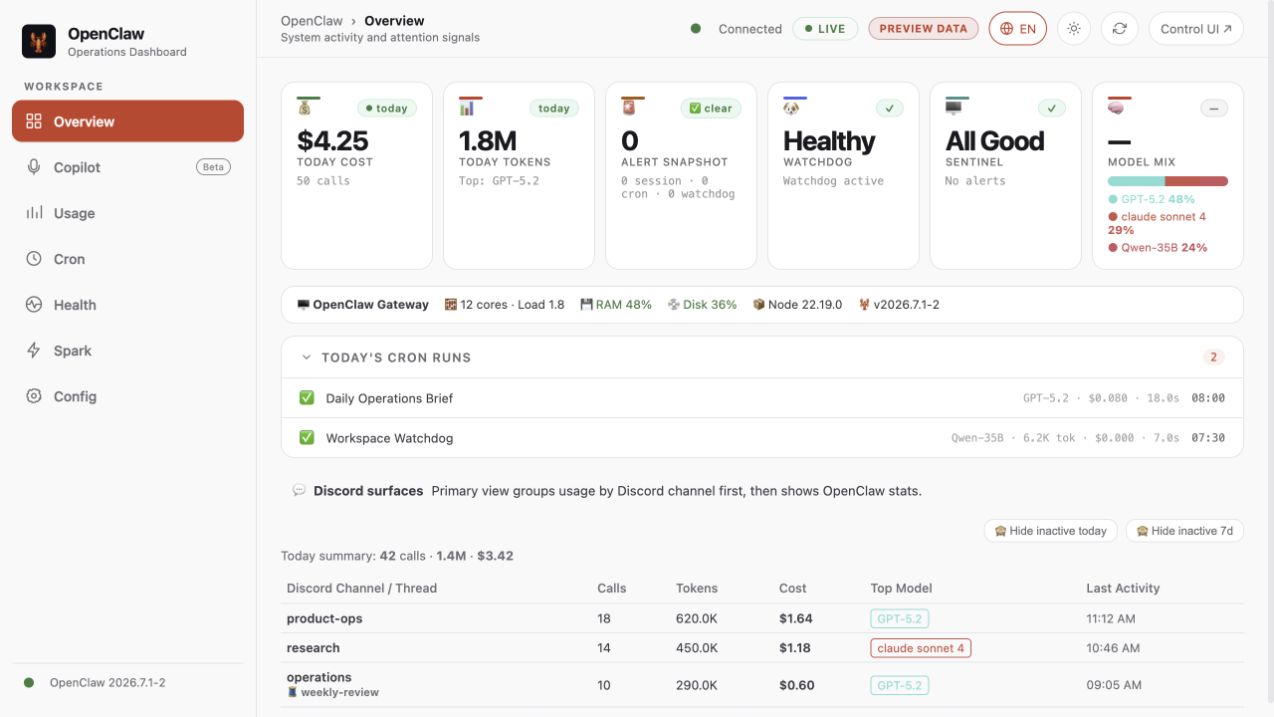
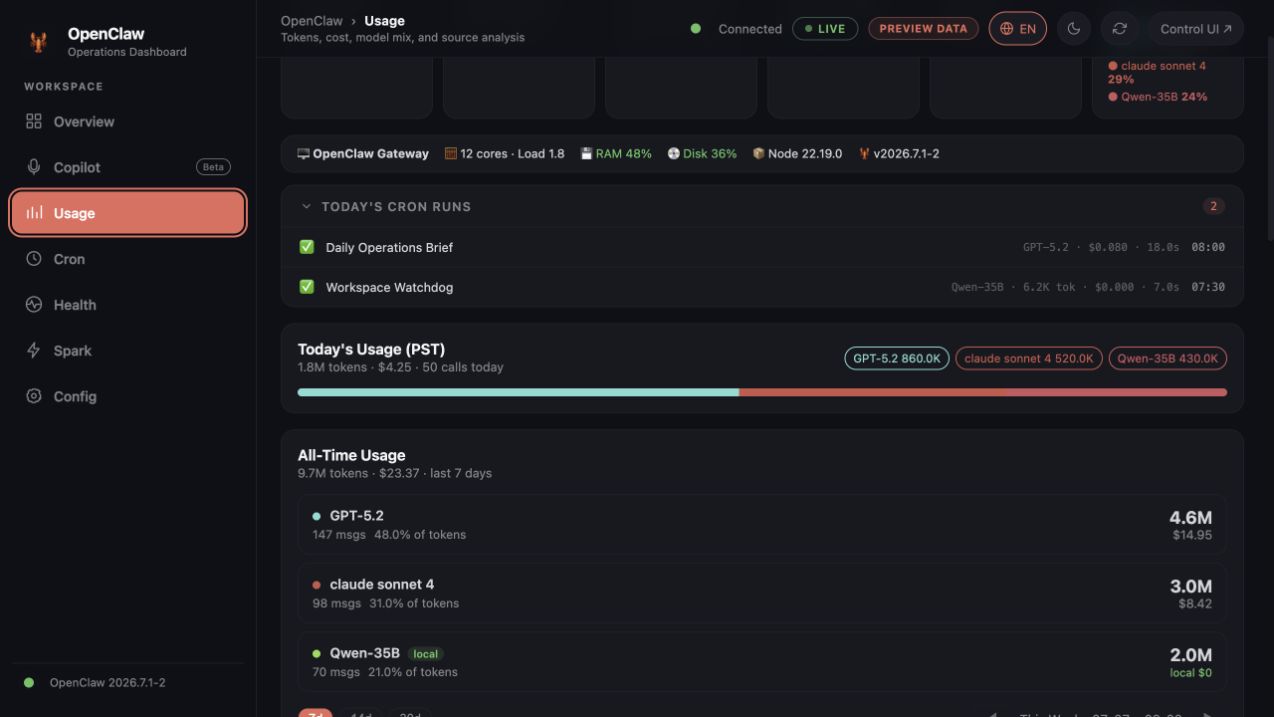
主文列出會話、用量與成本、計劃任務、閘道器健康、Spark 工作和本地 API Hub 等面板,並提及可選會議 Copilot。儀表盤會接觸本機執行資訊;部署時應限制網路暴露、保護認證令牌,並審查敏感欄位和安全風險。
資料釋出於 2026-10-27
以下是根據技能文件生成的示例,不代表實際執行結果。
2026-09 起統計方法調整:同名技能按作者分別統計,並覆蓋全部技能。圖中虛線為調整前的月份,與之後的資料不直接比較,也不計算跨越調整的增長。
| 月份 | 累計下載 | 環比 | 星標 |
|---|---|---|---|
| 2026-10 | 6665 | — | 11 |
| 2026-09 | 5654 | — | 11 |
| 2026-08 | 5462 | +5.8% | 11 |
| 2026-07 | 5161 | +8.0% | 11 |
| 2026-06 | 4778 | +5.4% | 11 |
| 2026-05 | 4534 | — | 11 |
| 2026-03 | 3020 | — | 7 |
以下是作者釋出的原始檔案,按純文字顯示,本站未做修改或稽核;其中的連結不可點選,命令請核實後再執行。抓取於 2026-10-23。
---
name: openclaw-dashboard
description: OpenClaw operations dashboard for sessions, usage and cost, cron runs, gateway health, DGX Spark work, Local API Hub, and opt-in meeting Copilot. Use when installing, operating, auditing, or extending the dashboard backend, frontend tabs, security model, or OpenClaw-aligned design.
metadata:
  openclaw:
    version: "2.0.2"
    emoji: "📊"
    homepage: https://github.com/JonathanJing/openclaw-dashboard
    requires:
bins: [node, openclaw] primaryEnv: OPENCLAW_AUTH_TOKEN
envVars:
- name: OPENCLAW_AUTH_TOKEN
required: true
description: Authentication token required before the dashboard starts.
- name: OPENCLAW_ENABLE_CONFIG_ENDPOINT
required: false
description: Opt in to redacted configuration inspection.
- name: OPENCLAW_ENABLE_COPILOT
required: false
description: Opt in to meeting audio processing.
- name: ALIBABA_CLOUD_API_KEY
required: false
description: Realtime provider credential used only when Copilot is enabled.
---
# OpenClaw Dashboard Skill
## Preview
The published screenshots use deterministic `?preview=1` sample data, never local host or workspace data.
<img src="https://raw.githubusercontent.com/JonathanJing/openclaw-dashboard/71604d6831bb24b9e8340bf0d1153a9545c5a038/screenshots/mobile-v2-dark.png" alt="OpenClaw Dashboard mobile layout" width="390">
## 🛠️ Installation
### 1. Ask OpenClaw (Recommended)
Tell OpenClaw: *"Install the openclaw-dashboard skill."* The agent will handle the installation and configuration automatically.
### 2. Manual Installation (CLI)
```bash
openclaw skills install @jonathanjing/openclaw-dashboard
```
## Mission
Keep this repository public-safe and easy to run. Prioritize:
1. Secret sanitization
2. Minimal setup steps
3. Stable API/UI behavior
## Architecture (v2.0)
The dashboard uses a **modular backend + tab-based frontend** architecture.
**Backend entry point:** `backend/server.js`
**Business logic:** `backend/providers/` — one file per data domain
**Frontend:** `frontend/tabs/` + `frontend/shared/` — one JS file per tab
**Runtime data:** stored in `~/.openclaw/dashboard/` (outside skill dir, not Git-tracked)
### Provider map
| Provider | Routes | Responsibility |
|---|---|---|
| `sessions.js` | `/ops/sessions`, `/api/sessions` | Session stats + model |
| `ledger.js` | `/ops/ledger/*`, `/api/cost/*` | SQLite token/cost data |
| `cron.js` | `/ops/cron`, `/ops/cron-costs`, `/cron/today` | Cron jobs + run history + cost breakdown |
| `watchdog.js` | `/ops/watchdog` | Watchdog state + timeline |
| `spark.js` | `/ops/dgx-status`, `/api/spark/*` | DGX Spark inference node |
| `system.js` | `/ops/system` | Host metrics (CPU/RAM/disk) |
| `local-api-hub.js` | `/ops/local-api-hub/*` | Unified local control-plane status |
| `spark-tasks.js` | `/api/spark/tasks/*` | DGX task history and PR Hunter output |
| `copilot.js` | `/api/copilot/status`, `/api/copilot/ws` | Opt-in realtime transcript/RAG/insights |
| `ground-truth.js` | `/api/ground-truth/*`, `/ops/models` | Model registry + colors |
| `tasks.js` | `/tasks`, `/tasks/:id`, `/logs` | Read-only task/history views |
| `config.js` | `/ops/config`, `/files`, `/skills` | Read-only config, file, and skill views |
| `ops-legacy.js` | `/ops/channels`, `/ops/alltime`, `/ops/audit`, `/memory` | Read-only compatibility views |
### Frontend tab map
| Tab | File | Key functions |
|---|---|---|
| Overview | `tabs/overview.js` | `loadSessions()`, `loadTasks()` |
| Cost | `tabs/cost.js` | `loadOpsChannels()`, `loadOpsAlltime()` |
| Cron | `tabs/cron.js` | `loadCronEnhanced()`, `loadCronCosts()`, `loadCronRuns()` |
| Health | `tabs/health.js` | `renderAgentMonitor()`, `loadSystemInfo()`, `renderWatchdogStatus()` |
| Spark | `tabs/spark-monitor.js` | `loadSparkMonitor()`, task history, GPU activity |
| Copilot | `tabs/copilot.js` | capability check, microphone stream, transcript/RAG/insights |
| Config | `tabs/config.js` | `loadConfig()`, `loadSkills()`, `loadFileList()` |
| Shared | `shared/api.js` | Auth, `apiFetch()`, watchdog renderers, toast, markdown |
| Shared | `shared/ui-utils.js` | `timeSince()`, task state |
| Shared | `shared/boot.js` | Init, week nav, chart renderers, confirm dialog |
## Apply when
Use this skill for:
- Dashboard feature requests (sessions, cost, cron, watchdog, operations)
- Backend route additions/fixes in `backend/providers/`
- Frontend behavior updates in `frontend/tabs/` or `frontend/shared/`
- README, setup, and environment simplification
- Public release checks for accidental sensitive data
## Key rules for agents editing this codebase
1. **No duplicate function definitions** across `api.js` and `ui-utils.js`. Shared utilities belong in `api.js` (loaded first). `ui-utils.js` only holds `timeSince()` and task state.
2. **Cross-tab function calls are implicit** — JS shares the same `window` scope. Keep shared helpers in `shared/` files.
3. **Runtime data goes to `~/.openclaw/dashboard/`**, not skill root. Path is set in `backend/lib/config.js` via `OPENCLAW_DASHBOARD_TASKS` env or default.
4. **`/ops/models` returns `{ registry: {...object...}, colors, displayNames, models }`** — `registry` must be an object keyed by alias, not an array.
5. **`/ops/cron-costs` returns `{ summary, jobs, dailyTrend, review, rows }`** — all five keys required for Cron tab to render correctly.
6. **`hideStale` query param** on `/ops/sessions` filters sessions with no activity for 7+ days.
7. **Frontend API calls are same-origin**. Never reintroduce a hardcoded dashboard/gateway port list.
8. **Copilot is opt-in**. Require `OPENCLAW_ENABLE_COPILOT=1`, an API key, authenticated WebSocket upgrade, and safe dependency failure states.
9. **Parse request URLs against a fixed internal base**. Never build a URL from the request `Host` header.
10. **Treat query-token login as a compatibility handoff only**. Set the cookie and redirect before serving HTML; never accept query tokens on API routes.
11. **Parse cookies per fragment**. Split on the first `=`, catch percent-decoding errors, and encode cookie values when setting them.
12. **Keep the shipped dashboard read-only**. Do not add task/file mutations, restart/doctor actions, model changes, package updates, backup/restore, or legacy proxying.
13. **Scope Copilot Redis events by meeting ID**. Permit unscoped legacy channels only for the first active meeting.
14. **Track the launcher and test harness**. Keep `start.sh` and `scripts/test-dashboard.js` in both Git and `package.json#files`.
15. **Use theme tokens in canvas rendering**. Never hardcode light-only chart text or borders.
## OpenClaw design alignment
- Reuse the current Control UI tokens: Inter/system typography, layered neutral surfaces, thin borders, 10–14px radii, red primary accent, semantic green/yellow/red/blue.
- Keep the desktop shell as left navigation + sticky topbar; use bottom navigation on narrow screens.
- Prefer flat cards and strong information hierarchy over gradients, glow, or decorative motion.
- Support dark and light modes, visible focus states, reduced motion, and responsive layouts.
- Keep IDs and `data-tab` contracts stable when changing navigation or visual structure.
## Public-safety guardrails
- Never hardcode tokens, API keys, cookies, or host-specific secrets.
- Require `OPENCLAW_AUTH_TOKEN`; do not start the dashboard without authentication.
- Never commit machine-specific absolute paths.
- Prefer `process.env.*` and safe defaults based on `HOME`.
- Keep examples as placeholders (`your_token_here`, `/path/to/...`).
- If uncertain, redact first and ask the user before exposing details.
- Keep sensitive behaviors opt-in (do not silently load local secret files).
## Runtime access declaration
The bundled server can access local OpenClaw files for dashboard views:
- Sessions, cron runs, watchdog state under `~/.openclaw/...`
- Local workspace files under `OPENCLAW_WORKSPACE`
- Task data in `~/.openclaw/dashboard/tasks.json`
- Task attachments in `~/.openclaw/dashboard/attachments/`
High-sensitivity features are disabled by default and require explicit env flags:
- `OPENCLAW_ENABLE_CONFIG_ENDPOINT=1` to expose `/ops/config`
- `OPENCLAW_ENABLE_COPILOT=1` plus `ALIBABA_CLOUD_API_KEY` to enable meeting Copilot
Network security:
- CORS restricted to loopback by default.
- Auth via HttpOnly cookie (`ds`) or `Authorization: Bearer` header.
- Set `DASHBOARD_COOKIE_SECURE=1` only when the dashboard origin uses HTTPS.
- Set `OPENCLAW_CONTROL_UI_URL` to the complete runtime URL when Gateway TLS or `gateway.controlUi.basePath` is enabled.
- Set `DASHBOARD_CORS_ORIGINS` (comma-separated) for external origins.
## Default implementation workflow
1. Identify which provider or tab file owns the feature.
2. Implement the smallest change that preserves behavior.
3. Check: does any other tab/shared file also define the same function? If yes, deduplicate.
4. Run a sensitive-string scan before finalizing.
5. Run `npm test`, `git diff --check`, and `npm pack --dry-run --json`.
6. Ensure docs match the actual runtime defaults.
## Sensitive-data checks
Before final response, scan for:
- `token=`, `OPENCLAW_AUTH_TOKEN`, `OPENCLAW_HOOK_TOKEN`
- `API_KEY`, `SECRET`, `PASSWORD`, `COOKIE`
- absolute paths like `/Users/`, `C:\\`, machine names, personal emails
If found: replace with env-based values or placeholders, and mention what was sanitized.
## Files to touch most often
- `backend/providers/*.js` — server behavior and API routes
- `frontend/tabs/*.js` — tab-specific UI logic
- `frontend/shared/api.js` — auth, fetch, shared renderers
- `backend/lib/config.js` — path and env configuration
- `README.md` — quick start and operator docs
- `env.example.txt` — ClawHub-compatible public-safe environment template
- `env.example` — compatibility mirror for Git/npm workflows
鍾馗.Skill——會更新漏洞庫的安全審查專家。直來直去、快刀斬亂麻,三層審查(靜態審計/行為模擬/供應鏈溯源)覆蓋12類風險,輸出結構化安全裁定(✅乾淨/⚠️可疑/🚫惡意)。Use when 使用者說"審查這個Skill"、"安全檢查"、"鍾馗看下"、"審一下"、"查一下這個skill"、安裝Skill前的安全評估、或需要審計SKILL.md的惡意載荷。
在使用技能包之前做安全掃描,並按結論決定放行或攔截的技能。
為 OpenClaw 配置 OpenRouter 免費模型與回退鏈的工具。
Parse, search, and analyze application logs across formats. Use when debugging from log files, setting up structured logging, analyzing error patterns, correlating events across services, parsing stack traces, or monitoring log output in real time.
用於安裝技能、包或外掛的安全檢查。請在執行任何 npm install、openclaw plugins install、clawhub install 或類似安裝命令之前使用。
網路安全與SRC漏洞掘金實戰技能。融合「系統學習路徑」與「SRC實戰掘金」雙模式: ①學習模式=法律→基礎→工具→靶場→攻防→就業全流程; ②實戰模式=直接指導在騰訊TSRC、阿里ASRC、百度BSRC等平台挖掘高價值漏洞變現。 當用戶提出以下問題時觸發: "我想學網路安全怎麼入門""SRC漏洞怎麼挖能賺錢""滲透測試需要學什麼" "Web安全漏洞原理是什麼""怎麼準備CTF比賽""護網面試會問什麼" "雲安全怎麼學""挖漏洞賺錢的方法""埠掃描指令碼怎麼寫" "SQL隱碼攻擊怎麼檢測""子域名怎麼列舉""XSS漏洞怎麼找" "靶場怎麼搭建""Kali Linux怎麼用""Metasploit怎麼入門" "等保測評是什麼""程式碼審計怎麼做""內網滲透怎麼學" "資訊洩露漏洞怎麼挖""越權漏洞怎麼測試""邏輯漏洞挖掘技巧" "簡歷怎麼寫才能進安全公司""安全行業面試題有哪些" "Burp Suite怎麼用""DVWA怎麼安裝""Pikachu靶場搭建" "Vulhub漏洞復現""網路安全法有什麼規定""CTF奪旗賽怎麼參加" "AWD比賽是什麼""應急響應怎麼做""攻擊溯源怎麼搞" "資料安全怎麼保障""公有云安全怎麼防護""私有云攻防怎麼做" "雲原生安全是什麼"。
這個技能特別簡單——你只需要呼叫它,給一個網站域名,它就會自動幫你跑一遍滲透測試,找出這個網站存在哪些安全漏洞。 不需要你配環境、不用你手動發包,一切自動化。測完直接出結果,告訴你哪裡有問題、怎麼修。 它的願景是:讓每個人都能成為白帽駭客——只要輸入一個域名,就能知道自己的網站安不安全。一切只為授權測試,只為發現漏洞、修復風險,讓網際網路更安全。
Security-first skill vetting for AI agents. Use before installing any skill from ClawdHub, GitHub, or other sources. Checks for red flags, permission scope, and suspicious patterns.
資料月份:2026-10 · 下載/星標數聚合自公開技能註冊庫(ClawHub、SkillHub),按月更新。口徑說明見資料方法。