
作者:christo更新於 2026-05-11共 4 個版本 · 最新版本釋出於 2026-04-07wecom@clawhub_qidu/wecom
工作流編排工具呼叫#微信
據 AlphaMoat 統計,截至 2026-10,Wecom 累計下載 12,882 次、獲 10 個星標,按累計下載量在本次參與排名的 10,914 個 AI 技能中排名第 2,160 位,在「AI 智慧體」分類(1,632 個)中排名第 292 位。
列表預設按累計下載量排序,也可按星標排序;詳情頁排名按累計下載量計算。
| 平台 | 累計下載 | 星標 | 評論 |
|---|---|---|---|
| ClawHub ↗ | 6259 | 9 | 4 |
| SkillHub ↗ | 1.3萬 | 10 | — |
各平台的計數口徑不同,統計時間不一致。
可向企業微信群傳送文字與 markdown 訊息,靠 WECOM_WEBHOOK_URL 指向群機器人地址,相容 Claude Code、Claude Desktop 等 MCP 客戶端。當前版本不支援表格、程式碼塊與一級到三級標題;webhook 地址等同於該群的發訊息許可權,不要寫進倉庫或日誌。
資料釋出於 2026-10-27
以下是根據技能文件生成的示例,不代表實際執行結果。
2026-09 起統計方法調整:同名技能按作者分別統計,並覆蓋全部技能。圖中虛線為調整前的月份,與之後的資料不直接比較,也不計算跨越調整的增長。
| 月份 | 累計下載 | 環比 | 星標 |
|---|---|---|---|
| 2026-10 | 1.3萬 | — | 10 |
| 2026-09 | 9412 | — | 10 |
| 2026-08 | 8458 | +5.6% | 10 |
| 2026-07 | 8011 | +7.0% | 10 |
| 2026-06 | 7487 | +11.0% | 10 |
| 2026-05 | 6747 | — | 10 |
| 2026-03 | 5147 | — | 9 |
以下是作者釋出的原始檔案,按純文字顯示,本站未做修改或稽核;其中的連結不可點選,命令請核實後再執行。抓取於 2026-10-23。
---`
name: wecom
description: "Send messages to WeCom (企业微信) via webhooks using MCP protocol. Works with Claude Code, Claude Desktop, and other MCP clients."
---

# WeCom Skill

Send text and markdown messages to `WeCom` (`企业微信`) via incoming webhooks (ENV: `WECOM_WEBHOOK_URL`).

`WeCom` is the enterprise version (using in office) of the famous all-in-on IM `WeChat` envied by Elon Musk.
## Setup
```bash
# Navigate to skill directory
cd skills/wecom
# Install dependencies
npm install
# Build TypeScript
npm run build
# Set webhook URL
export WECOM_WEBHOOK_URL="https://qyapi.weixin.qq.com/cgi-bin/webhook/send?key=YOUR_KEY"
```
## Usage with Claude Code
Add to your `~/.config/claude_code/mcp.json`:
```json
{
"mcpServers": {
"wecom": {
"command": "node",
"args": ["/path/to/clawdbot/skills/wecom/dist/index.js"],
"env": {
"WECOM_WEBHOOK_URL": "https://qyapi.weixin.qq.com/cgi-bin/webhook/send?key=YOUR_KEY"
}
}
}
}
```
Then restart Claude Code. You'll have three new tools:
# Tools
## `send_wecom_message`
Send a text message to WeCom.
```bash
# Simple message
await send_wecom_message({ content: "Hello from OpenClaw!" });
# With mentions
await send_wecom_message({
content: "Meeting starting now",
mentioned_list: ["zhangsan", "lisi"]
});
```
## `send_wecom_markdown_v2`
Send a markdown_v2 message to WeCom. **Recommended** — supports tables, code blocks, nested blockquotes, H1-H3 headers, and all standard markdown.
```bash
await send_wecom_markdown_v2({
content: `# Annual Report
## Revenue by Quarter
| Quarter | Revenue | Growth |
| :---- | -----: | ----: |
| Q1 | ¥1.2M | +15% |
| Q2 | ¥1.8M | +50% |
| Q3 | ¥2.1M | +17% |
## Notes
> Key insight: mobile revenue grew 80%
>
>> Detail: driven by short video ads
>
>> Another point: new user acquisition cost down 30%
## Code Example
\`\`\`python
def hello():
print("Hello WeCom!")
\`\`\`
---
More info [here](https://work.weixin.qq.com/api/doc)`
});
```
# WeCom Markdown v2 Features
markdown_v2 supports everything the original markdown supports, **plus**:
| Feature | Syntax | Example |
|---------|--------|----------|
| Tables | `\| col \| col \|` with `\| :--- \| -----: \|` | Supported with alignment |
| Nested blockquotes | `>>>` or `>>` | Up to 3 levels |
| H1/H2/H3 | `#` `##` `###` | Three heading levels |
| Code blocks | `\`code\`` and `\`\`\`lang` | Inline and multi-line |
| Horizontal rule | `---` | Dividers |
| Links | `[text](url)` | Standard markdown |
| Images | `` | Direct URL |
# WeCom Markdown (v1) Tags
The original `send_wecom_markdown` supports these limited tags:
| Feature | Syntax |
|---------|--------|
| Bold | `**text**` or `<strong>text</strong>` |
| Italic | `*text*` or `<i>text</i>` |
| Strikethrough | `~~text~~` or `<s>text</s>` |
| Mention | `<@userid>` |
| Link | `<a href="url">text</a>` |
| Image | `<img src="url" />` |
| Font size | `<font size="5">text</font>` |
| Color | `<font color="#FF0000">text</font>` |
⚠️ **v1 does NOT support tables, code blocks, or H1-H3 headers.** Use `send_wecom_markdown_v2` when you need those.
# Environment Variables
| Variable | Required | Default | Description |
|----------|----------|---------|-------------|
| `WECOM_WEBHOOK_URL` | Yes | - | WeCom webhook URL |
| `WECOM_TIMEOUT_MS` | No | 10000 | Request timeout (ms) |
# How To
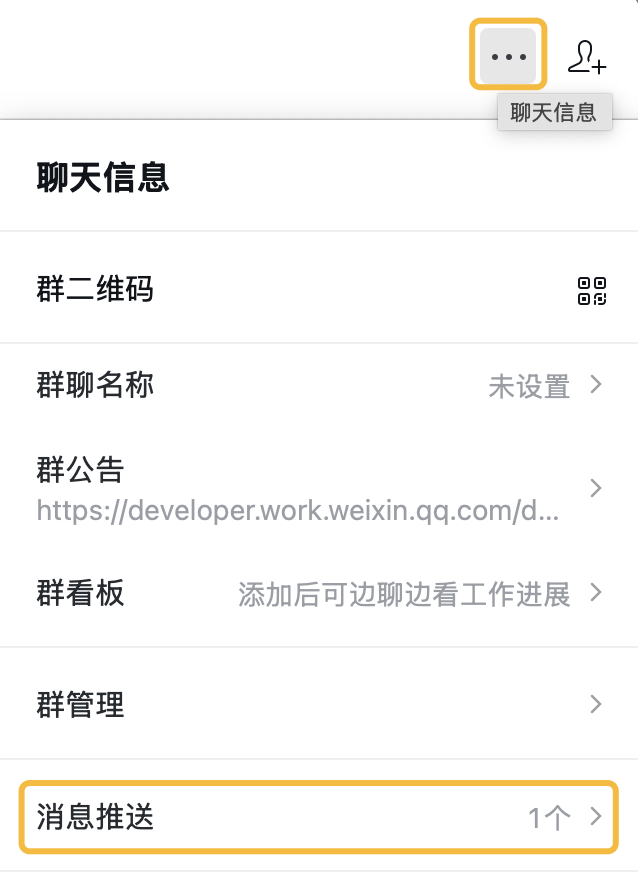
Get `WECOM_WEBHOOK_URL` following steps here, and envolve it as a bot into a group chat:
(Tip: You should get the `WECOM_WEBHOOK_URL` entirely as a URL, NOT just a KEY )
### STEP 1
### STEP 2
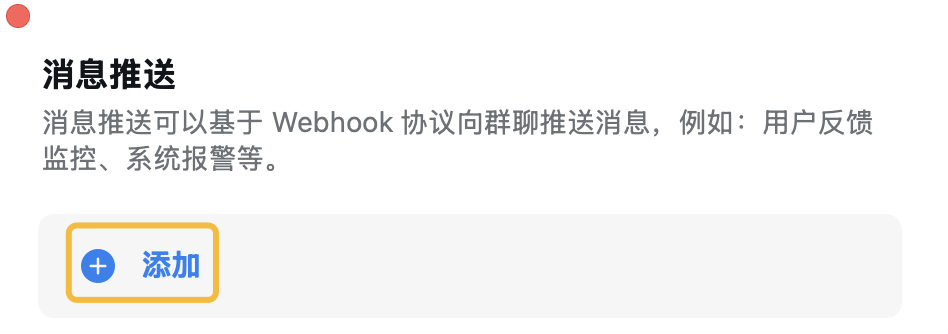
### STEP 3
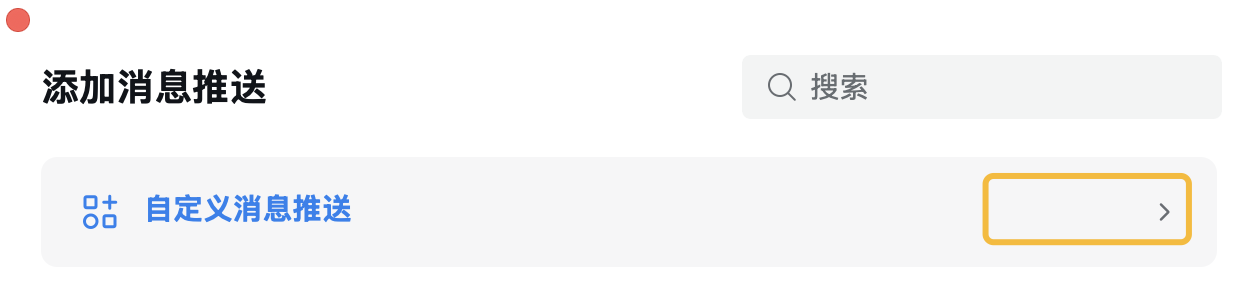
### STEP 4
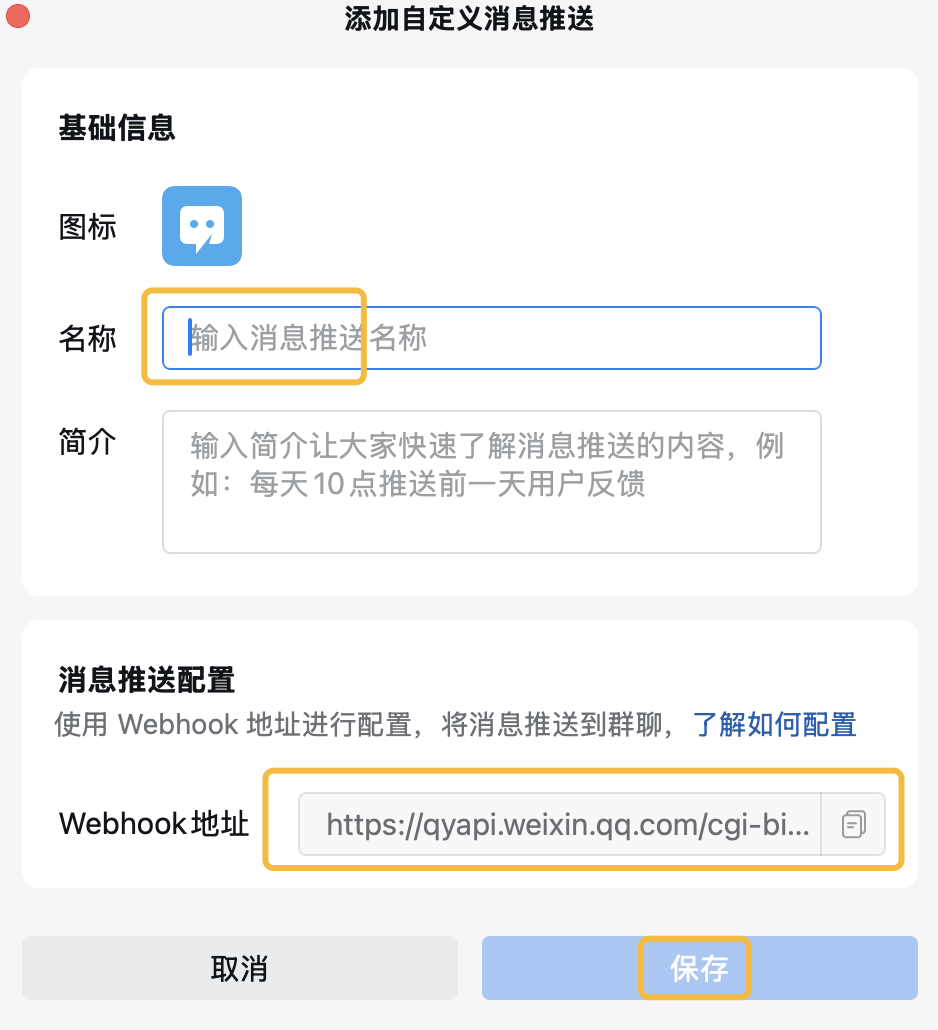
# Reference
[Message Receiving and Sending in a Group Chat](https://developer.work.weixin.qq.com/document/path/99110)
[Download WeCom Apps](https://work.weixin.qq.com/#indexDownload)
將開發過程中的經驗、錯誤與修正記錄為 Markdown 檔案,供日後重用並提升為工作區記憶。
用自然語言描述需求,在本機與遠端技能市場尋找技能並取得推薦。
給 AI agent 用的瀏覽器自動化命令列技能。
將使用者明確糾正與自我檢視整理成分層記憶,並依使用情況升級或封存。
規劃 AI 代理主動跟進、工作記憶與回顧流程的工作區設定指南。
指導如何建立與更新有效 Claude 技能的寫作指南。
在安裝第三方技能之前,按清單審查來源、許可權與危險模式的技能。
把盛唐詩人李白的詩學觀、意象系統與口吻,蒸餾成 AI 可呼叫的角色包。
資料月份:2026-10 · 下載/星標數聚合自公開技能註冊庫(ClawHub、SkillHub),按月更新。口徑說明見資料方法。