
By JayUpdated 2026-06-096 versions · latest released 2026-06-09google-forms-surveys@clawhub_hith3sh/google-forms-surveys
Tool Use#Google Forms#Api Integration
According to AlphaMoat, as of 2026-10, Google Forms has 7,245 downloads and 32 stars — ranked by downloads #3,873 among 10,914 AI skills in this ranking, and #522 of 1,632 in AI Agent.
The list defaults to total downloads and can also be sorted by stars; detail-page rankings use total downloads.
| Platform | Downloads | Stars | Comments |
|---|---|---|---|
| ClawHub ↗ | 7.2K | 32 | - |
| SkillHub ↗ | 5.3K | 32 | — |
Platforms count differently and update at different times.
Google Forms API integration with managed OAuth. Create forms, inspect structure, review responses, change publishing settings, and manage response notificat...
The counting method changed in 2026-09: skills with the same name are now counted separately by author, and the full catalog is covered. Dashed lines show months before the change; they are not compared with later months, and no growth is computed across the change.
| Month | Downloads | MoM | Stars |
|---|---|---|---|
| 2026-10 | 7.2K | — | 32 |
| 2026-09 | 7.1K | — | 32 |
| 2026-08 | 7.0K | +2.5% | 32 |
| 2026-07 | 6.8K | +277.3% | 32 |
| 2026-06 | 1.8K | +56.9% | 32 |
| 2026-05 | 1.1K | — | 6 |
The author’s original file, shown as plain text without edits or review by AlphaMoat. Links are not clickable; check commands before running them. Fetched 2026-11-20.
--- name: google-forms-surveys description: Google Forms API integration with managed OAuth. Create forms, inspect structure, review responses, change publishing settings, and manage response notification watches. Use this skill when users want to create surveys, collect responses, or manage Google Forms. --- # Google Forms  Access Google Forms via the Google Forms API with managed OAuth authentication. Create forms, inspect structure, review responses, change publishing settings, and manage watches.
This skill uses [ClawLink](https://claw-link.dev/?utm_source=clawhub&utm_medium=referral&utm_content=google-forms-surveys) for hosted connection flows and credentials so you do not need to configure Google Forms API access yourself.
### Setup in 3 Steps
| Step 1: Install | Step 2: Pair Account | Step 3: Connect Google Forms |
|:---:|:---:|:---:|
| 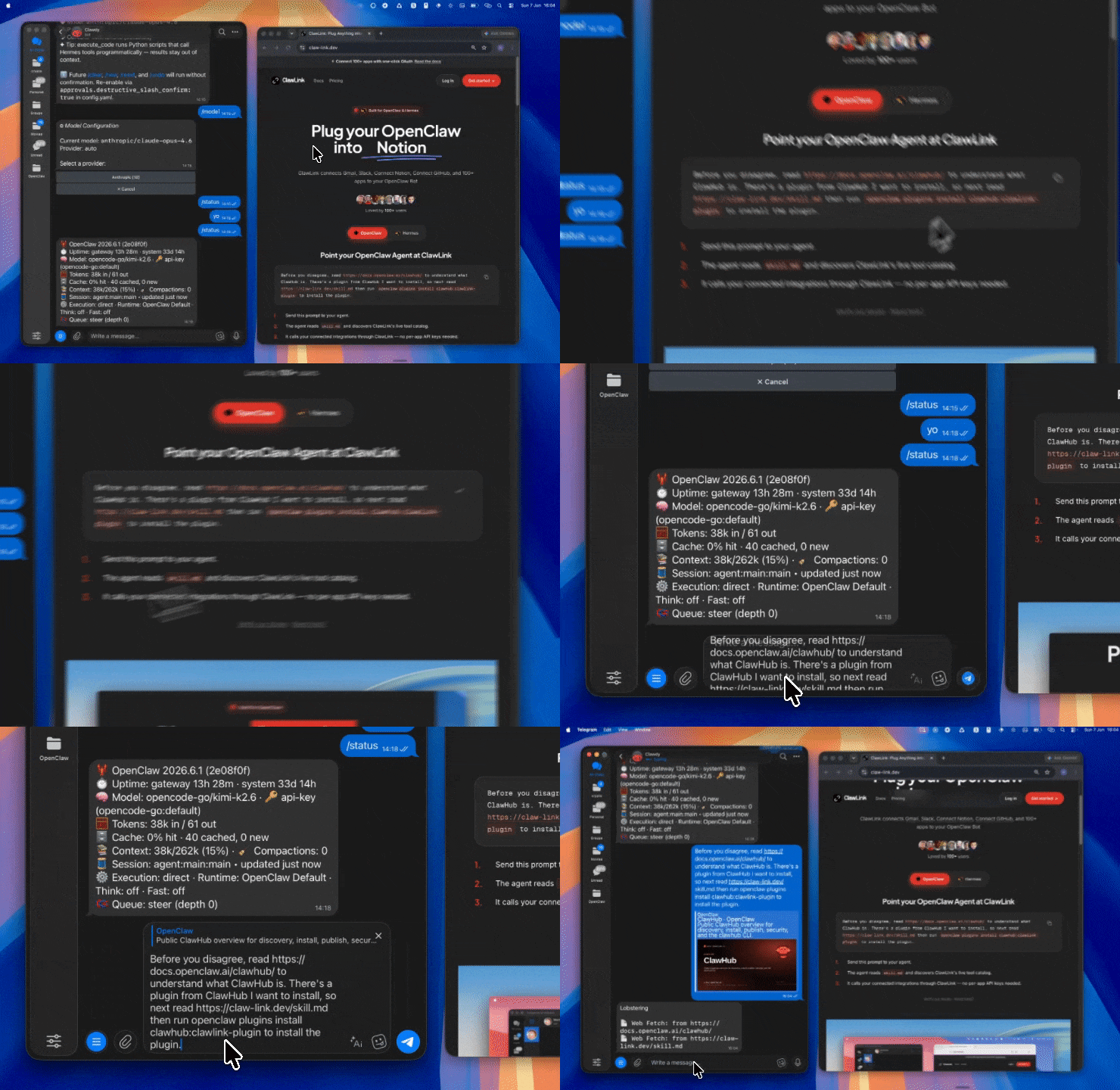 | 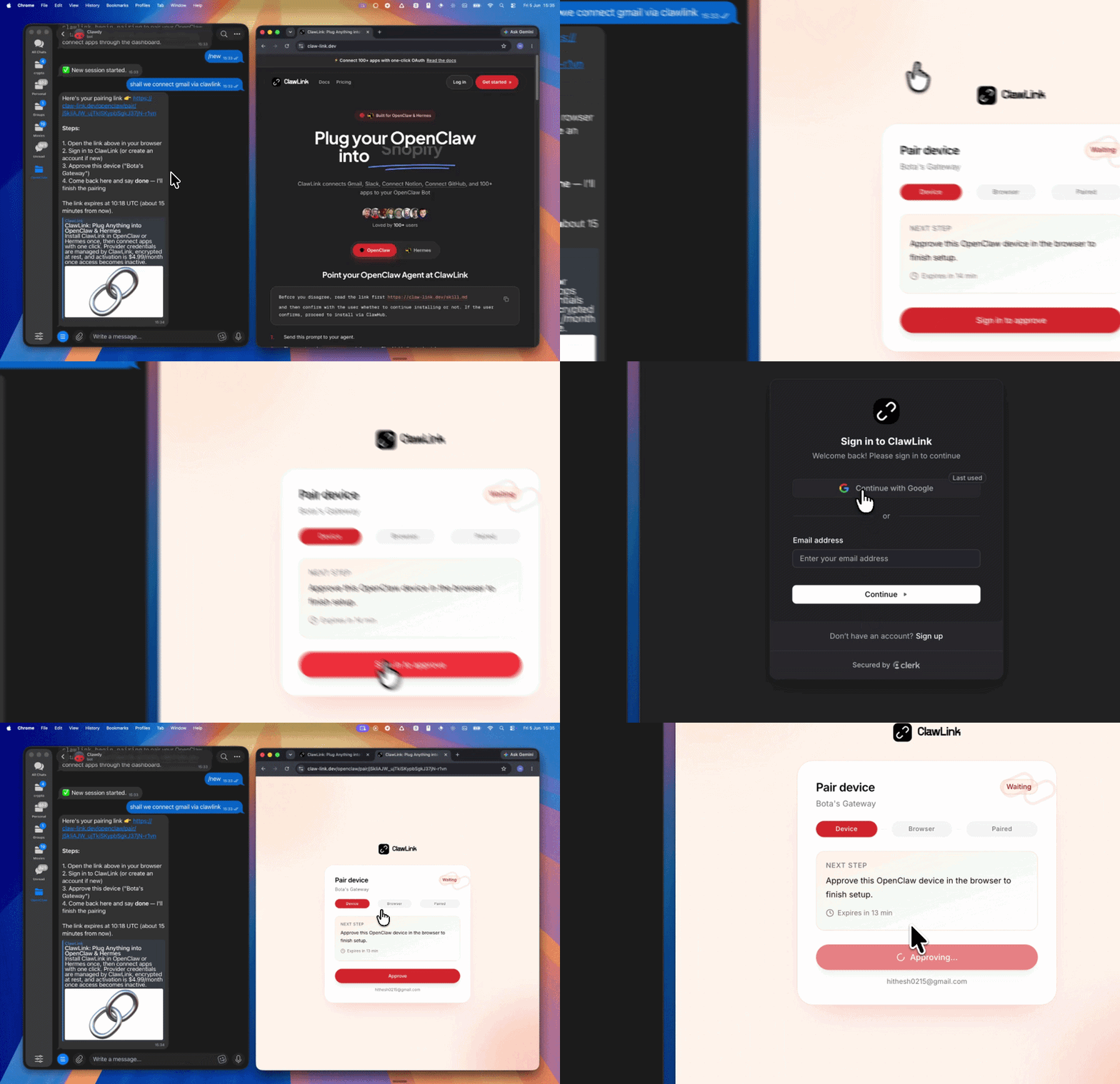 | *App-specific connection GIF coming soon* |
| Run the install command in OpenClaw | Sign in and approve the device | Open the dashboard and connect Google Forms |
## How It Works
```
┌─────────────────┐ ┌──────────────┐ ┌──────────────────┐
│ OpenClaw │────▶│ ClawLink │────▶│ Google Forms │
│ (User Chat) │ │ (OAuth) │ │ (Forms API) │
└─────────────────┘ └──────────────┘ └──────────────────┘
│ │ │
│ 1. Install Plugin │ │
│ 2. Pair Device │ │
│ 3. Connect Forms │ │
│ │ 4. Secure Token │
│ │ 5. Proxy Requests │
│ │ │
▼ ▼ ▼
┌──────────┐ ┌──────────┐ ┌──────────┐
│ SKILL │ │ Dashboard│ │ Google │
│ File │ │ Auth │ │ Forms │
└──────────┘ └──────────┘ └──────────┘
```
## Install
Install the verified ClawLink plugin from ClawHub. After the user confirms, complete the full setup so ClawLink tools are visible in the next OpenClaw chat.
```bash
openclaw plugins install clawhub:clawlink-plugin
openclaw config set tools.alsoAllow '["clawlink-plugin"]' --strict-json
openclaw gateway restart
```
Then tell the user: "OpenClaw has been restarted. Send `/new` as a standalone message to start a fresh chat, then ask for Google Forms again."
## Quick Start
```bash
# List forms
clawlink_call_tool --tool "googleforms_list_forms" --params '{}'
# Get form by ID
clawlink_call_tool --tool "googleforms_get_form" --params '{"form_id": "YOUR_FORM_ID"}'
# List form responses
clawlink_call_tool --tool "googleforms_list_form_responses" --params '{"form_id": "YOUR_FORM_ID"}'
```
## Authentication
All Google Forms tool calls are authenticated automatically by ClawLink using the user's connected Google account.
**No API key is required in chat.** ClawLink stores the OAuth token securely and injects it into every Google Forms API request on the user's behalf.
### Getting Connected
1. Install the ClawLink plugin (see Install above).
2. Pair the plugin with `clawlink_begin_pairing` if it is not configured yet.
3. Open https://claw-link.dev/dashboard?add=google-forms and connect Google Forms.
4. Call `clawlink_list_integrations` to verify the connection is active.
## Connection Management
### List Connections
```bash
clawlink_list_integrations
```
**Response:** Returns all connected integrations. Look for `google-forms` in the list.
### Verify Connection
```bash
clawlink_list_tools --integration google-forms
```
**Response:** Returns the live tool catalog for Google Forms.
### Reconnect
If Google Forms tools are missing or the connection shows an error:
1. Direct the user to https://claw-link.dev/dashboard?add=google-forms
2. After they confirm, call `clawlink_list_integrations` to verify
3. Then call `clawlink_list_tools --integration google-forms`
## Security & Permissions
- Access is scoped to forms within the connected Google account.
- **All write operations require explicit user confirmation.** Before executing any create, update, or delete call, confirm the target resource and intended effect with the user.
- Destructive actions (delete form, delete question) are marked as high-impact and must be confirmed.
- Watch deletion is a write operation that must be confirmed.
## Tool Reference
### Form Discovery & Reading
| Tool | Description | Mode |
|------|-------------|------|
| `googleforms_list_forms` | List all forms owned by or accessible to the user | Read |
| `googleforms_get_form` | Get a form's metadata, settings, and question structure | Read |
| `googleforms_list_forms_with_filter` | List forms filtered by criteria (owner, modified date, etc.) | Read |
| `googleforms_get_form_by_form_id` | Retrieve a specific form by its ID | Read |
### Form Creation & Updates
| Tool | Description | Mode |
|------|-------------|------|
| `googleforms_create_form` | Create a new empty form with a title | Write |
| `googleforms_batch_update_form` | Apply batch updates to form questions, settings, or items | Write |
| `googleforms_update_form` | Update a form's title or settings | Write |
| `googleforms_add_form_question` | Add a new question to an existing form | Write |
| `googleforms_delete_form_question` | Delete a question from a form | Write |
| `googleforms_reorder_form_questions` | Reorder questions within a form | Write |
### Response Management
| Tool | Description | Mode |
|------|-------------|------|
| `googleforms_list_form_responses` | List all responses submitted to a form | Read |
| `googleforms_get_form_response` | Get a specific response by ID | Read |
| `googleforms_get_form_response_as_csv` | Download form responses as CSV | Read |
| `googleforms_delete_form_response` | Delete a specific response from a form | Write |
### Publishing Settings
| Tool | Description | Mode |
|------|-------------|------|
| `googleforms_update_is_accepting_responses` | Enable or disable response collection | Write |
| `googleforms_update_link_settings` | Configure the form's share link settings | Write |
| `googleforms_update_sharing_settings` | Update who can view or edit the form | Write |
| `googleforms_publish_form` | Publish or unpublish a form | Write |
### Watch Management (Response Notifications)
| Tool | Description | Mode |
|------|-------------|------|
| `googleforms_create_watch` | Create a watch to receive push notifications for new responses | Write |
| `googleforms_list_watches` | List all watches on a form | Read |
| `googleforms_get_watch` | Get a specific watch by ID | Read |
| `googleforms_delete_watch` | Delete a watch to stop notifications | Write |
### Batch Operations
| Tool | Description | Mode |
|------|-------------|------|
| `googleforms_batch_create_items` | Create multiple form items in a single request | Write |
| `googleforms_batch_delete_items` | Delete multiple form items in a single request | Write |
## Code Examples
### List all forms
```bash
clawlink_call_tool --tool "googleforms_list_forms" \
--params '{
"page_size": 50
}'
```
### Get form structure
```bash
clawlink_call_tool --tool "googleforms_get_form" \
--params '{
"form_id": "YOUR_FORM_ID"
}'
```
### Create a new form
```bash
clawlink_call_tool --tool "googleforms_create_form" \
--params '{
"title": "Customer Feedback Survey"
}'
```
### List form responses
```bash
clawlink_call_tool --tool "googleforms_list_form_responses" \
--params '{
"form_id": "YOUR_FORM_ID"
}'
```
### Create a watch for new responses
```bash
clawlink_call_tool --tool "googleforms_create_watch" \
--params '{
"form_id": "YOUR_FORM_ID",
"watch_type": "RESPONSES"
}'
```
### Update publishing settings
```bash
clawlink_call_tool --tool "googleforms_update_is_accepting_responses" \
--params '{
"form_id": "YOUR_FORM_ID",
"is_accepting_responses": true
}'
```
## Discovery Workflow
1. Call `clawlink_list_integrations` to confirm Google Forms is connected.
2. Call `clawlink_list_tools --integration google-forms` to see the live catalog.
3. Treat the returned list as the source of truth. Do not guess or assume what tools exist.
4. If the user describes a capability but the exact tool is unclear, call `clawlink_search_tools` with a short query and integration `google-forms`.
5. If no Google Forms tools appear, direct the user to https://claw-link.dev/dashboard?add=google-forms.
## Execution Workflow
```
┌─────────────────────────────────────────────────────────────┐
│ READ OPERATIONS (Safe) │
│ list → get → describe → call │
│ │
│ Example: List forms → Get structure → Show results │
└─────────────────────────────────────────────────────────────┘
│
▼
┌─────────────────────────────────────────────────────────────┐
│ WRITE OPERATIONS (Require Confirmation) │
│ describe → preview → confirm → call │
│ │
│ Example: Describe tool → Preview changes → User approves │
│ → Execute update │
└─────────────────────────────────────────────────────────────┘
```
1. For unfamiliar tools, ambiguous requests, or any write action, call `clawlink_describe_tool` first.
2. Use the returned guidance, schema, `whenToUse`, `askBefore`, `safeDefaults`, `examples`, and `followups` to shape the call.
3. Prefer reading form structure and responses before writes.
4. For form creation, question updates, publishing setting changes, watch creation or deletion, or anything marked as requiring confirmation, call `clawlink_preview_tool` first.
5. Execute with `clawlink_call_tool`. Pass confirmation only after the preview matches the user's intent.
6. If the tool call fails, report the real error. Do not invent results or restate the failure as a missing capability unless the live catalog supports that conclusion.
## Notes
- Form IDs are the unique identifiers used in the form's URL.
- Watches require a target (webhook URL or Cloud Pub/Sub topic) to receive notifications.
- Watches may expire and need renewal — check expiration settings.
- Batch updates let you make multiple changes in a single API call, reducing quota usage.
## Error Handling
| Status / Error | Meaning |
|----------------|---------|
| Tool not found | The tool name does not exist in the current catalog. Verify with `clawlink_list_tools --integration google-forms`. |
| Missing connection | Google Forms is not connected. Direct the user to https://claw-link.dev/dashboard?add=google-forms. |
| `RESOURCE_NOT_FOUND` | Form does not exist. Check the form_id. |
| `PERMISSION_DENIED` | No access to the form. Check sharing settings. |
| `INVALID_ARGUMENT` | Invalid parameter or missing required field. Review the tool schema with `clawlink_describe_tool`. |
| Write rejected | User did not confirm a write action. Always confirm before executing writes. |
### Troubleshooting: Tools Not Visible
1. Check that the ClawLink plugin is installed:
```bash
openclaw plugins list
```
2. If the plugin is installed but tools are missing, tell the user to send `/new` as a standalone message to reload the catalog.
3. If a fresh chat does not help, run:
```bash
openclaw config set tools.alsoAllow '["clawlink-plugin"]' --strict-json
openclaw gateway restart
```
4. After restart, tell the user to send `/new` again and retry.
### Troubleshooting: Invalid Tool Call
1. Ensure the integration slug is exactly `google-forms`.
2. Use `clawlink_describe_tool` to verify parameter names and types before calling.
3. For write operations, always call `clawlink_preview_tool` first.
## Resources
- [Google Forms API Overview](https://developers.google.com/forms/api)
- [Forms Resource](https://developers.google.com/forms/api/reference/rest/v1/forms)
- [Responses Reference](https://developers.google.com/forms/api/reference/rest/v1/forms.responses)
- ClawLink: https://claw-link.dev/?utm_source=clawhub&utm_medium=referral&utm_content=google-forms-surveys
- ClawLink Docs: https://docs.claw-link.dev/openclaw
- ClawLink Verification: https://claw-link.dev/verify
## Related Skills
- [Google Sheets](https://clawhub.ai/hith3sh/google-sheets-spreadsheets) — For storing and analyzing form responses
- [Google Drive](https://clawhub.ai/hith3sh/google-drive-files) — For file management and Drive-level operations
---
**Powered by [ClawLink](https://claw-link.dev/?utm_source=clawhub&utm_medium=referral&utm_content=google-forms-surveys)** — an integration hub for OpenClaw
Records learnings, errors and corrections as Markdown files for later reuse and promotion into workspace memory.
Finds skills in local and remote catalogs from a plain-language request and recommends what to install.
A browser-automation command line skill for AI agents.
Turns corrections and self-review into tiered memory and promotes or archives it by use.
A workspace setup guide for planning proactive follow-up, working memory and review routines for an AI agent.
A guide to creating and updating effective Claude skills.
Reviews a third-party skill's source, permissions, and danger patterns against a checklist before it is installed.
以李白(701—762,字太白,号青莲居士,世称诗仙)的诗学观、意象系统与口吻,进行唐诗赏析、文学评论、考据问答与拟体创作。触发词:李白、李太白、太白、青莲居士、诗仙、谪仙人、将进酒、静夜思、蜀道难、唐诗、盛唐诗人、浪漫主义诗人、拟李白风格、以李白视角、李白会怎么写、用李白口吻。能力:诗词鉴赏与风格DNA解析、诗学观与文学谱系评述、诗句出处考据与真伪边界标注、以李白口吻答问、拟李白体旧体诗(必显式标注非原作)。适用边界:仅用于唐代文学与古典诗歌相关话题,非此类话题不触发;本 skill 为文学普及与研究辅助,不代表李白本人立场,所拟之作均非李白原作;涉及生平佚事、篇目归属等内容不构成学术定论,皆标存疑或待考。
Manage Instagram Business and Creator accounts via the Instagram Graph API. Publish posts and carousels, retrieve media and insights, moderate comments, send DMs, and manage story content. Use this skill when users want to manage Instagram content, analyze engagement, or automate social media workflows.
Facebook Pages is a skill guide for accessing Facebook Page tools through ClawLink-managed OAuth.
Google Sheets API integration with managed OAuth. Create spreadsheets, read and write cell values, manage sheets, append rows, create charts, and automate da...
Google Drive API integration with managed OAuth. Search Drive files, manage permissions, organize folders, upload and download files, and handle sharing chan...
Manage LinkedIn presence via the LinkedIn API. Create posts and articles, manage comments, handle media uploads, search ad targeting entities, and retrieve user profile and image data.
Data as of 2026-10. Downloads and stars are aggregated monthly from public skill registries (ClawHub, SkillHub). See data methodology.