
By JayUpdated 2026-06-072 versions · latest released 2026-06-07notion-pages@clawhub_hith3sh/notion-pages
Information Organizing#Notion
According to AlphaMoat, as of 2026-10, Notion has 7,433 downloads and 34 stars — ranked by downloads #3,772 among 10,914 AI skills in this ranking, and #261 of 745 in Knowledge.
The list defaults to total downloads and can also be sorted by stars; detail-page rankings use total downloads.
| Platform | Downloads | Stars | Comments |
|---|---|---|---|
| ClawHub ↗ | 7.4K | 33 | - |
| SkillHub ↗ | 5.6K | 34 | — |
Platforms count differently and update at different times.
Search pages and databases, update content, and manage Notion workspace data from chat. Use this skill when users want to read, create, or modify Notion page...
The counting method changed in 2026-09: skills with the same name are now counted separately by author, and the full catalog is covered. Dashed lines show months before the change; they are not compared with later months, and no growth is computed across the change. Other skills share this name; figures from before the change are attributed to this one, which currently has the most downloads.
| Month | Downloads | MoM | Stars |
|---|---|---|---|
| 2026-10 | 7.4K | — | 34 |
| 2026-09 | 7.3K | — | 34 |
| 2026-08 | 7.1K | +2.8% | 34 |
| 2026-07 | 6.9K | +279.0% | 34 |
| 2026-06 | 1.8K | — | 33 |
The author’s original file, shown as plain text without edits or review by AlphaMoat. Links are not clickable; check commands before running them. Fetched 2026-11-20.
---
name: notion-workspace
description: Search pages and databases, update content, and manage Notion workspace data from chat. Use this skill when users want to read, create, or modify Notion pages, query databases, manage sections, or automate Notion workflows via the Notion API.
---

# Notion Assistant

Access Notion via the Notion API with OAuth authentication. Search pages and databases, read and update content, manage sections, and coordinate workspace workflows.

This skill uses [ClawLink](https://claw-link.dev) for hosted connection flows and credentials so you do not need to configure Notion API access yourself.
### Setup in 3 Steps
| Step 1: Install | Step 2: Pair Account | Step 3: Connect Notion |
|:---:|:---:|:---:|
| 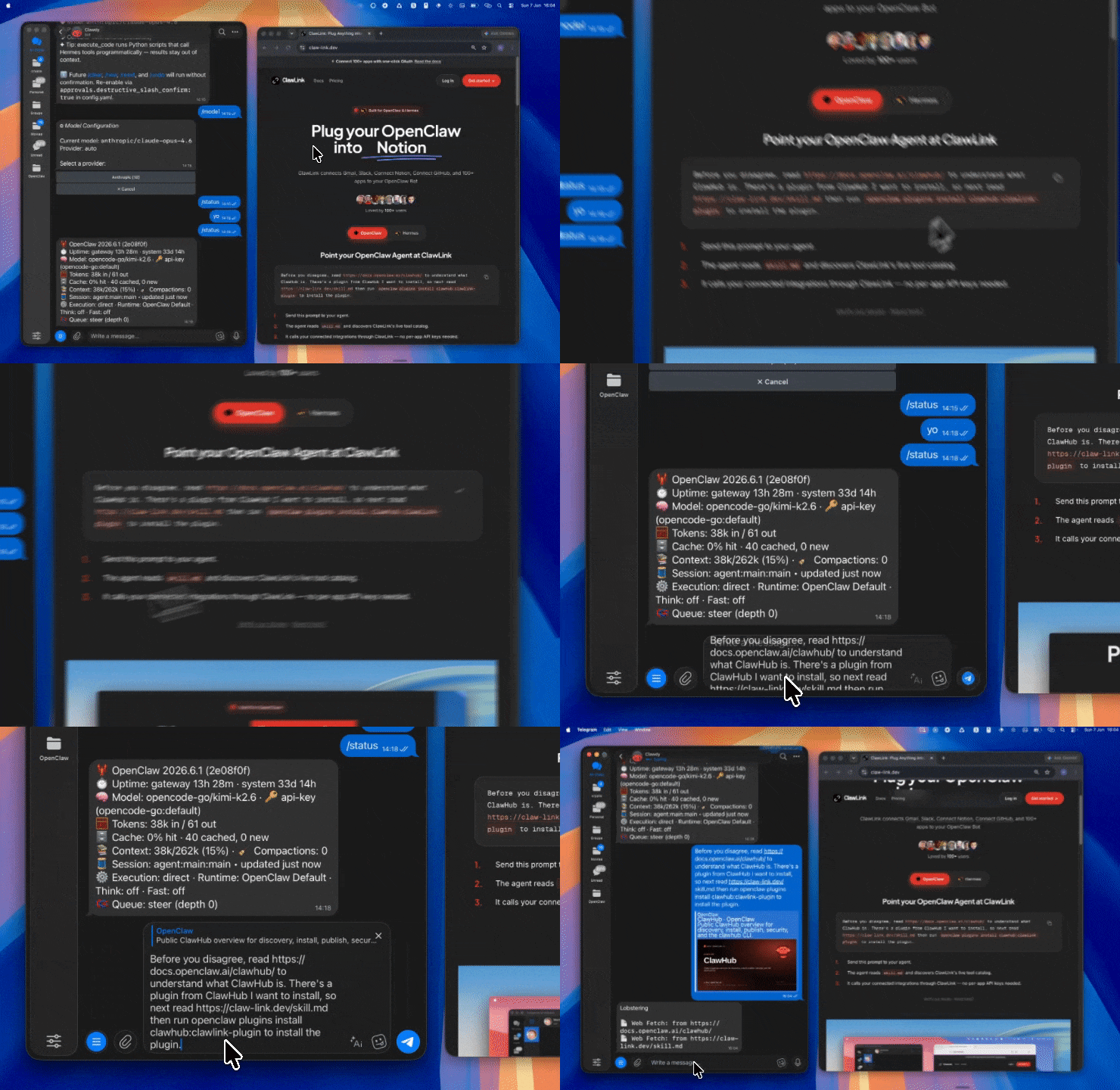 | 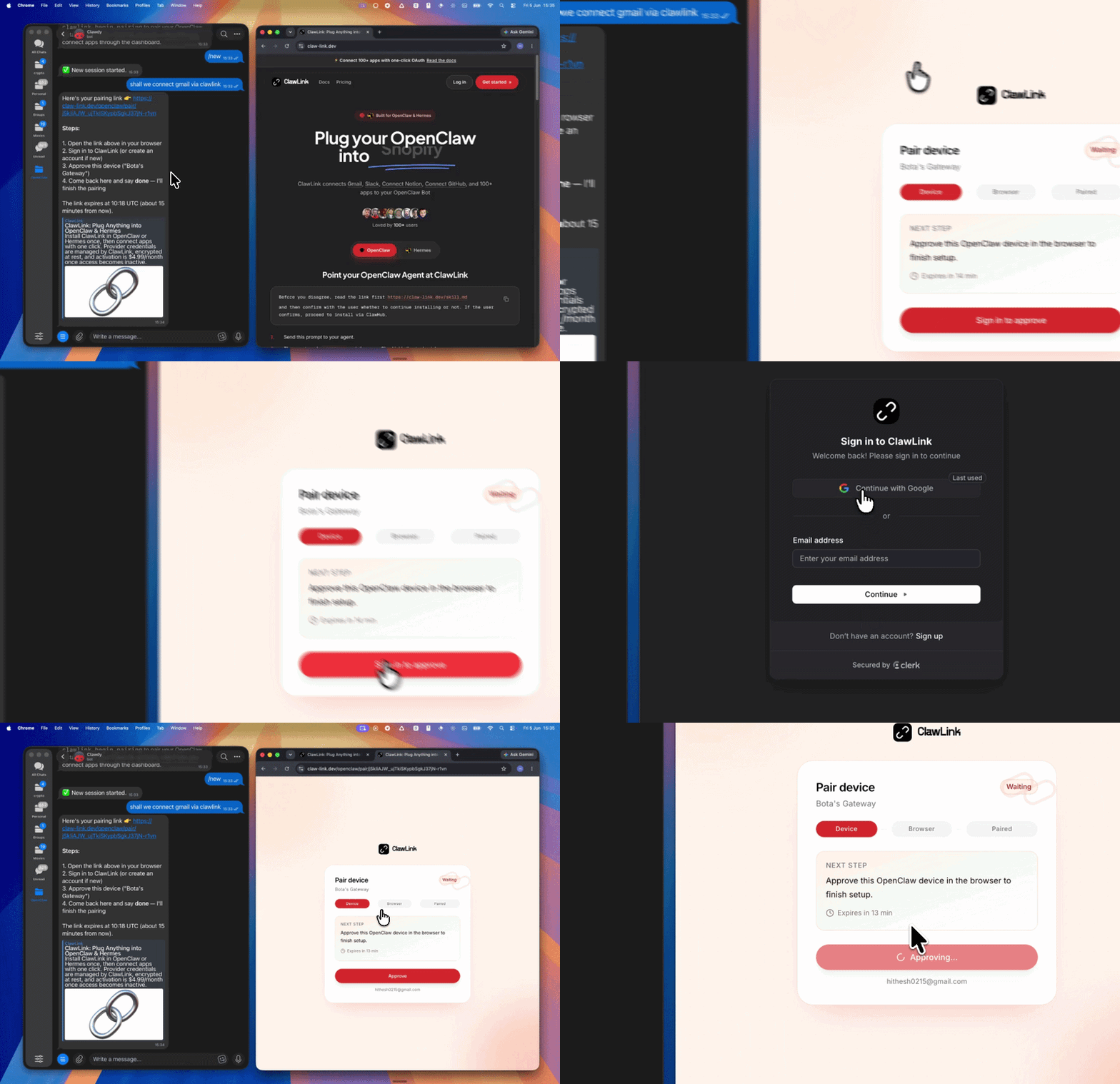 | *App-specific connection GIF coming soon* |
| Run the install command in OpenClaw | Sign in and approve the device | Open the dashboard and connect Notion |
## How It Works
```
┌─────────────────┐ ┌──────────────┐ ┌──────────────────┐
│ OpenClaw │────▶│ ClawLink │────▶│ Notion API │
│ (User Chat) │ │ (OAuth) │ │ │
└─────────────────┘ └──────────────┘ └──────────────────┘
│ │ │
│ 1. Install Plugin │ │
│ 2. Pair Device │ │
│ 3. Connect Notion │ │
│ │ 4. Secure Token │
│ │ 5. Proxy Requests │
│ │ │
▼ ▼ ▼
┌──────────┐ ┌──────────┐ ┌──────────┐
│ SKILL │ │ Dashboard│ │ Notion │
│ File │ │ Auth │ │ Workspace│
└──────────┘ └──────────┘ └──────────┘
```
## Install
Install the verified ClawLink plugin from ClawHub. After the user confirms, complete the full setup so ClawLink tools are visible in the next OpenClaw chat.
```bash
openclaw plugins install clawhub:clawlink-plugin
openclaw config set tools.alsoAllow '["clawlink-plugin"]' --strict-json
openclaw gateway restart
```
Then tell the user: "OpenClaw has been restarted. Send `/new` as a standalone message to start a fresh chat, then ask for Notion again."
## Quick Start
```bash
# List databases in the workspace
clawlink_call_tool --tool "notion_list_databases" --params '{}'
# Search for pages by title
clawlink_call_tool --tool "notion_search" --params '{"query": "project notes"}'
# Get page content
clawlink_call_tool --tool "notion_get_page" --params '{"page_id": "PAGE_ID"}'
```
## Authentication
All Notion tool calls are authenticated automatically by ClawLink using the user's connected Notion account.
**No API key is required in chat.** ClawLink stores the OAuth token securely and injects it into every Notion API request on the user's behalf.
### Getting Connected
1. Install the ClawLink plugin (see Install above).
2. Pair the plugin with `clawlink_begin_pairing` if it is not configured yet.
3. Open https://claw-link.dev/dashboard?add=notion and connect Notion.
4. Call `clawlink_list_integrations` to verify the connection is active.
## Connection Management
### List Connections
```bash
clawlink_list_integrations
```
**Response:** Returns all connected integrations. Look for `notion` in the list.
### Verify Connection
```bash
clawlink_list_tools --integration notion
```
**Response:** Returns the live tool catalog for Notion.
### Reconnect
If Notion tools are missing or the connection shows an error:
1. Direct the user to https://claw-link.dev/dashboard?add=notion
2. After they confirm, call `clawlink_list_integrations` to verify
3. Then call `clawlink_list_tools --integration notion`
## Security& Permissions
- Access is scoped to pages, databases, and content within the connected Notion workspace.
- **All write operations require explicit user confirmation.** Before executing any create, update, or delete call, confirm the target resource and intended effect with the user.
- Destructive actions (delete page, remove database entry) must be confirmed.
## Discovery Workflow
1. Call `clawlink_list_integrations` to confirm Notion is connected.
2. Call `clawlink_list_tools --integration notion` to see the live catalog.
3. Treat the returned list as the source of truth. Do not guess or assume what tools exist.
4. If the user describes a capability but the exact tool is unclear, call `clawlink_search_tools` with a short query and integration `notion`.
5. If no Notion tools appear, direct the user to https://claw-link.dev/dashboard?add=notion.
## Execution Workflow
```
┌─────────────────────────────────────────────────────────────┐
│ READ OPERATIONS (Safe) │
│ list → get → search → describe → call │
│ │
│ Example: Search pages → Read content → Show results │
└─────────────────────────────────────────────────────────────┘
│
▼
┌─────────────────────────────────────────────────────────────┐
│ WRITE OPERATIONS (Require Confirmation) │
│ list → get → describe → preview → confirm → call │
│ │
│ Example: Describe tool → Preview changes → User approves │
│ → Execute update │
└─────────────────────────────────────────────────────────────┘
```
1. For unfamiliar tools, ambiguous requests, or any write action, call `clawlink_describe_tool` first.
2. Use the returned guidance, schema, `whenToUse`, `askBefore`, `safeDefaults`, `examples`, and `followups` to shape the call.
3. Prefer read, list, search, and get operations before writes when that reduces ambiguity.
4. For writes or anything marked as requiring confirmation, call `clawlink_preview_tool` first.
5. Execute with `clawlink_call_tool`. Pass confirmation only after the preview matches the user's intent.
6. If the tool call fails, report the real error. Do not invent results or restate the failure as a missing capability unless the live catalog supports that conclusion.
## Code Examples
### Search pages
```bash
clawlink_call_tool --tool "notion_search" \
--params '{
"query": "meeting notes",
"filter": {
"property": "object",
"value": "page"
}
}'
```
### Query a database
```bash
clawlink_call_tool --tool "notion_query_database" \
--params '{
"database_id": "DATABASE_ID",
"filter": {
"property": "Status",
"select": {
"equals": "In Progress"
}
},
"sorts": [
{
"property": "Last edited time",
"direction": "descending"
}
]
}'
```
### Create a page
```bash
clawlink_call_tool --tool "notion_create_page" \
--params '{
"parent": {
"database_id": "DATABASE_ID"
},
"properties": {
"Name": {
"title": [
{
"text": {
"content": "New Project Page"
}
}
]
}
},
"children": [
{
"object": "block",
"type": "heading_2",
"heading_2": {
"rich_text": [
{
"text": {
"content": "Overview"
}
}
]
}
}
]
}'
```
## Notes
- Notion API has rate limits. Use exponential backoff when encountering 429 errors.
- Page and database IDs are UUIDs (e.g., `abc123-def456-...`). Use the full ID, not the human-readable page URL slug.
- Block content updates require the full block structure in the request body.
- Archived pages can be retrieved but may require specific filter conditions.
## Error Handling
| Status / Error | Meaning |
|----------------|---------|
| Tool not found | The tool name does not exist in the current catalog. Verify with `clawlink_list_tools --integration notion`. |
| Missing connection | Notion is not connected. Direct the user to https://claw-link.dev/dashboard?add=notion. |
| `object_not_found` | Page or database does not exist. Check the ID or search for the resource first. |
| `validation_error` | Invalid parameter or missing required field. Review the tool schema with `clawlink_describe_tool`. |
| `conflict_error` | Resource was modified concurrently. Retry or re-fetch the latest state. |
| Write rejected | User did not confirm a write action. Always confirm before executing writes. |
### Troubleshooting: Tools Not Visible
1. Check that the ClawLink plugin is installed:
```bash
openclaw plugins list
```
2. If the plugin is installed but tools are missing, tell the user to send `/new` as a standalone message to reload the catalog.
3. If a fresh chat does not help, run:
```bash
openclaw config set tools.alsoAllow '["clawlink-plugin"]' --strict-json
openclaw gateway restart
```
4. After restart, tell the user to send `/new` again and retry.
### Troubleshooting: Invalid Tool Call
1. Ensure the integration slug is exactly `notion`.
2. Use `clawlink_describe_tool` to verify parameter names and types before calling.
3. For write operations, always call `clawlink_preview_tool` first.
## Resources
- [Notion API Documentation](https://developers.notion.com/)
- [Notion Integration Guide](https://www.notion.so/help/guides)
- ClawLink: https://claw-link.dev
- ClawLink Docs: https://docs.claw-link.dev/openclaw
- ClawLink Verification: https://claw-link.dev/verify
## Related Skills
- [Google Docs](https://clawhub.ai/hith3sh/google-docs-documents) — For Google Workspace document operations
- [Notion](https://clawhub.ai/hith3sh/notion-workspace) — For this skill's native documentation
---
**Powered by [ClawLink](https://claw-link.dev)** — an integration hub for OpenClaw
通过公开搜索URL在16个搜索引擎(7个国内直连+9个国际)中做跨引擎检索、结果去重与多源交叉验证,无需API Key,内置零依赖Python脚本。Use when 用户要求“搜一下/查资料/多找几个来源/核实消息/找公众号文章/排查报错/找论文或开源项目”时。输入自然语言查询词,输出带来源链接与可信度标注的结构化结果。不适用于私有数据检索、批量抓取、需要登录后可见的内容。
Manage notes and knowledge-base content through the IMA OpenAPI.
A summarizer that condenses long text, documents, and web pages into key points and keywords.
通过“查一下、搜一下、搜索、找一下”等自然语言检索公开网页,整理来源并交付横版 PDF、Markdown 与标题链接表。支持用户主动开启、查看和取消技能收藏,保留原报告取回。
A required guide for routing web requests to the right tool.
AI HOT (aihot.virxact.com) 中文 AI 资讯查询 Skill。当用户想知道"今天 AI 圈有什么"、"AI 日报"、"AI HOT"、"AI 资讯"、"AI 热点"、"最近 AI"、"OpenAI/Anthropic/Google 最近发布了什么"、"AI hot today"、"AI...
全球12亿文献知识库(8千万中文期刊可下载)——通过 SmartLib 开放平台 API 提供中外文学术文献检索与下载能力,覆盖 8000 万篇授权中文期刊全文 + 12.28 亿条全球文献元数据(期刊 7.19 亿 / 专利 2.15 亿 / 会议 7155 万 / 学位论文 2473 万 / 标准 268 万)。 能力:中英文关键词检索、文献详情、中文期刊 PDF 全文下载、外文 OA 文献十级渠道免费下载(不消耗配额)、智能关键词扩展、核心期刊优先排序、相关性重排、引文追溯、分类号检索。 配额:首次使用自动注册,免费 100 次检索 + 10 次下载 / 月;耗尽自动弹出套餐(体验卡 / 个人版月 / 专业版月 / 单篇下载 / 下载包),可说「升级 / 充值」唤起;企业 / 机构定制联系 [email protected]。 触发:用户表达"查论文""找文献""检索学术""搜期刊""查专利""找标准""下论文""写文献综述""找参考文献""查 SCI/EI"等意图时启用;也适用"帮我找关于 XX 的论文""写文献综述""找几篇引用支撑论点"。英文:"find papers" "search literature" "write literature review" "find supporting citations"。 调用前必须先用 /consume 获取 consume_token,再凭 token 调 /search(每次计费接口调用都需一次 /consume)。
Calls markitdown through uvx to turn many file types into Markdown.
Manage Instagram Business and Creator accounts via the Instagram Graph API. Publish posts and carousels, retrieve media and insights, moderate comments, send DMs, and manage story content. Use this skill when users want to manage Instagram content, analyze engagement, or automate social media workflows.
Facebook Pages is a skill guide for accessing Facebook Page tools through ClawLink-managed OAuth.
Google Sheets API integration with managed OAuth. Create spreadsheets, read and write cell values, manage sheets, append rows, create charts, and automate da...
Google Drive API integration with managed OAuth. Search Drive files, manage permissions, organize folders, upload and download files, and handle sharing chan...
Manage LinkedIn presence via the LinkedIn API. Create posts and articles, manage comments, handle media uploads, search ad targeting entities, and retrieve user profile and image data.
Data as of 2026-10. Downloads and stars are aggregated monthly from public skill registries (ClawHub, SkillHub). See data methodology.