
作者:Jay更新於 2026-06-09共 6 個版本 · 最新版本釋出於 2026-06-09google-analytics-reporting@clawhub_hith3sh/google-analytics-reporting
報表生成資料洞察指標監控
據 AlphaMoat 統計,截至 2026-10,Google Analytics 累計下載 7,327 次、獲 32 個星標,按累計下載量在本次參與排名的 10,914 個 AI 技能中排名第 3,820 位,在「資料分析」分類(915 個)中排名第 352 位。
列表預設按累計下載量排序,也可按星標排序;詳情頁排名按累計下載量計算。
| 平台 | 累計下載 | 星標 | 評論 |
|---|---|---|---|
| ClawHub ↗ | 7327 | 32 | - |
| SkillHub ↗ | 5293 | 32 | — |
各平台的計數口徑不同,統計時間不一致。
透過 Google Analytics Data API 執行 GA4 報告、檢查屬性、列出受眾和資料流、分析流量和轉化資料。使用此技能...
2026-09 起統計方法調整:同名技能按作者分別統計,並覆蓋全部技能。圖中虛線為調整前的月份,與之後的資料不直接比較,也不計算跨越調整的增長。
| 月份 | 累計下載 | 環比 | 星標 |
|---|---|---|---|
| 2026-10 | 7327 | — | 32 |
| 2026-09 | 7157 | — | 32 |
| 2026-08 | 6996 | +3.5% | 32 |
| 2026-07 | 6760 | +272.0% | 32 |
| 2026-06 | 1817 | +58.8% | 32 |
| 2026-05 | 1144 | — | 6 |
以下是作者釋出的原始檔案,按純文字顯示,本站未做修改或稽核;其中的連結不可點選,命令請核實後再執行。抓取於 2026-11-20。
--- name: google-analytics-reporting description: Run GA4 reports, inspect properties, list audiences and data streams, and analyze traffic and conversion data via the Google Analytics Data API. Use this skill when users want to list account summaries and properties, run standard or realtime GA4 reports with chosen dimensions and metrics, inspect available fields and compatibility, list audiences, data streams and key events, compare traffic and campaign performance, or create key events after confirmation. --- # Google Analytics  Access Google Analytics via the GA4 Data API with OAuth authentication. Run GA4 reports, inspect properties, list audiences and data streams, and analyze traffic and conversion data.
This skill uses [ClawLink](https://claw-link.dev/?utm_source=clawhub&utm_medium=referral&utm_content=google-analytics-reporting) for hosted connection flows and credentials so you do not need to configure Google Analytics API access yourself.
### Setup in 3 Steps
| Step 1: Install | Step 2: Pair Account | Step 3: Connect Google Analytics |
|:---:|:---:|:---:|
| 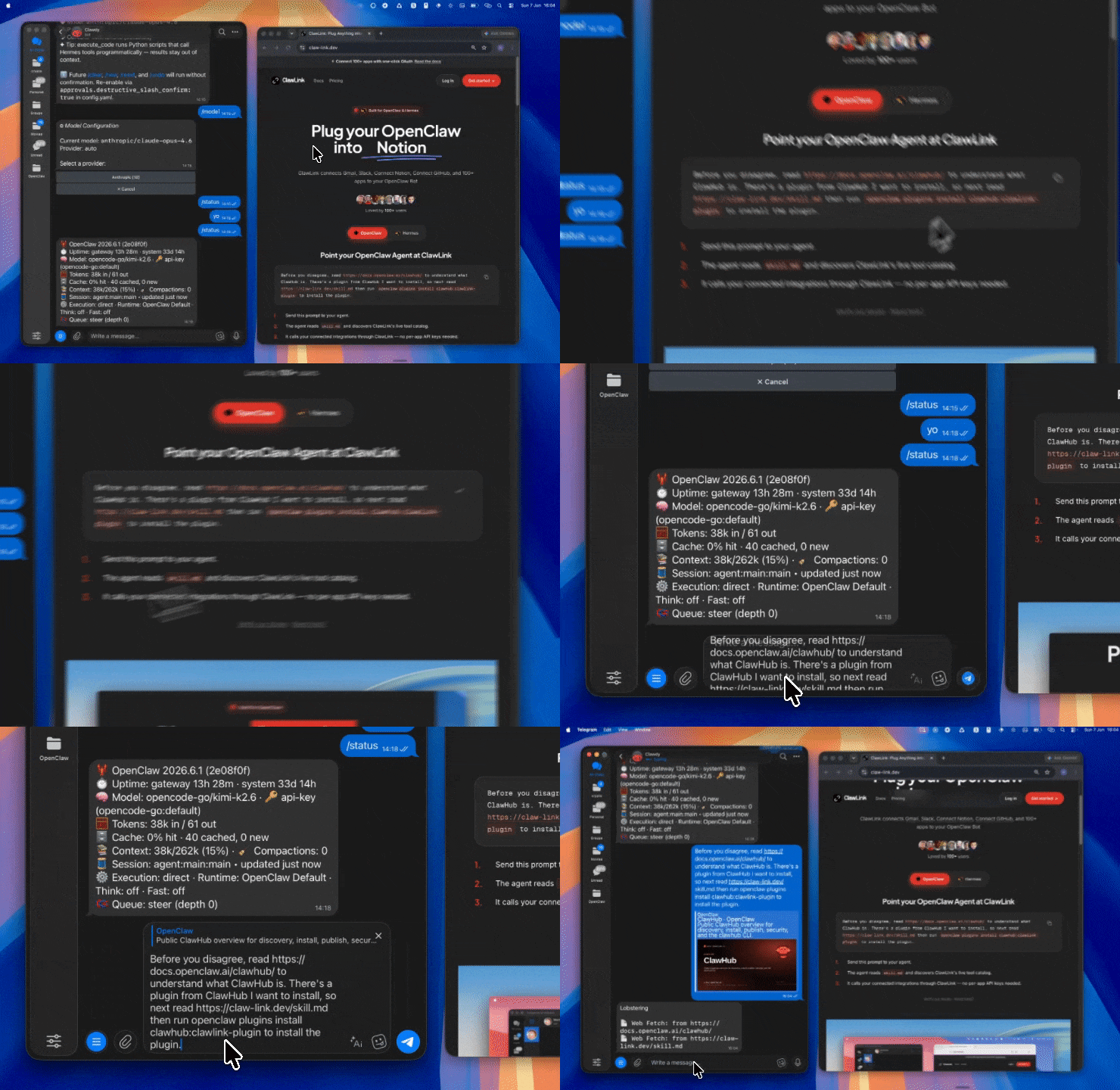 | 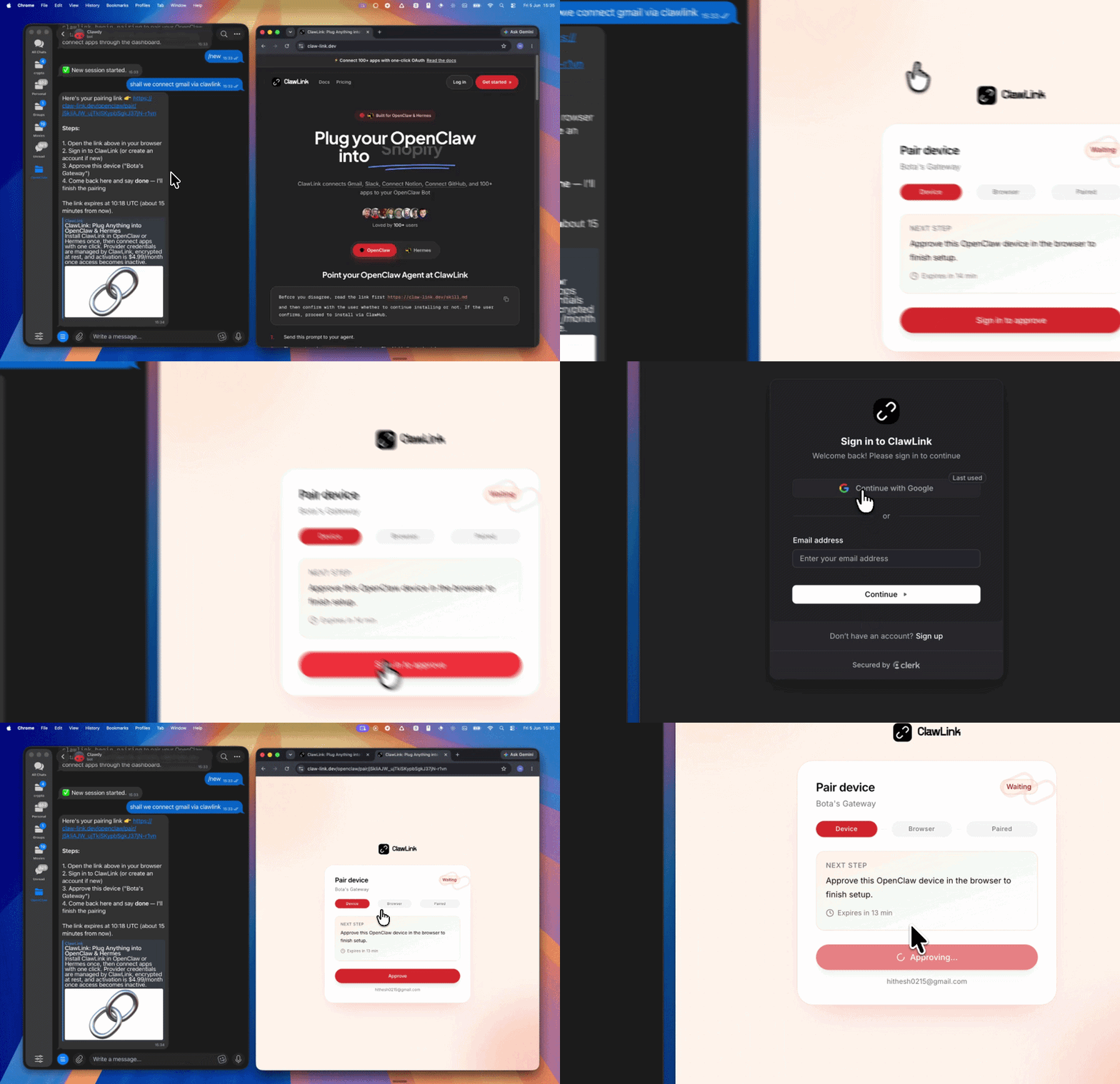 | *App-specific connection GIF coming soon* |
| Run the install command in OpenClaw | Sign in and approve the device | Open the dashboard and connect Google Analytics |
## How It Works
```
┌─────────────────┐ ┌──────────────┐ ┌──────────────────┐
│ OpenClaw │────▶│ ClawLink │────▶│ GA4 Data API │
│ (User Chat) │ │ (OAuth) │ │ (REST) │
└─────────────────┘ └──────────────┘ └──────────────────┘
│ │ │
│ 1. Install Plugin │ │
│ 2. Pair Device │ │
│ 3. Connect Google Analytics │
│ │ 4. Secure Token │
│ │ 5. Proxy Requests │
│ │ │
▼ ▼ ▼
┌──────────┐ ┌──────────┐ ┌──────────┐
│ SKILL │ │ Dashboard│ │ GA4 │
│ File │ │ Auth │ │ Reports │
└──────────┘ └──────────┘ └──────────┘
```
## Install
Install the verified ClawLink plugin from ClawHub. After the user confirms, complete the full setup so ClawLink tools are visible in the next OpenClaw chat.
```bash
openclaw plugins install clawhub:clawlink-plugin
openclaw config set tools.alsoAllow '["clawlink-plugin"]' --strict-json
openclaw gateway restart
```
Then tell the user: "OpenClaw has been restarted. Send `/new` as a standalone message to start a fresh chat, then ask for Google Analytics again."
## Quick Start
```bash
# List accessible accounts and properties
clawlink_call_tool --tool "google_analytics_list_account_summaries" --params '{}'
# Run a basic GA4 report
clawlink_call_tool --tool "google_analytics_run_report" --params '{"property": "properties/123456789", "dimensions": [{"name": "country"}, {"name": "deviceCategory"}], "metrics": [{"name": "sessions"}, {"name": "totalRevenue"}]}'
# Run a realtime report
clawlink_call_tool --tool "google_analytics_run_realtime_report" --params '{"property": "properties/123456789", "dimensions": [{"name": "country"}], "metrics": [{"name": "activeUsers"}]}'
```
## Authentication
All Google Analytics tool calls are authenticated automatically by ClawLink using the user's connected Google account.
**No API key is required in chat.** ClawLink stores the OAuth token securely and injects it into every GA4 API request on the user's behalf.
### Getting Connected
1. Install the ClawLink plugin (see Install above).
2. Pair the plugin with `clawlink_begin_pairing` if it is not configured yet.
3. Open https://claw-link.dev/dashboard?add=google-analytics and connect Google Analytics.
4. Call `clawlink_list_integrations` to verify the connection is active.
## Connection Management
### List Connections
```bash
clawlink_list_integrations
```
**Response:** Returns all connected integrations. Look for `google-analytics` in the list.
### Verify Connection
```bash
clawlink_list_tools --integration google-analytics
```
**Response:** Returns the live tool catalog for Google Analytics.
### Reconnect
If Google Analytics tools are missing or the connection shows an error:
1. Direct the user to https://claw-link.dev/dashboard?add=google-analytics
2. After they confirm, call `clawlink_list_integrations` to verify
3. Then call `clawlink_list_tools --integration google-analytics`
## Security & Permissions
- Access is scoped to GA4 properties accessible to the connected Google account.
- **All write operations require explicit user confirmation.** Before executing any key event creation or property update, confirm the intended effect with the user.
- Reports and analytics queries are read-only and do not modify account data.
## Tool Reference
### Account & Property Discovery
| Tool | Description | Mode |
|------|-------------|------|
| `google_analytics_list_account_summaries` | List all accessible accounts and properties | Read |
| `google_analytics_list_accounts_v1_beta` | List all Google Analytics accounts | Read |
| `google_analytics_list_properties_filtered` | List GA4 properties with filtering | Read |
| `google_analytics_get_property` | Get GA4 property details | Read |
| `google_analytics_get_account` | Get account details | Read |
### Reporting
| Tool | Description | Mode |
|------|-------------|------|
| `google_analytics_run_report` | Run a customized GA4 data report | Read |
| `google_analytics_run_realtime_report` | Run a realtime report (last 30-60 min) | Read |
| `google_analytics_run_pivot_report` | Run a pivot table report | Read |
| `google_analytics_run_funnel_report` | Run a funnel analysis report | Read |
| `google_analytics_batch_run_reports` | Run multiple reports in one batch | Read |
| `google_analytics_check_compatibility` | Check dimension/metric compatibility | Read |
### Metadata & Configuration
| Tool | Description | Mode |
|------|-------------|------|
| `google_analytics_get_metadata` | Get available dimensions, metrics, comparisons | Read |
| `google_analytics_get_property_quotas_snapshot` | Get API quota usage for a property | Read |
| `google_analytics_get_data_retention_settings` | Get data retention configuration | Read |
| `google_analytics_get_attribution_settings` | Get attribution model settings | Read |
| `google_analytics_get_google_signals_settings` | Get Google Signals configuration | Read |
### Audiences & Data Streams
| Tool | Description | Mode |
|------|-------------|------|
| `google_analytics_list_audiences` | List configured audiences | Read |
| `google_analytics_get_audience` | Get audience configuration details | Read |
| `google_analytics_list_data_streams` | List data streams for a property | Read |
| `google_analytics_list_key_events` | List key events (conversions) | Read |
| `google_analytics_get_key_event` | Get key event details | Read |
### Audience Lists
| Tool | Description | Mode |
|------|-------------|------|
| `google_analytics_create_audience_list` | Create an audience list snapshot | Write |
| `google_analytics_create_recurring_audience_list` | Create a recurring audience list | Write |
| `google_analytics_list_audience_lists` | List all audience lists | Read |
| `google_analytics_query_audience_list` | Query audience list results | Read |
### Custom Definitions
| Tool | Description | Mode |
|------|-------------|------|
| `google_analytics_list_custom_dimensions` | List custom dimensions | Read |
| `google_analytics_create_custom_dimension` | Create a custom dimension | Write |
| `google_analytics_list_custom_metrics` | List custom metrics | Read |
| `google_analytics_create_custom_metric` | Create a custom metric | Write |
### Property Management
| Tool | Description | Mode |
|------|-------------|------|
| `google_analytics_update_property` | Update property settings | Write |
| `google_analytics_create_rollup_property` | Create a roll-up property | Write |
## Code Examples
### Run a basic traffic report
```bash
clawlink_call_tool --tool "google_analytics_run_report" \
--params '{
"property": "properties/123456789",
"dimensions": [{"name": "date"}, {"name": "country"}, {"name": "deviceCategory"}],
"metrics": [{"name": "sessions"}, {"name": "totalUsers"}, {"name": "bounceRate"}],
"dateRanges": [{"startDate": "30daysAgo", "endDate": "today"}]
}'
```
### Run a realtime report
```bash
clawlink_call_tool --tool "google_analytics_run_realtime_report" \
--params '{
"property": "properties/123456789",
"dimensions": [{"name": "country"}, {"name": "city"}],
"metrics": [{"name": "activeUsers"}]
}'
```
### List key events
```bash
clawlink_call_tool --tool "google_analytics_list_key_events" \
--params '{
"property": "properties/123456789"
}'
```
### Check dimension/metric compatibility
```bash
clawlink_call_tool --tool "google_analytics_check_compatibility" \
--params '{
"property": "properties/123456789",
"dimensions": [{"name": "userAgeBracket"}, {"name": "sessionCampaignName"}],
"metrics": [{"name": "sessions"}]
}'
```
## Discovery Workflow
1. Call `clawlink_list_integrations` to confirm Google Analytics is connected.
2. Call `clawlink_list_tools --integration google-analytics` to see the live catalog.
3. Treat the returned list as the source of truth. Do not guess or assume what tools exist.
4. If the user describes a capability but the exact tool is unclear, call `clawlink_search_tools` with a short query and integration `google-analytics`.
5. If no Google Analytics tools appear, direct the user to https://claw-link.dev/dashboard?add=google-analytics.
## Execution Workflow
```
┌─────────────────────────────────────────────────────────────┐
│ READ OPERATIONS (Safe) │
│ list → get → run_report → check_compatibility │
│ │
│ Example: List properties → Run report → Show results │
└─────────────────────────────────────────────────────────────┘
│
▼
┌─────────────────────────────────────────────────────────────┐
│ WRITE OPERATIONS (Require Confirmation) │
│ describe → preview → confirm → create/update │
│ │
│ Example: Preview key event creation → User confirms │
│ → Execute create │
└─────────────────────────────────────────────────────────────┘
```
1. For unfamiliar tools, ambiguous requests, or any write action, call `clawlink_describe_tool` first.
2. Use the returned guidance, schema, `whenToUse`, `askBefore`, `safeDefaults`, `examples`, and `followups` to shape the call.
3. Prefer listing accounts, properties, metadata, compatibility, and read-only reports before writes.
4. For key event creation, property updates, or anything marked as requiring confirmation, call `clawlink_preview_tool` first, then confirm with the user.
5. Execute with `clawlink_call_tool`. Pass confirmation only after the preview matches the user's intent.
6. If the tool call fails, report the real error. Do not invent results or restate the failure as a missing capability unless the live catalog supports that conclusion.
## Notes
- GA4 property IDs use format `properties/123456789` in API calls.
- Dimension and metric names in GAQL use camelCase (e.g., `date`, `sessionCampaignName`, `totalUsers`).
- GA4 Data API has strict dimension/metric compatibility rules. Not all combinations are valid. Use `check_compatibility` to validate before running complex reports.
- Realtime data covers the last 30-60 minutes and may not be available for all custom dimensions.
- Key events (conversions) are read-only via API — creation and deletion require the Google Analytics UI.
## Error Handling
| Status / Error | Meaning |
|----------------|---------|
| Tool not found | The tool name does not exist in the current catalog. Verify with `clawlink_list_tools --integration google-analytics`. |
| Missing connection | Google Analytics is not connected. Direct the user to https://claw-link.dev/dashboard?add=google-analytics. |
| `400 INVALID_ARGUMENT` | Incompatible dimension/metric combination. Use `check_compatibility` to validate. |
| `403 Forbidden` | Insufficient OAuth scopes or permissions. |
| Write rejected | User did not confirm a write action. Always confirm before executing writes. |
### Troubleshooting: Tools Not Visible
1. Check that the ClawLink plugin is installed:
```bash
openclaw plugins list
```
2. If the plugin is installed but tools are missing, tell the user to send `/new` as a standalone message to reload the catalog.
3. If a fresh chat does not help, run:
```bash
openclaw config set tools.alsoAllow '["clawlink-plugin"]' --strict-json
openclaw gateway restart
```
4. After restart, tell the user to send `/new` again and retry.
### Troubleshooting: Invalid Tool Call
1. Ensure the integration slug is exactly `google-analytics`.
2. Use `clawlink_describe_tool` to verify parameter names and types before calling.
3. For write operations, always call `clawlink_preview_tool` first.
## Resources
- [GA4 Data API Documentation](https://developers.google.com/analytics/devguides/reporting/data/v1)
- [GA4 Dimensions & Metrics](https://developers.google.com/analytics/devguides/reporting/data/v1/api-schema)
- [GA4 Realtime API](https://developers.google.com/analytics/devguides/reporting/realtime/v1)
- [ClawLink](https://claw-link.dev/?utm_source=clawhub&utm_medium=referral&utm_content=google-analytics-reporting)
- [ClawLink Docs](https://docs.claw-link.dev/openclaw)
- [ClawLink Verification](https://claw-link.dev/verify)
---
**Powered by [ClawLink](https://claw-link.dev/?utm_source=clawhub&utm_medium=referral&utm_content=google-analytics-reporting)** — an integration hub for OpenClaw
中國金融機構資料爬取與分析綜合 Skill v12.0.0。2334家/43大類機構名單、60+財經媒體源輿情、 A股報告/公告/研報、60+種查詢多源金融資料(自動降級+快取)、爬取排程與網頁操作增強、 即時資料中樞、24 技術指標引擎、多源證據融合、110 MCP 工具 + 10 Resource + 14 Prompt。 🆕 v12.0.0 四條線(資訊獲取 / 打包下載 / 資料分析 / 登入): 編排:gather_info() 一次跑完"路由→抓取→去佔位→質量分→能力邊界→回執→打包", 8 類意圖各帶問法、輸入輸出、典型耗時與 not_for(說清哪件事做不了)。 誠實:反爬佔位條目一律剔除並記賬,空結果報 E_SOURCE_EMPTY,不把假資料判成 B 級成功。 交付:包內自帶 manifest.json(逐檔案 sha256),verify 查得出改動/缺失/多塞, 批次下載單條失敗不中斷整批,失敗清單可直接只重下那幾條。 登入:Cookie 由使用者匯出或掃碼接管,檔案化 + 健康度四檔,對外輸出全脫敏(值永不回顯)。 何時觸發:爬取機構、輿情爬取、東方財富、公告下載、即時行情、技術指標、統一查詢、 交付包、批次重下、我已經登入了、登入態還有效嗎(完整觸發詞見下方 auto_trigger)。
大宗商品價格資料查詢技能。用於查詢大宗商品期現貨價格、宏觀經濟指標、產業鏈供需資料、進出口庫存資料、金融市場資料等。當用戶詢問:(1) 期貨/現貨價格查詢,如"螺紋鋼價格"、"銅期貨收盤價"; (2) 歷史行情或趨勢分析;(3) 區域或企業價格對比;(4) 宏觀經濟指標,如GDP、CPI;(5) 產業鏈上下游資料;(6) 多市場金融資料(期權、股票、債券、外匯);(7) 結算確認單生成時觸發此技能。
32種圖表,3 個主題,2步生成: 1.上傳資料 — 將 CSV / Excel / JSON 等格式的資料檔案拖入對話方塊; 2.檢視結果 — 互動式圖表(HTML),可儲存圖表為圖片.
AdMapix 的取數層:把廣告與應用相關的查詢轉成介面呼叫,只回原始 JSON。
論文配圖一鍵生成:一條命令從 JSON/CSV/Excel 生成頂刊級學術圖表,科研繪圖 與期刊配圖全場景覆蓋。40 種圖表(森林圖/KM 生存曲線(自動風險表)/競爭風險累計發生率/ROC/校準 曲線/決策曲線 DCA/列線圖/RCS 非線性劑量反應/亞組分析森林圖/RMST 限制平均生存時間/Galbraith 徑向圖/火山圖/雨雲圖/山脊圖/啞鈴圖/游泳圖(逐例時長+里程碑)/ 腫瘤緩解瀑布圖/UpSet 交集/PRISMA 流程圖/漏斗/BA 一致性/PCA/熱圖/箱線/小提琴/ 組合圖/Cox 多因素迴歸森林圖等),9 套配色(含色盲安全 Okabe-Ito 與期刊色板),9 種期刊投稿預設, YAML 流水線一條命令出全套論文圖,一次渲染多格式匯出(TIFF/PNG/PDF), PDF 重疊門禁,600dpi。純本地執行,資料不出機,中文零配置。適用:寫論文/ 投稿要配圖、把資料變成可投稿圖表、批次重出全套圖。不適用:文字潤色/翻譯/ 改寫(請用寫作類工具);商業報表/儀表盤/海報裝飾;無資料支撐的純示意圖。
Intelligent chart generation and data analysis skill. Reads user-supplied data files (CSV/Excel/JSON), analyzes data characteristics with LLM assistance, auto-recommends and generates interactive ECharts visualizations. Use when the user asks to analyze data, generate charts, create visualizations, or work with tabular data files.
全球智慧投研工具(stock-researcher)v13.0:多源資料 + 機率預測 + 可匯出報告。 核心能力: - 多源資料路由:按市場/類別選源,逐級降級;每個結果標註來源與時效等級;源不可用時明確標 unavailable - 全資產量化:股票/ETF/場外基金/指數/期貨(期限結構、基差、持倉、折溢價)多因子分析 - 機率預測:1d/5d/1M/3M/6M 經驗分佈 + 分位數 + 方向機率 + 區間,kNN 鄰域收縮融合全域性分佈; 樣本不足自動棄權,可按歷史命中樣本(同桶)做機率校準 - 證據鏈簡報:每條結論繫結來源、時間與資料質量,衝突訊號保留而不抹平 - 報告匯出:Word/PPT/PDF/Markdown/JSON/純文字,純標準庫渲染 + 可選第三方引擎 - MCP Server 24 工具,Claude Code 可直接呼叫;知識庫 12 介面卡雙向同步 三條鐵律: - 資料不裝:拿不到就報不可用,不拿 0 價、不拿空表冒充 - 預測不裝:機率來自歷史相似條件的經驗分佈,樣本不足就說不足,不硬給方向 - 評分≠盈利保證:任何結論都帶免責宣告
透過 Tavily 搜尋公開網頁,並回傳含連結與摘要的結構化結果。
透過 Instagram Graph API 管理 Instagram 商業號和創作者賬號。釋出帖子和輪播,獲取媒體和洞察資料,稽核評論,傳送...
Facebook Pages 是一項透過 ClawLink 管理 OAuth 連線、訪問 Facebook Page 工具的技能說明。
透過託管 OAuth 整合 Google Sheets API,建立電子表格、讀寫單元格值、管理工作表、追加行、生成圖表並實現資料自動化。
整合 Google Drive API,採用託管式 OAuth,支援搜尋檔案、管理許可權、整理資料夾、上傳下載檔案以及處理共享變更等。
透過LinkedIn API管理LinkedIn形象,建立帖子和文章,管理評論,處理媒體上傳,搜尋廣告定向實體,並檢索...
資料月份:2026-10 · 下載/星標數聚合自公開技能註冊庫(ClawHub、SkillHub),按月更新。口徑說明見資料方法。