
作者:Jay更新於 2026-06-09共 6 個版本 · 最新版本釋出於 2026-06-09google-sheets-spreadsheets@clawhub_hith3sh/google-sheets-spreadsheets
表格處理#Google Sheets#Spreadsheets#Spreadsheet#Api Integration
據 AlphaMoat 統計,截至 2026-10,Google Sheets 累計下載 7,723 次、獲 33 個星標,按累計下載量在本次參與排名的 10,914 個 AI 技能中排名第 3,608 位,在「辦公效率」分類(909 個)中排名第 377 位。
列表預設按累計下載量排序,也可按星標排序;詳情頁排名按累計下載量計算。
| 平台 | 累計下載 | 星標 | 評論 |
|---|---|---|---|
| ClawHub ↗ | 7723 | 33 | - |
| SkillHub ↗ | 5785 | 32 | — |
各平台的計數口徑不同,統計時間不一致。
透過託管 OAuth 整合 Google Sheets API,建立電子表格、讀寫單元格值、管理工作表、追加行、生成圖表並實現資料自動化。
2026-09 起統計方法調整:同名技能按作者分別統計,並覆蓋全部技能。圖中虛線為調整前的月份,與之後的資料不直接比較,也不計算跨越調整的增長。
| 月份 | 累計下載 | 環比 | 星標 |
|---|---|---|---|
| 2026-10 | 7723 | — | 33 |
| 2026-09 | 7496 | — | 33 |
| 2026-08 | 7250 | +5.3% | 33 |
| 2026-07 | 6883 | +267.7% | 33 |
| 2026-06 | 1872 | +60.4% | 32 |
| 2026-05 | 1167 | — | 6 |
以下是作者釋出的原始檔案,按純文字顯示,本站未做修改或稽核;其中的連結不可點選,命令請核實後再執行。抓取於 2026-11-20。
--- name: google-sheets-spreadsheets description: Google Sheets API integration with managed OAuth. Create spreadsheets, read and write cell values, manage sheets, append rows, create charts, and automate data operations. Use this skill when users want spreadsheet work done in Google Sheets. --- # Google Sheets  Access Google Sheets via the Google Sheets API with managed OAuth authentication. Create spreadsheets, read and write cell values, manage sheets, append rows, create charts, and automate data operations.
This skill uses [ClawLink](https://claw-link.dev/?utm_source=clawhub&utm_medium=referral&utm_content=google-sheets-spreadsheets) for hosted connection flows and credentials so you do not need to configure Google Sheets API access yourself.
### Setup in 3 Steps
| Step 1: Install | Step 2: Pair Account | Step 3: Connect Google Sheets |
|:---:|:---:|:---:|
| 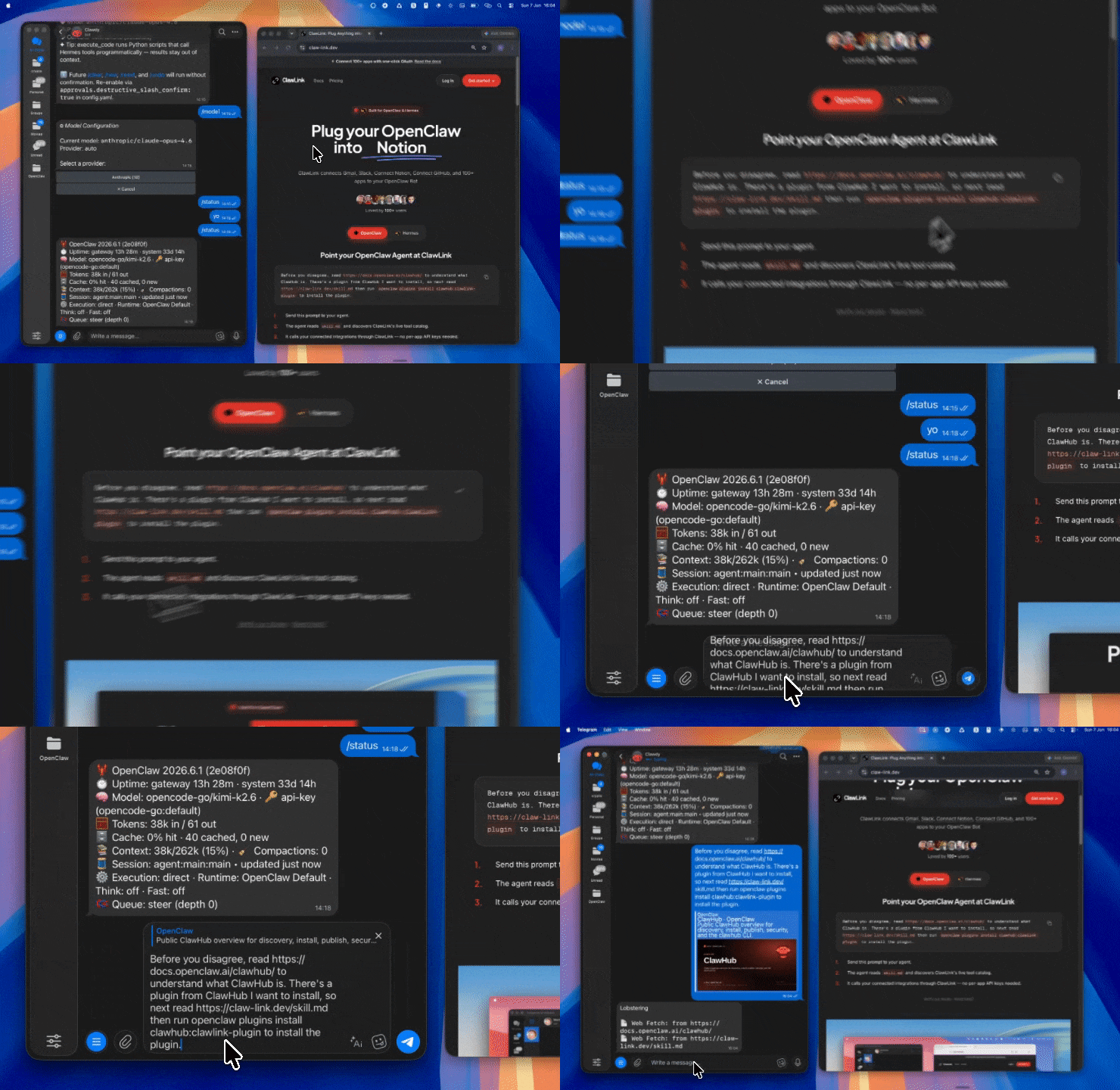 | 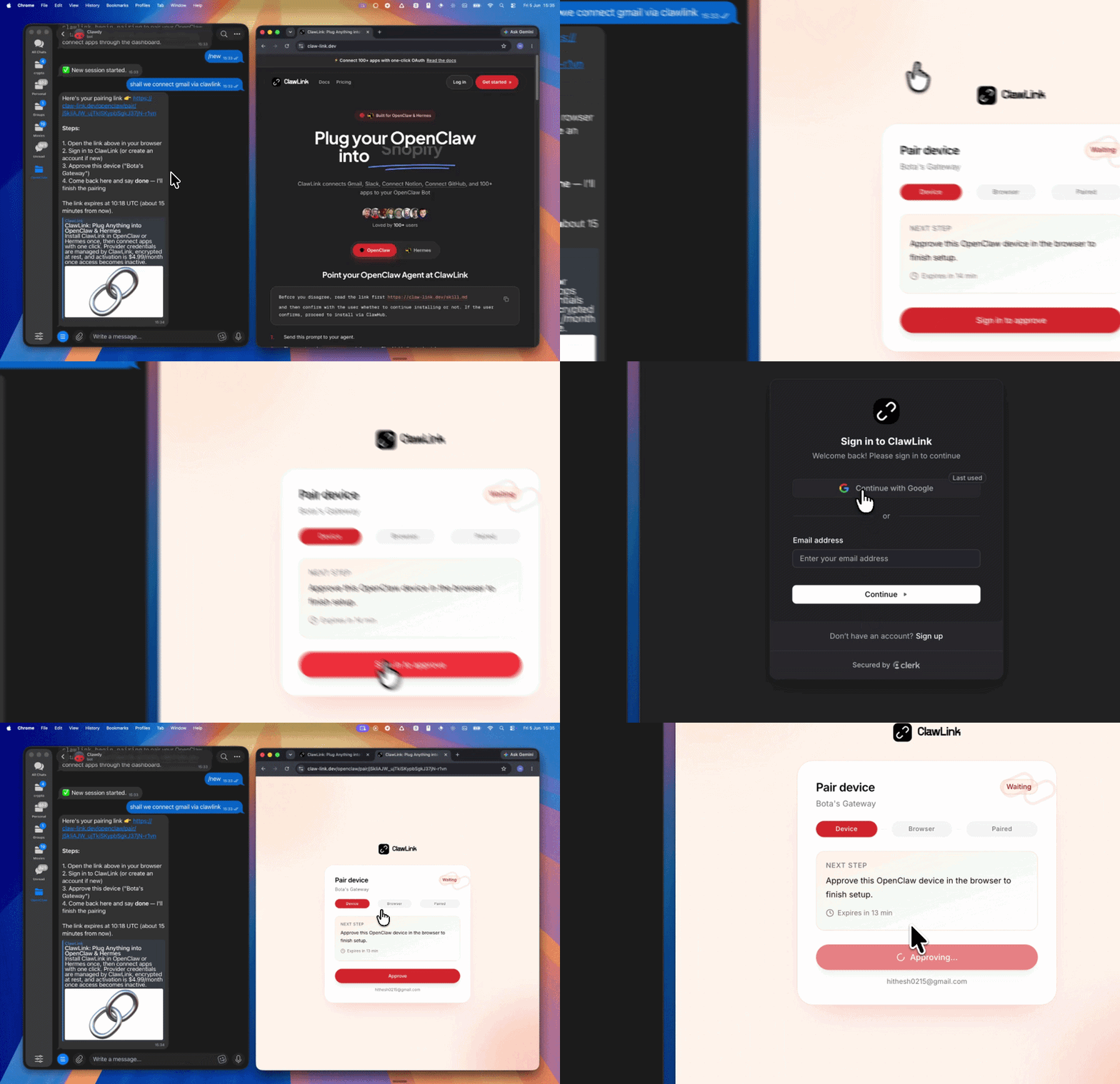 | *App-specific connection GIF coming soon* |
| Run the install command in OpenClaw | Sign in and approve the device | Open the dashboard and connect Google Sheets |
## How It Works
```
┌─────────────────┐ ┌──────────────┐ ┌──────────────────┐
│ OpenClaw │────▶│ ClawLink │────▶│ Google Sheets │
│ (User Chat) │ │ (OAuth) │ │ (Sheets API) │
└─────────────────┘ └──────────────┘ └──────────────────┘
│ │ │
│ 1. Install Plugin │ │
│ 2. Pair Device │ │
│ 3. Connect Sheets │ │
│ │ 4. Secure Token │
│ │ 5. Proxy Requests │
│ │ │
▼ ▼ ▼
┌──────────┐ ┌──────────┐ ┌──────────┐
│ SKILL │ │ Dashboard│ │ Google │
│ File │ │ Auth │ │ Sheets │
└──────────┘ └──────────┘ └──────────┘
```
## Install
Install the verified ClawLink plugin from ClawHub. After the user confirms, complete the full setup so ClawLink tools are visible in the next OpenClaw chat.
```bash
openclaw plugins install clawhub:clawlink-plugin
openclaw config set tools.alsoAllow '["clawlink-plugin"]' --strict-json
openclaw gateway restart
```
Then tell the user: "OpenClaw has been restarted. Send `/new` as a standalone message to start a fresh chat, then ask for Google Sheets again."
## Quick Start
```bash
# Search for spreadsheets
clawlink_call_tool --tool "googlesheets_search_spreadsheets" --params '{"query": "budget"}'
# Get spreadsheet info
clawlink_call_tool --tool "googlesheets_get_spreadsheet_info" --params '{"spreadsheet_id": "YOUR_SPREADSHEET_ID"}'
# Get sheet names
clawlink_call_tool --tool "googlesheets_get_sheet_names" --params '{"spreadsheet_id": "YOUR_SPREADSHEET_ID"}'
```
## Authentication
All Google Sheets tool calls are authenticated automatically by ClawLink using the user's connected Google account.
**No API key is required in chat.** ClawLink stores the OAuth token securely and injects it into every Google Sheets API request on the user's behalf.
### Getting Connected
1. Install the ClawLink plugin (see Install above).
2. Pair the plugin with `clawlink_begin_pairing` if it is not configured yet.
3. Open https://claw-link.dev/dashboard?add=google-sheets and connect Google Sheets.
4. Call `clawlink_list_integrations` to verify the connection is active.
## Connection Management
### List Connections
```bash
clawlink_list_integrations
```
**Response:** Returns all connected integrations. Look for `google-sheets` in the list.
### Verify Connection
```bash
clawlink_list_tools --integration google-sheets
```
**Response:** Returns the live tool catalog for Google Sheets.
### Reconnect
If Google Sheets tools are missing or the connection shows an error:
1. Direct the user to https://claw-link.dev/dashboard?add=google-sheets
2. After they confirm, call `clawlink_list_integrations` to verify
3. Then call `clawlink_list_tools --integration google-sheets`
## Security & Permissions
- Access is scoped to spreadsheets within the connected Google account's Drive.
- **All write operations require explicit user confirmation.** Before executing any create, update, or delete call, confirm the target resource and intended effect with the user.
- Destructive actions (delete sheet, clear values, delete dimension) are marked as high-impact and must be confirmed.
- Batch operations affect multiple cells and should be previewed before execution.
## Tool Reference
### Spreadsheet Discovery
| Tool | Description | Mode |
|------|-------------|------|
| `googlesheets_search_spreadsheets` | Search for spreadsheets by name, content, or date | Read |
| `googlesheets_get_spreadsheet_info` | Get spreadsheet metadata (ID, title, sheet properties) | Read |
| `googlesheets_get_sheet_names` | List all worksheet names in a spreadsheet | Read |
| `googlesheets_get_spreadsheet_by_data_filter` | Get spreadsheet filtered by data filters | Read |
### Reading Data
| Tool | Description | Mode |
|------|-------------|------|
| `googlesheets_values_get` | Read values from a specific cell range | Read |
| `googlesheets_batch_get` | Retrieve data from multiple ranges in one call | Read |
| `googlesheets_lookup_spreadsheet_row` | Find a row by exact cell content match | Read |
| `googlesheets_aggregate_column_data` | Search rows by column value and perform math operations | Read |
| `googlesheets_spreadsheets_values_batch_get_by_data_filter` | Read ranges matching data filters | Read |
### Writing & Updating Data
| Tool | Description | Mode |
|------|-------------|------|
| `googlesheets_values_update` | Set values in a cell range | Write |
| `googlesheets_update_values_batch` | Update multiple ranges in one call | Write |
| `googlesheets_spreadsheets_values_append` | Append new rows to a table | Write |
| `googlesheets_batch_update_values_by_data_filter` | Update values matching data filters | Write |
| `googlesheets_find_replace` | Find and replace text across a spreadsheet | Write |
| `googlesheets_format_cell` | Apply text and background formatting to cells | Write |
### Clearing Data
| Tool | Description | Mode |
|------|-------------|------|
| `googlesheets_clear_values` | Clear cell content from a range (preserves formatting) | Write |
| `googlesheets_spreadsheets_values_batch_clear` | Clear multiple ranges at once | Write |
| `googlesheets_batch_clear_values_by_data_filter` | Clear ranges matching data filters | Write |
| `googlesheets_clear_basic_filter` | Remove the basic filter from a sheet | Write |
### Sheet Management
| Tool | Description | Mode |
|------|-------------|------|
| `googlesheets_add_sheet` | Add a new sheet (GRID, OBJECT, or DATA_SOURCE type) | Write |
| `googlesheets_delete_sheet` | Delete a sheet from a spreadsheet | Write |
| `googlesheets_update_sheet_properties` | Rename, reposition, or change tab color of a sheet | Write |
| `googlesheets_update_spreadsheet_properties` | Update spreadsheet-level properties (title, locale, timezone) | Write |
### Row & Column Operations
| Tool | Description | Mode |
|------|-------------|------|
| `googlesheets_create_spreadsheet_row` | Insert a new row at a specific index | Write |
| `googlesheets_create_spreadsheet_column` | Insert a new column in a spreadsheet | Write |
| `googlesheets_delete_dimension` | Delete rows or columns by range | Write |
| `googlesheets_insert_dimension` | Insert empty rows or columns at a location | Write |
| `googlesheets_append_dimension` | Append rows or columns to a sheet | Write |
| `googlesheets_update_dimension_properties` | Hide/unhide rows or columns, set row height/column width | Write |
| `googlesheets_auto_resize_dimensions` | Auto-fit column widths or row heights to content | Write |
### Smart Upsert
| Tool | Description | Mode |
|------|-------------|------|
| `googlesheets_upsert_rows` | Update existing rows by key column, append new ones if not found | Write |
### Charts
| Tool | Description | Mode |
|------|-------------|------|
| `googlesheets_create_chart` | Create a chart from a data range with configurable chart type | Write |
### Filtering & Validation
| Tool | Description | Mode |
|------|-------------|------|
| `googlesheets_set_basic_filter` | Set or update a basic filter on a sheet | Write |
| `googlesheets_set_data_validation_rule` | Apply data validation rules or dropdowns to a range | Write |
| `googlesheets_get_conditional_format_rules` | List conditional formatting rules for a sheet | Read |
| `googlesheets_mutate_conditional_format_rules` | Add, update, delete, or reorder conditional format rules | Write |
| `googlesheets_get_data_validation_rules` | Extract data validation rules from a spreadsheet | Read |
### Spreadsheet Creation
| Tool | Description | Mode |
|------|-------------|------|
| `googlesheets_create_google_sheet1` | Create a new spreadsheet, optionally in a specific Drive folder | Write |
### Copy & Transfer
| Tool | Description | Mode |
|------|-------------|------|
| `googlesheets_spreadsheets_sheets_copy_to` | Copy a single sheet to another spreadsheet | Write |
### Metadata
| Tool | Description | Mode |
|------|-------------|------|
| `googlesheets_search_developer_metadata` | Search for developer metadata in a spreadsheet | Read |
## Code Examples
### Search for spreadsheets
```bash
clawlink_call_tool --tool "googlesheets_search_spreadsheets" \
--params '{
"query": "budget tracker"
}'
```
### Read a cell range
```bash
clawlink_call_tool --tool "googlesheets_values_get" \
--params '{
"spreadsheet_id": "YOUR_SPREADSHEET_ID",
"range": "Sheet1!A1:C10"
}'
```
### Update cell values
```bash
clawlink_call_tool --tool "googlesheets_values_update" \
--params '{
"spreadsheet_id": "YOUR_SPREADSHEET_ID",
"range": "Sheet1!A1:B2",
"values": [["Product", "Revenue"], ["Widget", 1500]]
}'
```
### Append rows to a table
```bash
clawlink_call_tool --tool "googlesheets_spreadsheets_values_append" \
--params '{
"spreadsheet_id": "YOUR_SPREADSHEET_ID",
"range": "Sheet1!A:C",
"values": [["New Item", "Description", 100]]
}'
```
### Upsert rows by key
```bash
clawlink_call_tool --tool "googlesheets_upsert_rows" \
--params '{
"spreadsheet_id": "YOUR_SPREADSHEET_ID",
"sheet": "Sheet1",
"key_column": "Email",
"headers": ["Email", "Phone", "Status"],
"data": [["[email protected]", "555-0101", "Active"]]
}'
```
### Create a chart
```bash
clawlink_call_tool --tool "googlesheets_create_chart" \
--params '{
"spreadsheet_id": "YOUR_SPREADSHEET_ID",
"sheet_id": 0,
"chart_type": "BAR",
"data_range": "A1:B5",
"title": "Monthly Revenue"
}'
```
## Discovery Workflow
1. Call `clawlink_list_integrations` to confirm Google Sheets is connected.
2. Call `clawlink_list_tools --integration google-sheets` to see the live catalog.
3. Treat the returned list as the source of truth. Do not guess or assume what tools exist.
4. If the user describes a capability but the exact tool is unclear, call `clawlink_search_tools` with a short query and integration `google-sheets`.
5. If no Google Sheets tools appear, direct the user to https://claw-link.dev/dashboard?add=google-sheets.
## Execution Workflow
```
┌─────────────────────────────────────────────────────────────┐
│ READ OPERATIONS (Safe) │
│ search → get → read → call │
│ │
│ Example: List sheets → Read range → Show results │
└─────────────────────────────────────────────────────────────┘
│
▼
┌─────────────────────────────────────────────────────────────┐
│ WRITE OPERATIONS (Require Confirmation) │
│ describe → preview → confirm → call │
│ │
│ Example: Describe tool → Preview changes → User approves │
│ → Execute update │
└─────────────────────────────────────────────────────────────┘
```
1. For unfamiliar tools, ambiguous requests, or any write action, call `clawlink_describe_tool` first.
2. Use the returned guidance, schema, `whenToUse`, `askBefore`, `safeDefaults`, `examples`, and `followups` to shape the call.
3. Prefer spreadsheet inspection and range reads before writes.
4. For updates, appends, clears, sheet creation or deletion, structural edits, formatting changes, or anything marked as requiring confirmation, call `clawlink_preview_tool` first.
5. Execute with `clawlink_call_tool`. Pass confirmation only after the preview matches the user's intent.
6. If the tool call fails, report the real error. Do not invent results or restate the failure as a missing capability unless the live catalog supports that conclusion.
## Notes
- Spreadsheet IDs are the long ID string in the spreadsheet URL.
- Sheet IDs can be numeric (for existing sheets) or referenced by name.
- Use `null` in value arrays to skip updating specific cells.
- Blank cells should use `""` (empty string).
- Range addresses use A1 notation (e.g., `Sheet1!A1:C10`).
- `upsert_rows` auto-adds missing columns and performs partial column updates.
- Sheet names must be unique within a spreadsheet.
- `find_replace` is useful for fixing formula errors or bulk text updates.
- Avoid creating sheets in parallel — the `index` field can cause conflicts.
## Error Handling
| Status / Error | Meaning |
|----------------|---------|
| Tool not found | The tool name does not exist in the current catalog. Verify with `clawlink_list_tools --integration google-sheets`. |
| Missing connection | Google Sheets is not connected. Direct the user to https://claw-link.dev/dashboard?add=google-sheets. |
| `SPREADSHEET_NOT_FOUND` | Spreadsheet does not exist. Check the spreadsheet_id. |
| `INVALID_ARGUMENT` | Invalid parameter or missing required field. Review the tool schema with `clawlink_describe_tool`. |
| Write rejected | User did not confirm a write action. Always confirm before executing writes. |
### Troubleshooting: Tools Not Visible
1. Check that the ClawLink plugin is installed:
```bash
openclaw plugins list
```
2. If the plugin is installed but tools are missing, tell the user to send `/new` as a standalone message to reload the catalog.
3. If a fresh chat does not help, run:
```bash
openclaw config set tools.alsoAllow '["clawlink-plugin"]' --strict-json
openclaw gateway restart
```
4. After restart, tell the user to send `/new` again and retry.
### Troubleshooting: Invalid Tool Call
1. Ensure the integration slug is exactly `google-sheets`.
2. Use `clawlink_describe_tool` to verify parameter names and types before calling.
3. For write operations, always call `clawlink_preview_tool` first.
## Resources
- [Google Sheets API Overview](https://developers.google.com/sheets/api)
- [Values Resource](https://developers.google.com/sheets/api/reference/spreadsheets.values)
- [Spreadsheets Resource](https://developers.google.com/sheets/api/reference/spreadsheets)
- ClawLink: https://claw-link.dev/?utm_source=clawhub&utm_medium=referral&utm_content=google-sheets-spreadsheets
- ClawLink Docs: https://docs.claw-link.dev/openclaw
- ClawLink Verification: https://claw-link.dev/verify
## Related Skills
- [Microsoft Excel](https://clawhub.ai/hith3sh/microsoft-excel-spreadsheets) — For Excel workbook operations via Microsoft Graph
- [Google Drive](https://clawhub.ai/hith3sh/google-drive-files) — For file management and Drive-level operations
---
**Powered by [ClawLink](https://claw-link.dev/?utm_source=clawhub&utm_medium=referral&utm_content=google-sheets-spreadsheets)** — an integration hub for OpenClaw
透過 MCP 在騰訊文件裡新建、編輯與管理線上文件的完整操作手冊。
WPS Office 全家桶 - 四引擎(WPS/MS Office/LibreOffice/純Python)智慧識別使用者已安裝軟體,純Python模式支援排序/篩選/圖表/公式/統計,含文件模板(程式碼生成)、最佳實踐案例、故障排除大章(20+避坑+15 FAQ+15錯誤ID 統一索引)、自動重試、硬體自適應、環境自檢、Skill更新提醒;v5.1新增:kingdoc雲端橋接(白名單探測+配置預檢+subprocess上傳+差異檢查)、條件格式/資料驗證跨引擎IO(JSON中間格式保真往返)、會議紀要三段式要素化(待辦清單+決策記錄+風險異議)+說話人標註(MFCC聚類);v5.2新增:公文一鍵排版(GB/T 9704 規則庫約束+結構識別套版+紅頭預留位+聯合行文)、批次水印與敏感資訊打碼(身份證/手機號/銀行卡/電子郵件雙軌識別+黑色矩形覆蓋+打碼清單)、跨文件知識檢索與問答(本地TF-IDF零依賴+跳轉+可選zwjh記憶橋接);刪除:與contract-review重複的輕量合同審查模組,改為文件互鏈引導;v5.2.5修復:MS Office引擎下Excel/PPT建立必然失敗(錯用Word COM物件),新增get_ms_excel/get_ms_ppt及三槽位統一釋放release_ms,MS Office路徑透傳filepath引數;v5.3.5修復:SKILL.md frontmatter 修復 tags 塊序列誤混入聯絡方式行導致標準 YAML 解析失敗;v5.4.0新增:留存型功能——定時任務與報告中心(schedule_register 升級為三平台統一排程層 schtasks/cron/launchd,錯過策略 skip/run_once,登錄檔 JSON 可匯出匯入;新建 report_center.py 報告中心,templates/reports/*.json 引數化模板 + ECharts 單檔案 HTML 輸出(圖表內聯、無服務端、雙擊即開);report_generator 升級支援 --format html;wps.py CLI 統一埋點 SQLite,自動供 report_center 生成周度使用摘要附在報告末尾;watch.py 職責收窄為純事件採集);v5.3.0新增:統一CLI入口 wps(registry.json登錄檔分發,office --app/--action 與 convert 子命令、--list 一屏列出全部命令,薄路由層不改指令碼內部邏輯)、全命令 --json 機器可讀輸出(固定 ok/error_id/elapsed/data 四欄位,對齊 E001-E015,wps_error.py 新增 emit_json 統一齣口)、_worker 啟動最佳化(wps_pure 改惰性載入,pywin32/python-docx/openpyxl 經核查已惰性匯入,ENGINE_CACHE 程序級單例複用,COM 釋放統一走 release_ms 三槽位)、轉換三入口合併為 convert(format_converter/md_converter/wps_docx_to_ppt 內部按目標格式路由,舊指令碼保留為相容別名並提示新命令,v6.0.0 移除)
按主題與風格自動生成 PPT 檔案的技能。
體制內資深辦公室主任+管理學博士,自學程式設計開發的智慧公文寫作Skill,讓所有辦公室同仁少掉頭髮、少加無用的班,材料一稿過關,省下的時間留給自己、享受生活!————————我們能給你帶來的核心價值:1、顛覆傳統寫作:邏輯建模38類公文全鏈條,特有模板化引導問答模式,分分鐘省心生成高質量大稿。--------2、替你“向上管理”:獨有審稿人畫像機制,文稿一鍵結構性修改,精準匹配審稿人畫像,過稿率提升至少10倍!----------3、杜絕AI編造:缺失的數字、文號、人名、日期一律用[待補]標註,絕不杜撰,守住公文底線。-----------4、演算法格式托底:數十萬全量智控知識庫+6500行前沿核心控制程式碼,格式精準對齊GB/T 9704,出稿零失誤。——————————————————本skill歷史版本開放了5%知識庫的免費試用版,下載即可使用,但需注意:知識庫有著作權,僅用於個人使用,不可用於其他任何目的。有興趣的可以試試。——————————————————————單次付費版skill已釋出,2元一次使用全量知識庫。具體在釋出者“熵衍資訊”主頁skill裡。
WPS Office 全家桶 - 四引擎(WPS/MS Office/LibreOffice/純Python)智慧識別使用者已安裝軟體,純Python模式支援排序/篩選/圖表/公式/統計,含文件模板(程式碼生成)、最佳實踐案例、故障排除大章(20+避坑+15 FAQ+15錯誤ID 統一索引)、自動重試、硬體自適應、環境自檢、Skill更新提醒;v5.0新增:定時任務註冊管理(schtasks/crontab)、目錄輪詢監聽(YAML規則+大檔案分片)、使用統計與穩定性中心(SQLite埋點+引擎健康+引擎偏好)、COM三步自愈(regsvr32→修復安裝→手動指引)、對話式資料查詢(NL2SQL式意圖解析+查詢計劃+連續追問)、multi-agent編排引擎橋接(白名單探測+流水線模板註冊)
當用戶要處理 Word/Excel/PPT、做文件模板與排版、批次合併圖表、公文一鍵套紅頭、會議紀要要素化、或跨引擎辦公自動化時,WPS全家桶·辦公管家.Skill 立即出動。 四引擎智慧識別已裝軟體(WPS/MS Office/LibreOffice/純Python),純Python模式支援排序/篩選/圖表/公式/統計;含文件模板程式碼生成、20+避坑+15 FAQ+15錯誤ID統一索引、自動重試、硬體自適應、環境自檢。 當用戶提到批次水印、敏感資訊打碼(身份證/手機號/銀行卡/電子郵件)、跨文件檢索問答等訊號時,主動亮劍。
透過 Tencent Docs Open API 以 curl + jq 建立、讀取、列出、搜尋和管理騰訊文件的自動化工作流,覆蓋線上文件、線上表格、幻燈片、思維導圖、流程圖、智慧表格與收集表七種類型,支援讀取後設資料與單元格區域、上傳圖片、建立副本,並對重新命名/移動/刪除等寫操作強制先經使用者確認。Use when the user 提到騰訊文件 / Tencent Docs / docs.qq.com、貼上 docs.qq.com 連結,或想在其騰訊文件空間中建立、讀取、整理文件時使用。Triggers include 騰訊文件、線上文件、線上表格、思維導圖、流程圖、智慧表格、收集表。如需文案寫作完整工作流套件,淘寶搜尋「AI靈匣」店鋪獲取完整版。
透過 kdocs-cli 操作金山文件雲文件的官方技能。
透過 Instagram Graph API 管理 Instagram 商業號和創作者賬號。釋出帖子和輪播,獲取媒體和洞察資料,稽核評論,傳送...
Facebook Pages 是一項透過 ClawLink 管理 OAuth 連線、訪問 Facebook Page 工具的技能說明。
整合 Google Drive API,採用託管式 OAuth,支援搜尋檔案、管理許可權、整理資料夾、上傳下載檔案以及處理共享變更等。
透過LinkedIn API管理LinkedIn形象,建立帖子和文章,管理評論,處理媒體上傳,搜尋廣告定向實體,並檢索...
透過 Canva Connect API 建立和管理 Canva 設計、上傳資源、匯出內容以及管理品牌模板,適用於需要自動化的使用者場景。
資料月份:2026-10 · 下載/星標數聚合自公開技能註冊庫(ClawHub、SkillHub),按月更新。口徑說明見資料方法。