
據 AlphaMoat 統計,截至 2026-10,Google Search Console 累計下載 7,288 次、獲 32 個星標,按累計下載量在本次參與排名的 10,914 個 AI 技能中排名第 3,847 位,在「資料分析」分類(915 個)中排名第 357 位。
列表預設按累計下載量排序,也可按星標排序;詳情頁排名按累計下載量計算。
| 平台 | 累計下載 | 星標 | 評論 |
|---|---|---|---|
| ClawHub ↗ | 7288 | 32 | - |
| SkillHub ↗ | 5425 | 32 | — |
各平台的計數口徑不同,統計時間不一致。
這個技能是做什麼的
透過託管 OAuth 整合 Google Search Console API,查詢搜尋表現分析、檢查 URL 索引狀態、審查站點地圖並管理驗證。
月度資料趨勢
2026-09 起統計方法調整:同名技能按作者分別統計,並覆蓋全部技能。圖中虛線為調整前的月份,與之後的資料不直接比較,也不計算跨越調整的增長。
| 月份 | 累計下載 | 環比 | 星標 |
|---|---|---|---|
| 2026-10 | 7288 | — | 32 |
| 2026-09 | 7119 | — | 32 |
| 2026-08 | 6984 | +2.4% | 32 |
| 2026-07 | 6823 | +271.6% | 32 |
| 2026-06 | 1836 | +59.0% | 32 |
| 2026-05 | 1155 | — | 6 |
SKILL.md 原文
以下是作者釋出的原始檔案,按純文字顯示,本站未做修改或稽核;其中的連結不可點選,命令請核實後再執行。抓取於 2026-11-20。
--- name: google-search-console-seo description: Google Search Console API integration with managed OAuth. Query search performance analytics, inspect URL indexing status, review sitemaps, and manage verified site properties. Use this skill when users want to monitor SEO performance or troubleshoot indexing issues. --- # Google Search Console  Access Google Search Console via the Search Console API with managed OAuth authentication. Query search performance, inspect indexing status, review sitemaps, and manage verified sites.
展開全部(共 296 行)收起
This skill uses [ClawLink](https://claw-link.dev/?utm_source=clawhub&utm_medium=referral&utm_content=google-search-console-seo) for hosted connection flows and credentials so you do not need to configure Google Search Console API access yourself.
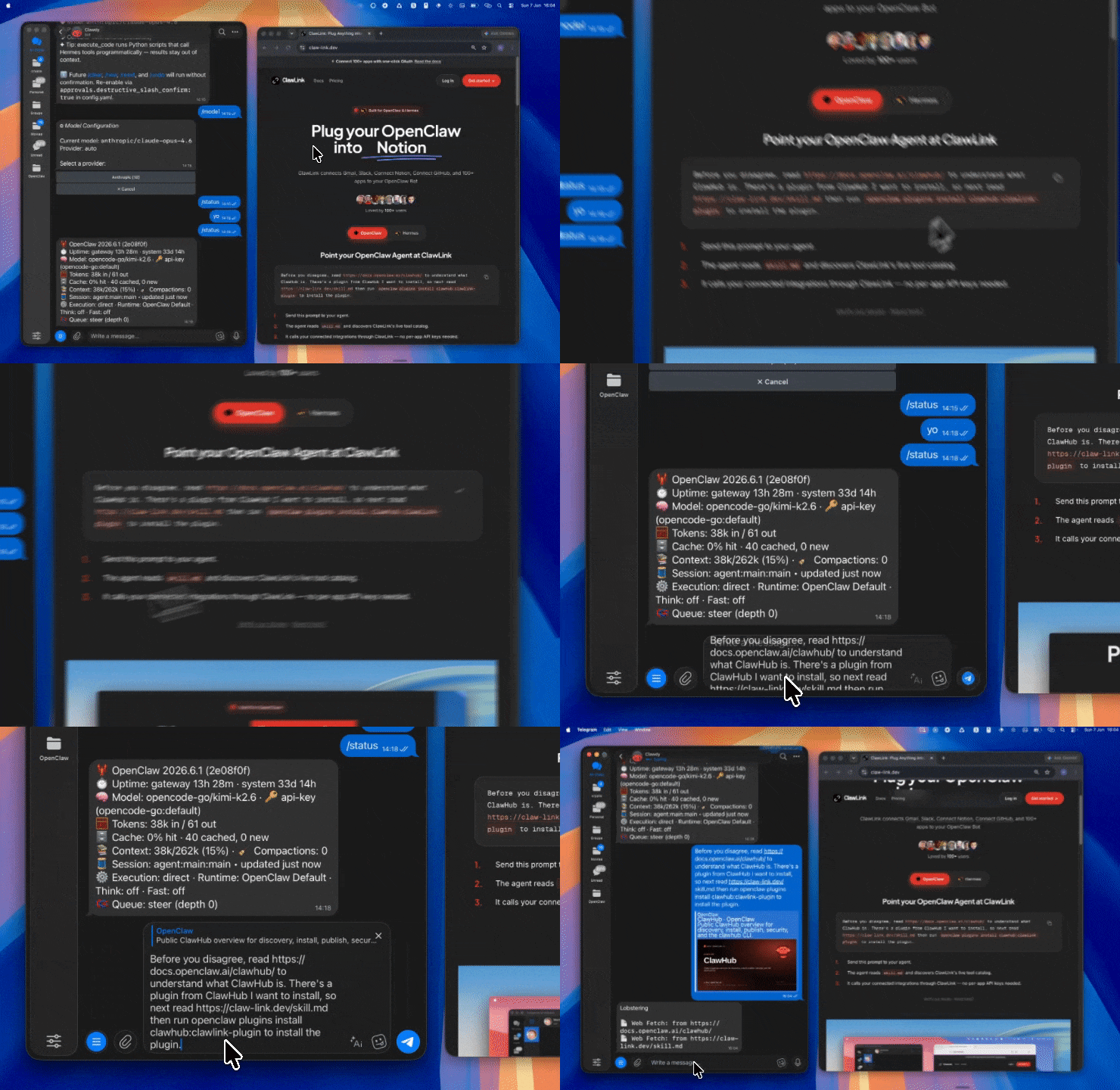
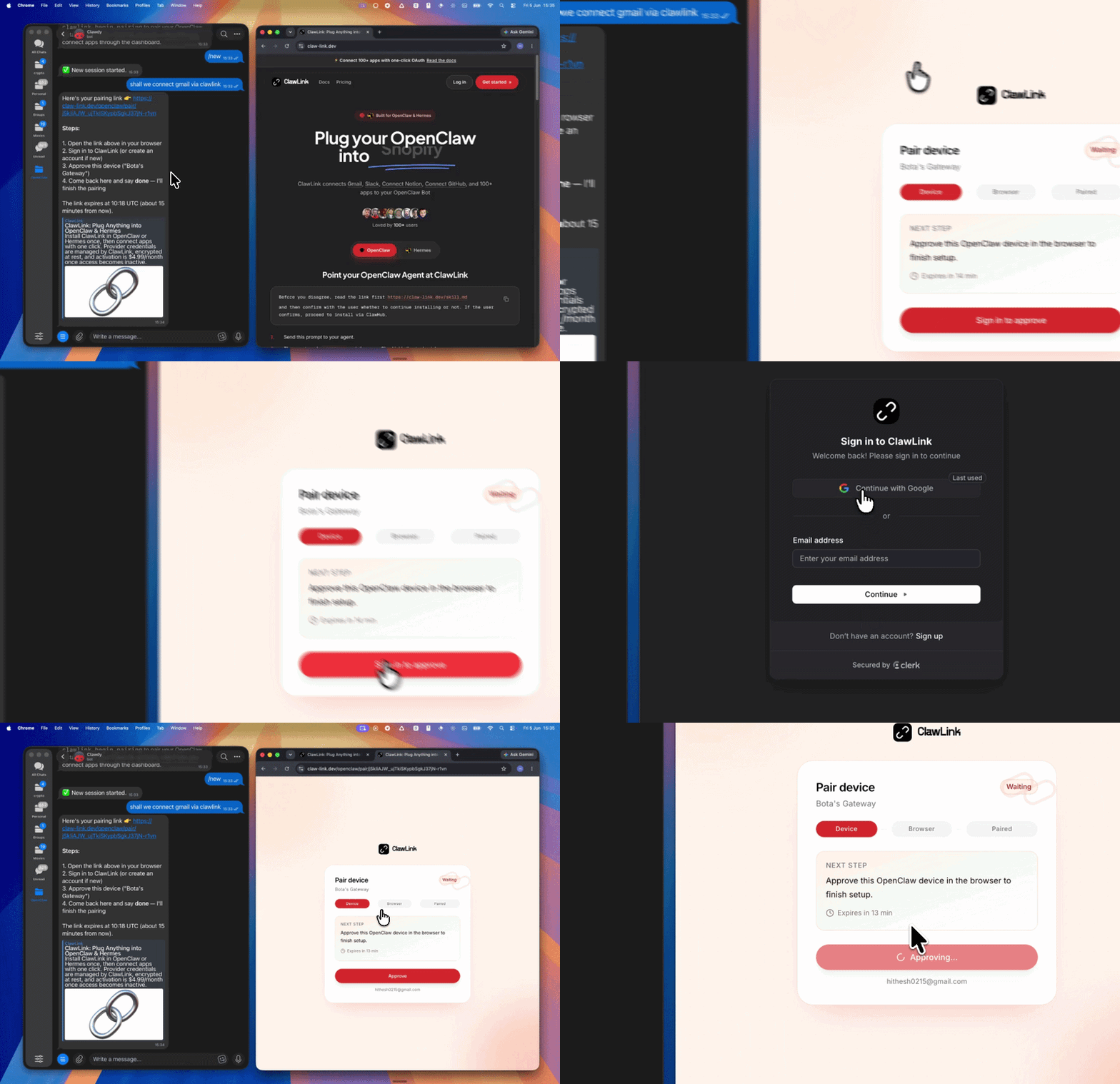
### Setup in 3 Steps
| Step 1: Install | Step 2: Pair Account | Step 3: Connect Search Console |
|:---:|:---:|:---:|
|  |  | *App-specific connection GIF coming soon* |
| Run the install command in OpenClaw | Sign in and approve the device | Open the dashboard and connect Google Search Console |
## How It Works
```
┌─────────────────┐ ┌──────────────┐ ┌──────────────────┐
│ OpenClaw │────▶│ ClawLink │────▶│ Google Search │
│ (User Chat) │ │ (OAuth) │ │ Console API │
└─────────────────┘ └──────────────┘ └──────────────────┘
│ │ │
│ 1. Install Plugin │ │
│ 2. Pair Device │ │
│ 3. Connect GSC │ │
│ │ 4. Secure Token │
│ │ 5. Proxy Requests │
│ │ │
▼ ▼ ▼
┌──────────┐ ┌──────────┐ ┌──────────┐
│ SKILL │ │ Dashboard│ │ Search │
│ File │ │ Auth │ │ Console │
└──────────┘ └──────────┘ └──────────┘
```
## Install
Install the verified ClawLink plugin from ClawHub. After the user confirms, complete the full setup so ClawLink tools are visible in the next OpenClaw chat.
```bash
openclaw plugins install clawhub:clawlink-plugin
openclaw config set tools.alsoAllow '["clawlink-plugin"]' --strict-json
openclaw gateway restart
```
Then tell the user: "OpenClaw has been restarted. Send `/new` as a standalone message to start a fresh chat, then ask for Google Search Console again."
## Quick Start
```bash
# List verified sites
clawlink_call_tool --tool "google_search_console_list_sites" --params '{}'
# Query search analytics
clawlink_call_tool --tool "google_search_console_search_analytics_query" --params '{"site_url": "https://example.com/", "start_date": "2024-01-01", "end_date": "2024-01-31"}'
# Inspect a URL
clawlink_call_tool --tool "google_search_console_inspect_url" --params '{"site_url": "https://example.com/", "inspection_url": "https://example.com/page/"}'
```
## Authentication
All Google Search Console tool calls are authenticated automatically by ClawLink using the user's connected Google account.
**No API key is required in chat.** ClawLink stores the OAuth token securely and injects it into every Search Console API request on the user's behalf.
### Getting Connected
1. Install the ClawLink plugin (see Install above).
2. Pair the plugin with `clawlink_begin_pairing` if it is not configured yet.
3. Open https://claw-link.dev/dashboard?add=google-search-console and connect Google Search Console.
4. Call `clawlink_list_integrations` to verify the connection is active.
## Connection Management
### List Connections
```bash
clawlink_list_integrations
```
**Response:** Returns all connected integrations. Look for `google-search-console` in the list.
### Verify Connection
```bash
clawlink_list_tools --integration google-search-console
```
**Response:** Returns the live tool catalog for Google Search Console.
### Reconnect
If Google Search Console tools are missing or the connection shows an error:
1. Direct the user to https://claw-link.dev/dashboard?add=google-search-console
2. After they confirm, call `clawlink_list_integrations` to verify
3. Then call `clawlink_list_tools --integration google-search-console`
## Security & Permissions
- Access is scoped to sites verified in the connected Google Search Console account.
- **All write operations require explicit user confirmation.** Before executing any site addition, removal, or sitemap submission, confirm the target and intended effect with the user.
- Destructive actions (delete site) are marked as high-impact and must be confirmed.
## Tool Reference
### Site Management
| Tool | Description | Mode |
|------|-------------|------|
| `google_search_console_list_sites` | List all verified sites (URL-prefix and domain properties) owned by the user | Read |
| `google_search_console_get_site` | Get details and permission level for a specific site | Read |
| `google_search_console_add_site` | Register a new site property in Search Console | Write |
| `google_search_console_delete_site` | Remove a site from Search Console tracking | Write |
### Search Analytics
| Tool | Description | Mode |
|------|-------------|------|
| `google_search_console_search_analytics_query` | Query clicks, impressions, CTR, and position metrics | Read |
### URL Inspection
| Tool | Description | Mode |
|------|-------------|------|
| `google_search_console_inspect_url` | Inspect a specific URL for indexing status and issues | Read |
### Sitemap Management
| Tool | Description | Mode |
|------|-------------|------|
| `google_search_console_list_sitemaps` | List all sitemaps submitted for a site | Read |
| `google_search_console_get_sitemap` | Get sitemap metadata (submitted/indexed counts, errors, timestamps) | Read |
| `google_search_console_submit_sitemap` | Submit or resubmit a sitemap for a verified property | Write |
## Code Examples
### List verified sites
```bash
clawlink_call_tool --tool "google_search_console_list_sites" \
--params '{}'
```
### Query search analytics for a date range
```bash
clawlink_call_tool --tool "google_search_console_search_analytics_query" \
--params '{
"site_url": "https://example.com/",
"start_date": "2024-01-01",
"end_date": "2024-01-31",
"dimensions": ["query", "page"]
}'
```
### Query analytics filtered by country
```bash
clawlink_call_tool --tool "google_search_console_search_analytics_query" \
--params '{
"site_url": "https://example.com/",
"start_date": "2024-01-01",
"end_date": "2024-01-31",
"dimensions": ["country"],
"row_limit": 50
}'
```
### Inspect a URL for indexing issues
```bash
clawlink_call_tool --tool "google_search_console_inspect_url" \
--params '{
"site_url": "https://example.com/",
"inspection_url": "https://example.com/important-page/"
}'
```
### Submit a sitemap
```bash
clawlink_call_tool --tool "google_search_console_submit_sitemap" \
--params '{
"site_url": "https://example.com/",
"feedpath": "/sitemap.xml"
}'
```
### Add a new site
```bash
clawlink_call_tool --tool "google_search_console_add_site" \
--params '{
"site_url": "https://newsite.example.com/"
}'
```
## Discovery Workflow
1. Call `clawlink_list_integrations` to confirm Google Search Console is connected.
2. Call `clawlink_list_tools --integration google-search-console` to see the live catalog.
3. Treat the returned list as the source of truth. Do not guess or assume what tools exist.
4. If the user describes a capability but the exact tool is unclear, call `clawlink_search_tools` with a short query and integration `google-search-console`.
5. If no Google Search Console tools appear, direct the user to https://claw-link.dev/dashboard?add=google-search-console.
## Execution Workflow
```
┌─────────────────────────────────────────────────────────────┐
│ READ OPERATIONS (Safe) │
│ list → get → query → inspect → call │
│ │
│ Example: List sites → Query analytics → Show results │
└─────────────────────────────────────────────────────────────┘
│
▼
┌─────────────────────────────────────────────────────────────┐
│ WRITE OPERATIONS (Require Confirmation) │
│ describe → preview → confirm → call │
│ │
│ Example: Describe tool → Preview → User approves │
│ → Execute sitemap submission │
└─────────────────────────────────────────────────────────────┘
```
1. For unfamiliar tools, ambiguous requests, or any write action, call `clawlink_describe_tool` first.
2. Use the returned guidance, schema, `whenToUse`, `askBefore`, `safeDefaults`, `examples`, and `followups` to shape the call.
3. Prefer listing sites, querying analytics, and inspecting URLs before writes.
4. For sitemap submissions, site additions or removals, or anything marked as requiring confirmation, call `clawlink_preview_tool` first.
5. Execute with `clawlink_call_tool`. Pass confirmation only after the preview matches the user's intent.
6. If the tool call fails, report the real error. Do not invent results or restate the failure as a missing capability unless the live catalog supports that conclusion.
## Notes
- The `site_url` parameter must exactly match the property as returned by `list_sites` — include protocol, subdomain, and trailing slash where applicable.
- `search_analytics_query` only returns URLs with at least one impression; missing rows do not confirm non-indexing.
- Position is an impression-weighted average rank across all queries.
- Sitemap metadata (`errors`, `warnings`, `submitted`, `indexed`) may be returned as strings — cast to integers before comparisons.
- Results may reflect cached data lagging real changes by several days.
- High-volume inspect_url usage can trigger 429 quota errors — limit to priority URLs.
- Numeric fields in sitemap responses can lag several days after submission.
## Error Handling
| Status / Error | Meaning |
|----------------|---------|
| Tool not found | The tool name does not exist in the current catalog. Verify with `clawlink_list_tools --integration google-search-console`. |
| Missing connection | Google Search Console is not connected. Direct the user to https://claw-link.dev/dashboard?add=google-search-console. |
| `NOT_VERIFIED` | Site is not verified in Search Console. Complete verification first. |
| `FORBIDDEN` | No permission level for the requested site. |
| `INVALID_ARGUMENT` | Invalid parameter or missing required field. Review the tool schema with `clawlink_describe_tool`. |
| Write rejected | User did not confirm a write action. Always confirm before executing writes. |
### Troubleshooting: Tools Not Visible
1. Check that the ClawLink plugin is installed:
```bash
openclaw plugins list
```
2. If the plugin is installed but tools are missing, tell the user to send `/new` as a standalone message to reload the catalog.
3. If a fresh chat does not help, run:
```bash
openclaw config set tools.alsoAllow '["clawlink-plugin"]' --strict-json
openclaw gateway restart
```
4. After restart, tell the user to send `/new` again and retry.
### Troubleshooting: Invalid Tool Call
1. Ensure the integration slug is exactly `google-search-console`.
2. Use `clawlink_describe_tool` to verify parameter names and types before calling.
3. For write operations, always call `clawlink_preview_tool` first.
## Resources
- [Search Console API Overview](https://developers.google.com/webmaster-tools/search-console-api-original)
- [Search Analytics Reference](https://developers.google.com/webmaster-tools/search-console-api-original/v3/searchanalytics)
- [Sites Reference](https://developers.google.com/webmaster-tools/search-console-api-original/v3/sites)
- [Sitemaps Reference](https://developers.google.com/webmaster-tools/search-console-api-original/v3/sitemaps)
- ClawLink: https://claw-link.dev/?utm_source=clawhub&utm_medium=referral&utm_content=google-search-console-seo
- ClawLink Docs: https://docs.claw-link.dev/openclaw
- ClawLink Verification: https://claw-link.dev/verify
---
**Powered by [ClawLink](https://claw-link.dev/?utm_source=clawhub&utm_medium=referral&utm_content=google-search-console-seo)** — an integration hub for OpenClaw
「資料分析」分類下的熱門技能
中國金融機構資料爬取與分析綜合 Skill v12.0.0。2334家/43大類機構名單、60+財經媒體源輿情、 A股報告/公告/研報、60+種查詢多源金融資料(自動降級+快取)、爬取排程與網頁操作增強、 即時資料中樞、24 技術指標引擎、多源證據融合、110 MCP 工具 + 10 Resource + 14 Prompt。 🆕 v12.0.0 四條線(資訊獲取 / 打包下載 / 資料分析 / 登入): 編排:gather_info() 一次跑完"路由→抓取→去佔位→質量分→能力邊界→回執→打包", 8 類意圖各帶問法、輸入輸出、典型耗時與 not_for(說清哪件事做不了)。 誠實:反爬佔位條目一律剔除並記賬,空結果報 E_SOURCE_EMPTY,不把假資料判成 B 級成功。 交付:包內自帶 manifest.json(逐檔案 sha256),verify 查得出改動/缺失/多塞, 批次下載單條失敗不中斷整批,失敗清單可直接只重下那幾條。 登入:Cookie 由使用者匯出或掃碼接管,檔案化 + 健康度四檔,對外輸出全脫敏(值永不回顯)。 何時觸發:爬取機構、輿情爬取、東方財富、公告下載、即時行情、技術指標、統一查詢、 交付包、批次重下、我已經登入了、登入態還有效嗎(完整觸發詞見下方 auto_trigger)。
大宗商品價格資料查詢技能。用於查詢大宗商品期現貨價格、宏觀經濟指標、產業鏈供需資料、進出口庫存資料、金融市場資料等。當用戶詢問:(1) 期貨/現貨價格查詢,如"螺紋鋼價格"、"銅期貨收盤價"; (2) 歷史行情或趨勢分析;(3) 區域或企業價格對比;(4) 宏觀經濟指標,如GDP、CPI;(5) 產業鏈上下游資料;(6) 多市場金融資料(期權、股票、債券、外匯);(7) 結算確認單生成時觸發此技能。
32種圖表,3 個主題,2步生成: 1.上傳資料 — 將 CSV / Excel / JSON 等格式的資料檔案拖入對話方塊; 2.檢視結果 — 互動式圖表(HTML),可儲存圖表為圖片.
AdMapix 的取數層:把廣告與應用相關的查詢轉成介面呼叫,只回原始 JSON。
論文配圖一鍵生成:一條命令從 JSON/CSV/Excel 生成頂刊級學術圖表,科研繪圖 與期刊配圖全場景覆蓋。40 種圖表(森林圖/KM 生存曲線(自動風險表)/競爭風險累計發生率/ROC/校準 曲線/決策曲線 DCA/列線圖/RCS 非線性劑量反應/亞組分析森林圖/RMST 限制平均生存時間/Galbraith 徑向圖/火山圖/雨雲圖/山脊圖/啞鈴圖/游泳圖(逐例時長+里程碑)/ 腫瘤緩解瀑布圖/UpSet 交集/PRISMA 流程圖/漏斗/BA 一致性/PCA/熱圖/箱線/小提琴/ 組合圖/Cox 多因素迴歸森林圖等),9 套配色(含色盲安全 Okabe-Ito 與期刊色板),9 種期刊投稿預設, YAML 流水線一條命令出全套論文圖,一次渲染多格式匯出(TIFF/PNG/PDF), PDF 重疊門禁,600dpi。純本地執行,資料不出機,中文零配置。適用:寫論文/ 投稿要配圖、把資料變成可投稿圖表、批次重出全套圖。不適用:文字潤色/翻譯/ 改寫(請用寫作類工具);商業報表/儀表盤/海報裝飾;無資料支撐的純示意圖。
Intelligent chart generation and data analysis skill. Reads user-supplied data files (CSV/Excel/JSON), analyzes data characteristics with LLM assistance, auto-recommends and generates interactive ECharts visualizations. Use when the user asks to analyze data, generate charts, create visualizations, or work with tabular data files.
全球智慧投研工具(stock-researcher)v13.0:多源資料 + 機率預測 + 可匯出報告。 核心能力: - 多源資料路由:按市場/類別選源,逐級降級;每個結果標註來源與時效等級;源不可用時明確標 unavailable - 全資產量化:股票/ETF/場外基金/指數/期貨(期限結構、基差、持倉、折溢價)多因子分析 - 機率預測:1d/5d/1M/3M/6M 經驗分佈 + 分位數 + 方向機率 + 區間,kNN 鄰域收縮融合全域性分佈; 樣本不足自動棄權,可按歷史命中樣本(同桶)做機率校準 - 證據鏈簡報:每條結論繫結來源、時間與資料質量,衝突訊號保留而不抹平 - 報告匯出:Word/PPT/PDF/Markdown/JSON/純文字,純標準庫渲染 + 可選第三方引擎 - MCP Server 24 工具,Claude Code 可直接呼叫;知識庫 12 介面卡雙向同步 三條鐵律: - 資料不裝:拿不到就報不可用,不拿 0 價、不拿空表冒充 - 預測不裝:機率來自歷史相似條件的經驗分佈,樣本不足就說不足,不硬給方向 - 評分≠盈利保證:任何結論都帶免責宣告
透過 Tavily 搜尋公開網頁,並回傳含連結與摘要的結構化結果。
Jay 的其他技能
透過 Instagram Graph API 管理 Instagram 商業號和創作者賬號。釋出帖子和輪播,獲取媒體和洞察資料,稽核評論,傳送...
Facebook Pages 是一項透過 ClawLink 管理 OAuth 連線、訪問 Facebook Page 工具的技能說明。
透過託管 OAuth 整合 Google Sheets API,建立電子表格、讀寫單元格值、管理工作表、追加行、生成圖表並實現資料自動化。
整合 Google Drive API,採用託管式 OAuth,支援搜尋檔案、管理許可權、整理資料夾、上傳下載檔案以及處理共享變更等。
透過LinkedIn API管理LinkedIn形象,建立帖子和文章,管理評論,處理媒體上傳,搜尋廣告定向實體,並檢索...
資料月份:2026-10 · 下載/星標數聚合自公開技能註冊庫(ClawHub、SkillHub),按月更新。口徑說明見資料方法。