
作者:Jay更新于 2026-06-09共 5 个版本 · 最新版本发布于 2026-06-09github-repos@clawhub_hith3sh/github-repos
Git 辅助#GitHub#GraphQL
据 AlphaMoat 统计,截至 2026-10,GitHub 累计下载 7,602 次、获 34 个星标,按累计下载量在本次参与排名的 10,914 个 AI 技能中排名第 3,685 位,在「开发编程」分类(1,069 个)中排名第 299 位。
列表默认按累计下载量排序,也可按星标排序;详情页排名按累计下载量计算。
| 平台 | 累计下载 | 星标 | 评论 |
|---|---|---|---|
| ClawHub ↗ | 7,602 | 32 | - |
| SkillHub ↗ | 5,793 | 34 | — |
各平台的计数口径不同,统计时间不一致。
通过 GitHub REST 和GraphQL API 与仓库、议题、拉取请求、提交、分支、发布和工作流进行交互。在需要时使用此技能。
2026-09 起统计方法调整:同名技能按作者分别统计,并覆盖全部技能。图中虚线为调整前的月份,与之后的数据不直接比较,也不计算跨越调整的增长。 该技能有同名的其他版本,调整前的数据归属当前下载量最大的这一个。
| 月份 | 累计下载 | 环比 | 星标 |
|---|---|---|---|
| 2026-10 | 7,602 | — | 34 |
| 2026-09 | 7,369 | — | 34 |
| 2026-08 | 7,190 | +1.2% | 34 |
| 2026-07 | 7,104 | +250.1% | 34 |
| 2026-06 | 2,029 | +55.1% | 32 |
| 2026-05 | 1,308 | — | 6 |
以下是作者发布的原始文件,按纯文本显示,本站未做修改或审核;其中的链接不可点击,命令请核实后再运行。抓取于 2026-11-20。
--- name: github-repos description: Work with GitHub repositories, issues, pull requests, commits, branches, releases, and workflows via the GitHub REST and GraphQL APIs. Use this skill when users want to list repositories, inspect issues and PRs, manage branches and commits, create or update issues after confirmation, or trigger and inspect GitHub Actions workflows. --- # GitHub  Access GitHub via the GitHub API with OAuth authentication. Manage repositories, issues, pull requests, commits, branches, releases, and workflows.
This skill uses [ClawLink](https://claw-link.dev/?utm_source=clawhub&utm_medium=referral&utm_content=github-repos) for hosted connection flows and credentials so you do not need to configure GitHub API access yourself.
### Setup in 3 Steps
| Step 1: Install | Step 2: Pair Account | Step 3: Connect GitHub |
|:---:|:---:|:---:|
| 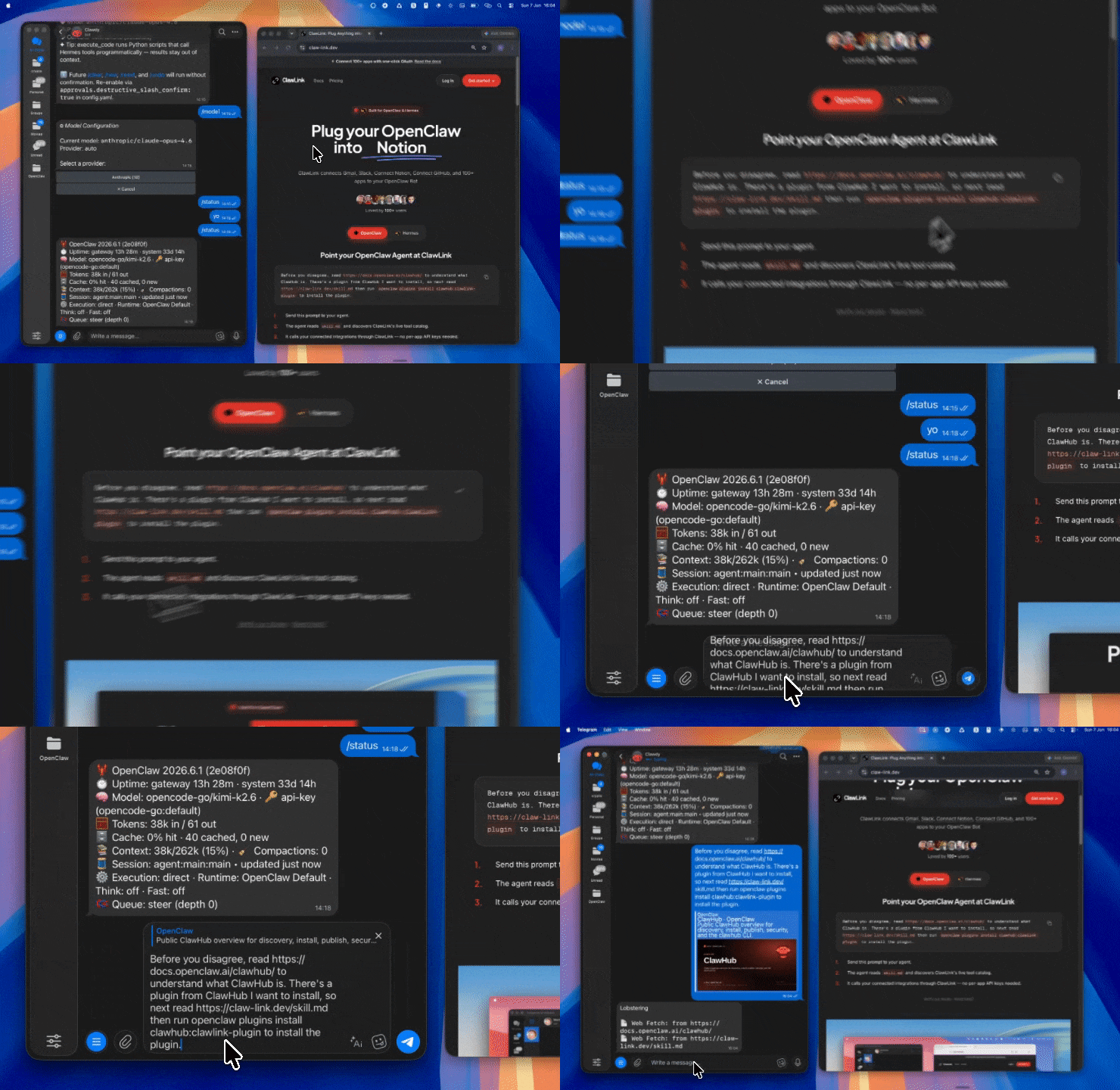 | 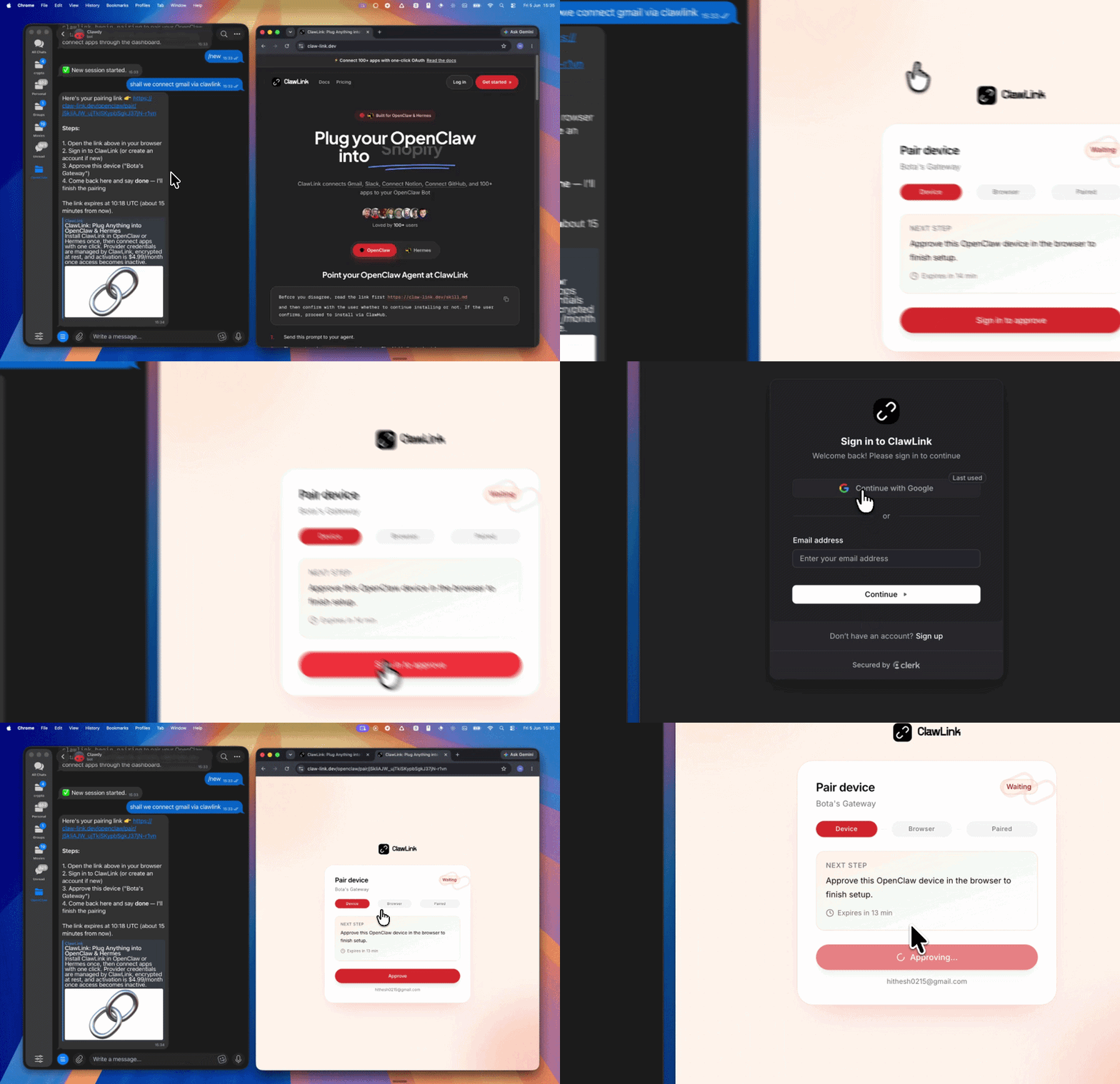 | *App-specific connection GIF coming soon* |
| Run the install command in OpenClaw | Sign in and approve the device | Open the dashboard and connect GitHub |
## How It Works
```
┌─────────────────┐ ┌──────────────┐ ┌──────────────────┐
│ OpenClaw │────▶│ ClawLink │────▶│ GitHub API │
│ (User Chat) │ │ (OAuth) │ │ (REST/GraphQL) │
└─────────────────┘ └──────────────┘ └──────────────────┘
│ │ │
│ 1. Install Plugin │ │
│ 2. Pair Device │ │
│ 3. Connect GitHub │ │
│ │ 4. Secure Token │
│ │ 5. Proxy Requests │
│ │ │
▼ ▼ ▼
┌──────────┐ ┌──────────┐ ┌──────────┐
│ SKILL │ │ Dashboard│ │ GitHub │
│ File │ │ Auth │ │ Repos │
└──────────┘ └──────────┘ └──────────┘
```
## Install
Install the verified ClawLink plugin from ClawHub. After the user confirms, complete the full setup so ClawLink tools are visible in the next OpenClaw chat.
```bash
openclaw plugins install clawhub:clawlink-plugin
openclaw config set tools.alsoAllow '["clawlink-plugin"]' --strict-json
openclaw gateway restart
```
Then tell the user: "OpenClaw has been restarted. Send `/new` as a standalone message to start a fresh chat, then ask for GitHub again."
## Quick Start
```bash
# List repositories for the authenticated user
clawlink_call_tool --tool "github_list_repositories_for_the_authenticated_user" --params '{}'
# Get a specific repository
clawlink_call_tool --tool "github_get_a_repository" --params '{"owner": "owner", "repo": "repo-name"}'
# List issues in a repository
clawlink_call_tool --tool "github_list_issues_for_a_repository" --params '{"owner": "owner", "repo": "repo-name", "state": "open"}'
```
## Authentication
All GitHub tool calls are authenticated automatically by ClawLink using the user's connected GitHub account.
**No API key is required in chat.** ClawLink stores the OAuth token securely and injects it into every GitHub API request on the user's behalf.
### Getting Connected
1. Install the ClawLink plugin (see Install above).
2. Pair the plugin with `clawlink_begin_pairing` if it is not configured yet.
3. Open https://claw-link.dev/dashboard?add=github and connect GitHub.
4. Call `clawlink_list_integrations` to verify the connection is active.
## Connection Management
### List Connections
```bash
clawlink_list_integrations
```
**Response:** Returns all connected integrations. Look for `github` in the list.
### Verify Connection
```bash
clawlink_list_tools --integration github
```
**Response:** Returns the live tool catalog for GitHub.
### Reconnect
If GitHub tools are missing or the connection shows an error:
1. Direct the user to https://claw-link.dev/dashboard?add=github
2. After they confirm, call `clawlink_list_integrations` to verify
3. Then call `clawlink_list_tools --integration github`
## Security & Permissions
- Access is scoped to repositories and resources accessible to the connected GitHub account.
- **All write operations require explicit user confirmation.** Before executing any create, update, or delete call, confirm the target resource and intended effect with the user.
- Destructive actions (deleting issues, closing PRs, removing collaborators) are marked as high-impact and must be confirmed.
- Workflow triggers and deployments affect external systems — always confirm before executing.
## Tool Reference
### Repositories
| Tool | Description | Mode |
|------|-------------|------|
| `github_list_repositories_for_the_authenticated_user` | List all repos for the authenticated user | Read |
| `github_get_a_repository` | Get repository details | Read |
| `github_create_a_repository` | Create a new repository | Write |
| `github_update_a_repository` | Update repository settings | Write |
| `github_delete_a_repository` | Delete a repository | Write |
| `github_list_repository_collaborators` | List repo collaborators | Read |
### Issues
| Tool | Description | Mode |
|------|-------------|------|
| `github_list_issues_for_a_repository` | List issues with filtering | Read |
| `github_get_an_issue` | Get issue details | Read |
| `github_create_an_issue` | Create a new issue | Write |
| `github_update_an_issue` | Update issue fields (labels, assignee, state) | Write |
| `github_add_labels_to_an_issue` | Add labels to an issue | Write |
| `github_add_assignees_to_an_issue` | Add assignees to an issue | Write |
### Pull Requests
| Tool | Description | Mode |
|------|-------------|------|
| `github_list_pull_requests` | List PRs in a repository | Read |
| `github_get_a_pull_request` | Get PR details | Read |
| `github_create_a_pull_request` | Create a new PR | Write |
| `github_update_a_pull_request` | Update PR fields | Write |
### Commits & Branches
| Tool | Description | Mode |
|------|-------------|------|
| `github_list_commits` | List commits in a repository | Read |
| `github_get_a_commit` | Get commit details | Read |
| `github_list_branches` | List branches in a repository | Read |
| `github_create_a_branch` | Create a new branch | Write |
### Workflows
| Tool | Description | Mode |
|------|-------------|------|
| `github_list_repository_workflows` | List workflows in a repo | Read |
| `github_list_workflow_runs` | List workflow runs | Read |
| `github_get_a_workflow_run` | Get workflow run details | Read |
| `github_cancel_workflow_run` | Cancel an in-progress workflow run | Write |
### Releases
| Tool | Description | Mode |
|------|-------------|------|
| `github_list_releases` | List releases in a repository | Read |
| `github_get_a_release` | Get release details | Read |
| `github_create_a_release` | Create a new release | Write |
## Code Examples
### List open issues in a repository
```bash
clawlink_call_tool --tool "github_list_issues_for_a_repository" \
--params '{
"owner": "owner",
"repo": "repo-name",
"state": "open",
"sort": "created",
"direction": "desc"
}'
```
### Create a new issue
```bash
clawlink_call_tool --tool "github_create_an_issue" \
--params '{
"owner": "owner",
"repo": "repo-name",
"title": "Bug: Login fails on mobile",
"body": "Steps to reproduce: 1. Go to login 2. Enter credentials 3. Error shown",
"labels": ["bug", "high-priority"]
}'
```
### Add labels to an issue
```bash
clawlink_call_tool --tool "github_add_labels_to_an_issue" \
--params '{
"owner": "owner",
"repo": "repo-name",
"issue_number": 123,
"labels": ["needs-review", "bug"]
}'
```
### Create a pull request
```bash
clawlink_call_tool --tool "github_create_a_pull_request" \
--params '{
"owner": "owner",
"repo": "repo-name",
"title": "Fix login bug",
"head": "fix/login-bug",
"base": "main",
"body": "Fixes #123 - Login fails on mobile devices"
}'
```
## Discovery Workflow
1. Call `clawlink_list_integrations` to confirm GitHub is connected.
2. Call `clawlink_list_tools --integration github` to see the live catalog.
3. Treat the returned list as the source of truth. Do not guess or assume what tools exist.
4. If the user describes a capability but the exact tool is unclear, call `clawlink_search_tools` with a short query and integration `github`.
5. If no GitHub tools appear, direct the user to https://claw-link.dev/dashboard?add=github.
## Execution Workflow
```
┌─────────────────────────────────────────────────────────────┐
│ READ OPERATIONS (Safe) │
│ list → get → search → describe → call │
│ │
│ Example: List issues → Get issue → Show details │
└─────────────────────────────────────────────────────────────┘
│
▼
┌─────────────────────────────────────────────────────────────┐
│ WRITE OPERATIONS (Require Confirmation) │
│ list → get → describe → preview → confirm → call │
│ │
│ Example: Describe tool → Preview issue → User approves │
│ → Execute create │
└─────────────────────────────────────────────────────────────┘
```
1. For unfamiliar tools, ambiguous requests, or any write action, call `clawlink_describe_tool` first.
2. Use the returned guidance, schema, `whenToUse`, `askBefore`, `safeDefaults`, `examples`, and `followups` to shape the call.
3. Prefer read, list, search, and get operations before writes when that reduces ambiguity.
4. For writes or anything marked as requiring confirmation, call `clawlink_preview_tool` first.
5. Execute with `clawlink_call_tool`. Pass confirmation only after the preview matches the user's intent.
6. If the tool call fails, report the real error. Do not invent results or restate the failure as a missing capability unless the live catalog supports that conclusion.
## Notes
- GitHub API rate limits apply. The number of calls depends on the connected account type (free, pro, or enterprise).
- Some tools require specific OAuth scopes. If a tool fails with insufficient scope, verify the connection has the right permissions.
- Repository names must use `owner/repo` format for owner and repo parameters.
- Issues and PRs use different numbering systems within the same repository.
## Error Handling
| Status / Error | Meaning |
|----------------|---------|
| Tool not found | The tool name does not exist in the current catalog. Verify with `clawlink_list_tools --integration github`. |
| Missing connection | GitHub is not connected. Direct the user to https://claw-link.dev/dashboard?add=github. |
| `404 Not Found` | Repository, issue, or PR does not exist. Verify owner, repo, and number. |
| `403 Forbidden` | Rate limit exceeded or insufficient permissions. |
| `422 Unprocessable` | Invalid request body or missing required fields. Verify tool schema. |
| Write rejected | User did not confirm a write action. Always confirm before executing writes. |
### Troubleshooting: Tools Not Visible
1. Check that the ClawLink plugin is installed:
```bash
openclaw plugins list
```
2. If the plugin is installed but tools are missing, tell the user to send `/new` as a standalone message to reload the catalog.
3. If a fresh chat does not help, run:
```bash
openclaw config set tools.alsoAllow '["clawlink-plugin"]' --strict-json
openclaw gateway restart
```
4. After restart, tell the user to send `/new` again and retry.
### Troubleshooting: Invalid Tool Call
1. Ensure the integration slug is exactly `github`.
2. Use `clawlink_describe_tool` to verify parameter names and types before calling.
3. For write operations, always call `clawlink_preview_tool` first.
## Resources
- [GitHub REST API Documentation](https://docs.github.com/en/rest)
- [GitHub GraphQL API](https://docs.github.com/en/graphql)
- [GitHub Actions Documentation](https://docs.github.com/en/actions)
- [ClawLink](https://claw-link.dev/?utm_source=clawhub&utm_medium=referral&utm_content=github-repos)
- [ClawLink Docs](https://docs.claw-link.dev/openclaw)
- [ClawLink Verification](https://claw-link.dev/verify)
## Related Skills
- [GitLab Repos](https://clawhub.ai/hith3sh/gitlab-repos) — For GitLab project management
- [GitHub Triage](https://clawhub.ai/hith3sh/github-triage-workflow) — For GitHub issue triage workflows
---
**Powered by [ClawLink](https://claw-link.dev/?utm_source=clawhub&utm_medium=referral&utm_content=github-repos)** — an integration hub for OpenClaw
【全栈能力】编程大神.Skill:面向复杂真实项目的高阶全栈编程助手。不止生成代码,而是从一句目标接手陌生代码库,拆解需求、补齐实现、追到根因、完成重构、联调前后端,并把结果推进到能运行、能验证、能交付。覆盖 Web、后端、脚本、iOS、安卓、鸿蒙 ArkUI、微信小程序及其他技术栈,支持中英文工程、疑难 Bug、跨模块任务和长任务续做;用构建、日志、真实入口、设备或接口证据说明结果。仅问概念时直接回答,要求落地时持续推进到验收或明确阻塞。
编程专家 Pro:融合编程专家 2.0.3 工程专题与编程大神的鸿蒙 ArkTS/ArkUI、微信小程序和小游戏开发资料。用于项目实现、根因调试、审查、重构、测试、架构性能分析及多端开发验证。支持自然语言和 @专题标识,按任务读取包内知识;只问概念时直接回答。
编程专家.Skill P8级编程助手,25年实战经验技能Skill,全栈:Java/Php网站/软件项目、API设计、Bug诊断、代码生成、代码审查、重构、测试用例、性能基准、技术选型、文档生成、任务拆解、Spec驱动、Karpathy规范、CMS二次开发、前端设计、MySQL/Mariadb、项目知识图谱,以及工程纪律层(根因调试硬闭环、阶段导航、事故复盘/SLO、威胁建模/供应链安全、生产就绪/渐进式发布、AI编码治理、面向Agent代码可读性、LLM应用安全)。支持 @标识 显式调用跳过路由。
编程专家.Skill P8级编程助手,25年实战经验技能Skill,全栈:Java/Php网站/软件项目、API设计、Bug诊断、代码生成、代码审查、重构、测试用例、性能基准、技术选型、文档生成、任务拆解、Spec驱动、Karpathy规范、CMS二次开发、前端设计、MySQL/Mariadb、项目知识图谱,以及工程纪律层(根因调试硬闭环、阶段导航、事故复盘/SLO、威胁建模/供应链安全、生产就绪/渐进式发布、AI编码治理、面向Agent代码可读性、LLM应用安全)。支持 @标识 显式调用跳过路由。
编程专家 Pro:融合编程专家 2.0.3 工程专题与编程大神的鸿蒙 ArkTS/ArkUI、微信小程序和小游戏开发资料。用于项目实现、根因调试、审查、重构、测试、架构性能分析及多端开发验证。支持自然语言和 @专题标识,按任务读取包内知识;只问概念时直接回答。
编程专家 Pro:融合编程专家 2.0.3 工程专题与编程大神的鸿蒙 ArkTS/ArkUI、微信小程序和小游戏开发资料。用于项目实现、根因调试、审查、重构、测试、架构性能分析及多端开发验证。支持自然语言和 @专题标识,按任务读取包内知识;只问概念时直接回答。
编程专家.Skill P8级编程助手,25年实战经验技能Skill,全栈:Java/Php网站/软件项目、API设计、Bug诊断、代码生成、代码审查、重构、测试用例、性能基准、技术选型、文档生成、任务拆解、Spec驱动、Karpathy规范、CMS二次开发、前端设计、MySQL/Mariadb、项目知识图谱,以及工程纪律层(根因调试硬闭环、阶段导航、事故复盘/SLO、威胁建模/供应链安全、生产就绪/渐进式发布、AI编码治理、面向Agent代码可读性、LLM应用安全)。支持 @标识 显式调用跳过路由。
用 gh 命令行工具查看 GitHub 上的 PR 检查、工作流运行与 API 查询的技能。
通过 Instagram Graph API 管理 Instagram 商业号和创作者账号。发布帖子和轮播,获取媒体和洞察数据,审核评论,发送...
Facebook Pages 是一项通过 ClawLink 管理 OAuth 连接、访问 Facebook Page 工具的技能说明。
通过托管 OAuth 集成 Google Sheets API,创建电子表格、读写单元格值、管理工作表、追加行、生成图表并实现数据自动化。
集成 Google Drive API,采用托管式 OAuth,支持搜索文件、管理权限、整理文件夹、上传下载文件以及处理共享变更等。
通过LinkedIn API管理LinkedIn形象,创建帖子和文章,管理评论,处理媒体上传,搜索广告定向实体,并检索...
数据月份:2026-10 · 下载/星标数聚合自公开技能注册库(ClawHub、SkillHub),按月更新。口径说明见数据方法。