
作者:Jay更新于 2026-10-03共 8 个版本 · 最新版本发布于 2026-10-03linkedin-social@clawhub_hith3sh/linkedin-social
文章写作营销文案自媒体运营#LinkedIn
据 AlphaMoat 统计,截至 2026-10,LinkedIn 累计下载 7,692 次、获 32 个星标,按累计下载量在本次参与排名的 10,914 个 AI 技能中排名第 3,632 位,在「内容创作」分类(927 个)中排名第 354 位。
列表默认按累计下载量排序,也可按星标排序;详情页排名按累计下载量计算。
| 平台 | 累计下载 | 星标 | 评论 |
|---|---|---|---|
| ClawHub ↗ | 7,692 | 32 | - |
| SkillHub ↗ | 5,359 | 32 | — |
各平台的计数口径不同,统计时间不一致。
通过LinkedIn API管理LinkedIn形象,创建帖子和文章,管理评论,处理媒体上传,搜索广告定向实体,并检索...
2026-09 起统计方法调整:同名技能按作者分别统计,并覆盖全部技能。图中虚线为调整前的月份,与之后的数据不直接比较,也不计算跨越调整的增长。
| 月份 | 累计下载 | 环比 | 星标 |
|---|---|---|---|
| 2026-10 | 7,692 | — | 32 |
| 2026-09 | 7,301 | — | 32 |
| 2026-08 | 7,092 | +3.2% | 32 |
| 2026-07 | 6,871 | +271.6% | 32 |
| 2026-06 | 1,849 | +56.4% | 32 |
| 2026-05 | 1,182 | — | 6 |
以下是作者发布的原始文件,按纯文本显示,本站未做修改或审核;其中的链接不可点击,命令请核实后再运行。抓取于 2026-11-20。
--- name: linkedin-social description: Manage LinkedIn presence via the LinkedIn API. Create posts and articles, manage comments, handle media uploads, search ad targeting entities, and retrieve user profile and image data. --- # LinkedIn  Manage a LinkedIn presence for professional content and social interactions. Create posts and articles, manage comments and engagement, handle media, and search ad targeting options.
This skill uses [ClawLink](https://claw-link.dev/?utm_source=clawhub&utm_medium=referral&utm_content=linkedin-social) for hosted connection flows and credentials so you do not need to configure LinkedIn API access yourself.
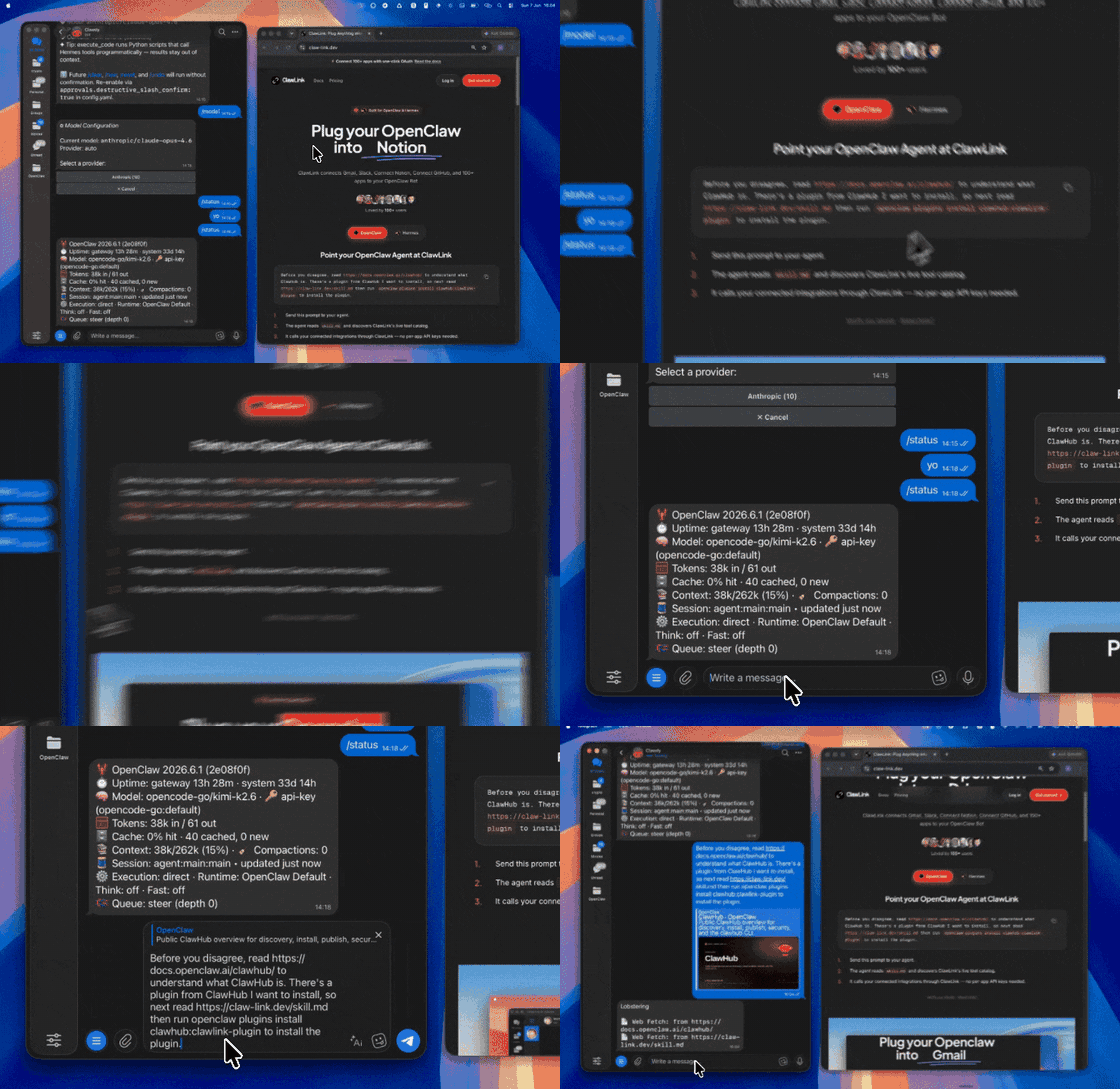
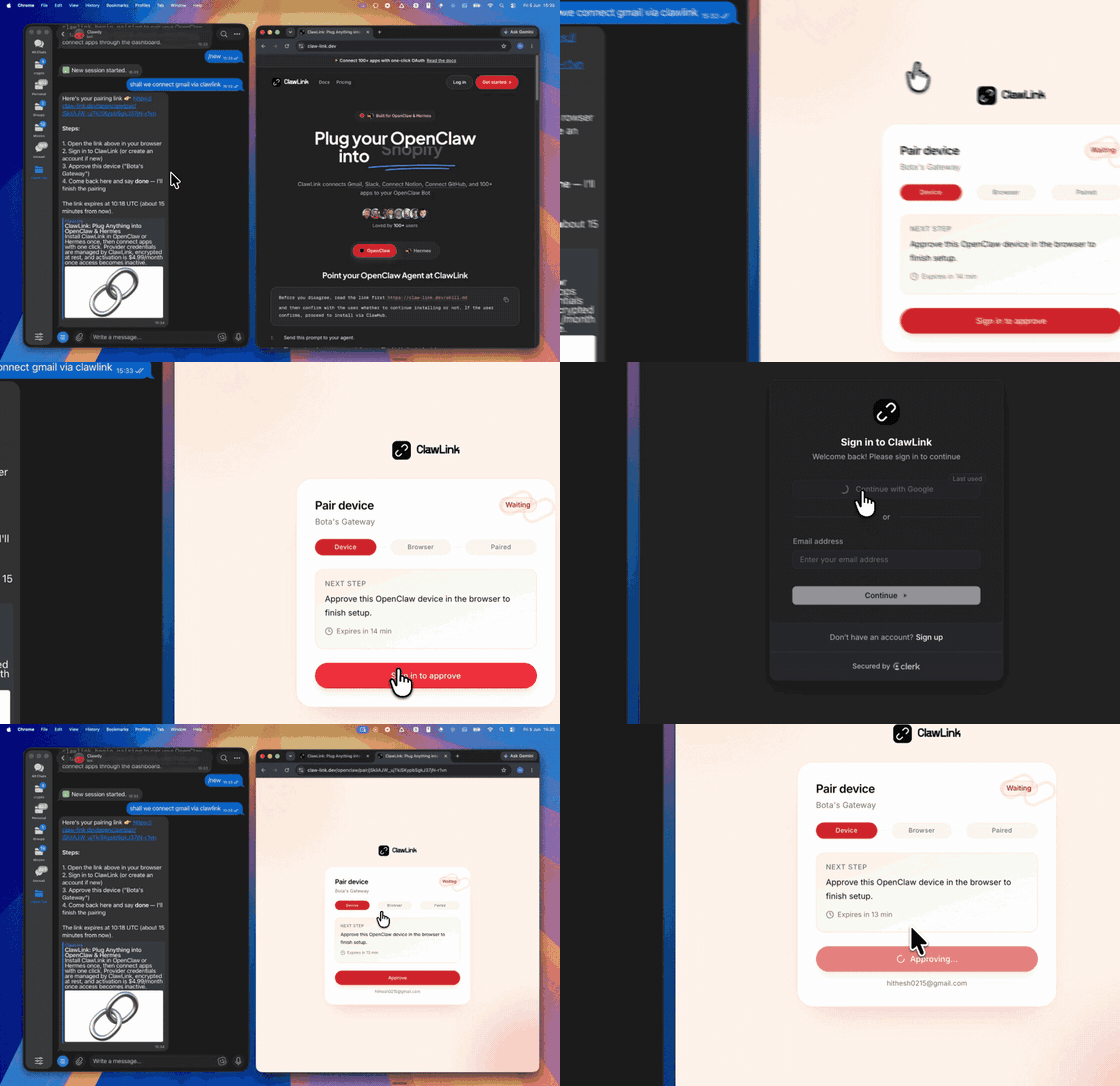
### Setup in 3 Steps
| Step 1: Install | Step 2: Pair Account | Step 3: Connect LinkedIn |
|:---:|:---:|:---:|
|  |  | *App-specific connection GIF coming soon* |
## No Account Needed: Public LinkedIn Data
Read any LinkedIn profile, company page or post, search people, companies and jobs, and browse the LinkedIn Ad Library, without connecting a LinkedIn account. These tools work as soon as the plugin is paired: there is nothing to connect, and each call is paid from ClawLink credit (most cost a fraction of a cent; new accounts get $0.50 free).
| Tool | What it returns | Price |
|------|-----------------|-------|
| `linkedindata_user_profile` | A LinkedIn member's profile by URL: name, headline, location, about, experience, education, skills and follower count | $0.0015 |
| `linkedindata_company_profile` | Public LinkedIn company page: industry, size, headquarters, follower count, description | $0.00282 |
| `linkedindata_company_posts` | Recent public posts of a LinkedIn company page | $0.00282 |
| `linkedindata_search_people` | Search LinkedIn members by name, title, company, school or location | $0.006 |
| `linkedindata_search_companies` | Search LinkedIn companies by name, location, size or industry | $0.006 |
| `linkedindata_search_jobs` | Search LinkedIn job listings by title, location, date, experience, workplace, job type and salary, 25 a page | $0.0015 |
Use the connected-account tools above for the user's own LinkedIn; use these for anyone else's public content. More: [LinkedIn Prospector](https://clawhub.ai/hith3sh/skills/linkedin-prospector), [Ad Spy](https://clawhub.ai/hith3sh/skills/ad-spy).
## How It Works
```
┌─────────────────┐ ┌──────────────┐ ┌──────────────────┐
│ OpenClaw │────▶│ ClawLink │────▶│ LinkedIn API │
│ (User Chat) │ │ (OAuth) │ │ (v2) │
└─────────────────┘ └──────────────┘ └──────────────────┘
│ │ │
│ 1. Install Plugin │ │
│ 2. Pair Device │ │
│ 3. Connect LinkedIn│ │
│ │ 4. Secure Token │
│ │ 5. Proxy Requests │
│ │ │
▼ ▼ ▼
┌──────────┐ ┌──────────┐ ┌──────────┐
│ SKILL │ │ Dashboard│ │ LinkedIn │
│ File │ │ Auth │ │ Social │
└──────────┘ └──────────┘ └──────────┘
```
## Install
Install the verified ClawLink plugin from ClawHub. After the user confirms, complete the full setup so ClawLink tools are visible in the next OpenClaw chat.
```bash
openclaw plugins install clawhub:clawlink-plugin
openclaw config set tools.alsoAllow '["clawlink-plugin"]' --strict-json
openclaw gateway restart
```
Then tell the user: "OpenClaw has been restarted. Send `/new` as a standalone message to start a fresh chat, then ask for LinkedIn again."
## Quick Start
```bash
# Get your LinkedIn profile info
clawlink_call_tool --tool "linkedin_get_my_info" --params '{}'
# Create a post
clawlink_call_tool --tool "linkedin_create_linked_in_post" --params '{"text": "Hello from OpenClaw!"}'
# Get images
clawlink_call_tool --tool "linkedin_get_images" --params '{}'
```
## Authentication
All LinkedIn tool calls are authenticated automatically by ClawLink using the user's connected LinkedIn account.
**No API key is required in chat.** ClawLink stores the OAuth token securely and injects it into every LinkedIn API request on the user's behalf.
### Getting Connected
1. Install the ClawLink plugin (see Install above).
2. Pair the plugin with `clawlink_begin_pairing` if it is not configured yet.
3. Open https://claw-link.dev/dashboard?add=linkedin and connect LinkedIn (requires a LinkedIn account).
4. Call `clawlink_list_integrations` to verify the connection is active.
## Connection Management
### List Connections
```bash
clawlink_list_integrations
```
**Response:** Returns all connected integrations. Look for `linkedin` in the list.
### Verify Connection
```bash
clawlink_list_tools --integration linkedin
```
**Response:** Returns the live tool catalog for LinkedIn.
### Reconnect
If LinkedIn tools are missing or the connection shows an error:
1. Direct the user to https://claw-link.dev/dashboard?add=linkedin
2. After they confirm, call `clawlink_list_integrations` to verify
3. Then call `clawlink_list_tools --integration linkedin`
## Security & Permissions
- Connected-account tools are scoped to the connected LinkedIn account.
- The public-data tools under "No Account Needed" read other people's public LinkedIn content (profiles, posts, comments) without any connected account. They are read-only, never post or change anything, and each call is paid from the user's ClawLink credit.
- **All write operations require explicit user confirmation.** Before executing any post, comment, or delete action, confirm the target resource and intended effect with the user.
- Destructive actions (delete post) are marked as high-impact and must be confirmed.
- Posting as an organization requires admin role (ADMINISTRATOR, DIRECT_SPONSORED_CONTENT_POSTER, or CONTENT_ADMIN).
- Ad targeting requires LinkedIn Marketing API access.
## Tool Reference
### Profile
| Tool | Description | Mode |
|------|-------------|------|
| `linkedin_get_my_info` | Get authenticated user's profile (name, headline, picture, details) | Read |
### Posts & Content
| Tool | Description | Mode |
|------|-------------|------|
| `linkedin_create_linked_in_post` | Create a new post on LinkedIn (personal or organization) | Write |
| `linkedin_create_article_or_url_share` | Share a link with optional commentary as an article | Write |
| `linkedin_delete_linked_in_post` | Delete a specific post by share_id | Write |
| `linkedin_delete_post` | Delete a post using Posts API (supports ugcPost and share URN formats) | Write |
### Comments
| Tool | Description | Mode |
|------|-------------|------|
| `linkedin_create_comment_on_post` | Create a first-level or nested comment on a post | Write |
### Media
| Tool | Description | Mode |
|------|-------------|------|
| `linkedin_get_image` | Get details of a single image by URN | Read |
| `linkedin_get_images` | Get image metadata including download URLs, status, dimensions | Read |
### Ad Targeting
| Tool | Description | Mode |
|------|-------------|------|
| `linkedin_get_ad_targeting_facets` | Get available ad targeting facets (locations, industries, job functions) | Read |
| `linkedin_search_ad_targeting_entities` | Search targeting entities (geographics, job titles, industries) | Read |
## Code Examples
### Get your profile info
```bash
clawlink_call_tool --tool "linkedin_get_my_info" \
--params '{}'
```
### Create a post
```bash
clawlink_call_tool --tool "linkedin_create_linked_in_post" \
--params '{"text": "Excited to share our latest update! What do you think?"}'
```
### Create a comment
```bash
clawlink_call_tool --tool "linkedin_create_comment_on_post" \
--params '{"author": "urn:li:person:PROFILE_ID", "message": {"text": "Great post!"}, "post_id": "POST_ID"}'
```
### Get images
```bash
clawlink_call_tool --tool "linkedin_get_images" \
--params '{}'
```
### Search ad targeting entities
```bash
clawlink_call_tool --tool "linkedin_search_ad_targeting_entities" \
--params '{"type": "location", "keywords": "San Francisco"}'
```
## Discovery Workflow
1. Call `clawlink_list_integrations` to confirm LinkedIn is connected.
2. Call `clawlink_list_tools --integration linkedin` to see the live catalog.
3. Treat the returned list as the source of truth. Do not guess or assume what tools exist.
4. If the user describes a capability but the exact tool is unclear, call `clawlink_search_tools` with a short query and integration `linkedin`.
5. If no LinkedIn tools appear, direct the user to https://claw-link.dev/dashboard?add=linkedin.
## Execution Workflow
```
┌─────────────────────────────────────────────────────────────┐
│ READ OPERATIONS (Safe) │
│ list → get → search → describe → call │
│ │
│ Example: Get profile → Get images → Show results │
└─────────────────────────────────────────────────────────────┘
│
▼
┌─────────────────────────────────────────────────────────────┐
│ WRITE OPERATIONS (Require Confirmation) │
│ list → get → describe → preview → confirm → call │
│ │
│ Example: Preview post create → User approves → Execute │
└─────────────────────────────────────────────────────────────┘
```
1. For unfamiliar tools, ambiguous requests, or any write action, call `clawlink_describe_tool` first.
2. Use the returned guidance, schema, `whenToUse`, `askBefore`, `safeDefaults`, `examples`, and `followups` to shape the call.
3. Prefer read, list, search, and get operations before writes when that reduces ambiguity.
4. For writes or anything marked as requiring confirmation, call `clawlink_preview_tool` first.
5. Execute with `clawlink_call_tool`. Pass confirmation only after the preview matches the user's intent.
6. If the tool call fails, report the real error. Do not invent results or restate the failure as a missing capability unless the live catalog supports that conclusion.
## Notes
- Posting as an organization requires `w_organization_social` scope with ADMINISTRATOR, DIRECT_SPONSORED_CONTENT_POSTER, or CONTENT_ADMIN role.
- Posting as a person requires `w_member_social` scope.
- Delete operations are idempotent — previously deleted posts return success (204).
- Ad targeting facets require LinkedIn Marketing API access.
- Image URNs are required for media retrieval operations.
## Error Handling
| Status / Error | Meaning |
|----------------|---------|
| Tool not found | The tool name does not exist in the current catalog. Verify with `clawlink_list_tools --integration linkedin`. |
| Missing connection | LinkedIn is not connected. Direct the user to https://claw-link.dev/dashboard?add=linkedin. |
| Permission error | The authenticated account lacks the required scope for this operation. |
| Post not found | The post ID does not exist or is not accessible. |
| Write rejected | User did not confirm a write action. Always confirm before executing writes. |
### Troubleshooting: Tools Not Visible
1. Check that the ClawLink plugin is installed:
```bash
openclaw plugins list
```
2. If the plugin is installed but tools are missing, tell the user to send `/new` as a standalone message to reload the catalog.
3. If a fresh chat does not help, run:
```bash
openclaw config set tools.alsoAllow '["clawlink-plugin"]' --strict-json
openclaw gateway restart
```
4. After restart, tell the user to send `/new` again and retry.
### Troubleshooting: Permission Errors
1. Confirm the LinkedIn account has the correct permissions for the operation.
2. For organization posting, verify the account has an admin role in the organization.
3. For ad targeting, verify Marketing API access is enabled.
## Resources
- [LinkedIn API Documentation](https://learn.microsoft.com/en-us/linkedin/)
- [LinkedIn Marketing API](https://learn.microsoft.com/en-us/linkedin/marketing/)
- ClawLink: https://claw-link.dev/?utm_source=clawhub&utm_medium=referral&utm_content=linkedin-social
- ClawLink Docs: https://docs.claw-link.dev/openclaw
- ClawLink Verification: https://claw-link.dev/verify
## Related Skills
- [LinkedIn Prospector](https://clawhub.ai/hith3sh/skills/linkedin-prospector)
- [Ad Spy](https://clawhub.ai/hith3sh/skills/ad-spy)
- [Instagram Posts](https://clawhub.ai/hith3sh/instagram-posts) — For Instagram social media management
- [Twitter](https://clawhub.ai/hith3sh/twitter) — For Twitter/X post management and analytics
- [Facebook Pages](https://clawhub.ai/hith3sh/facebook-pages) — For Facebook Page management
---
**Powered by [ClawLink](https://claw-link.dev/?utm_source=clawhub&utm_medium=referral&utm_content=linkedin-social)** — an integration hub for OpenClaw
李白.Skill:润色专家 检测并消除中文文本中的AI生成痕迹,将生硬的机器输出转化为自然流畅的人类文笔。融合规则检测、分层改写(词汇→句式→内容→逻辑→语气)和六步质控流水线,确保最终文本通过人工审查。
李白.Skill:润色专家 检测并消除中文文本中的AI生成痕迹,将生硬的机器输出转化为自然流畅的人类文笔。融合规则检测、分层改写和质控流水线,确保最终文本通过人工审查。
识别并去掉文本里的 AI 写作痕迹,让文字读起来更像人写。
【零一数科·出品】视频号爆款短视频拆解(全能版)(付费版)。视频号爆款短视频拆解(付费版:全能)。一键拆解爆款,把一条视频号视频拆成结构分段、爆款归因、六维评分和可借鉴策略,照着学照着抄。支持视频号分享链接和本地视频,付费全能版远端分析,1–5 分钟出可视化 HTML 报告。
【零一数科·出品】视频号挂车爆单短视频脚本生成(付费版)。一条链接二创脚本,丢进爆款视频号链接即以此骨架改写成你的挂车脚本,或按方向/目的/商品原创多条口播脚本(含分段表、口播全文、六维质检评分)。
把文本里 AI 写作的典型痕迹挑出来并改写得更自然,同时保留原意的写作编辑技能。
用于中文公文、事务性材料和新闻稿件的起草、改写、压缩、润色、审校、文种核对、去口语化、降 AI 味及 Word 格式处理,适用于机关、企事业单位、学校和新闻机构。涵盖申请、请示、报告、通知、通告、意见、决定、决议、议案、公报、命令、函、复函、批复、说明、方案、纪要、公告、公示、通报、制度、规定、办法、细则、操作规程、工作要点、总结、调研、讲话、致辞、主持词、述职、可研、审查材料、技术需求、新闻消息、编者按、新闻评论,以及采购、整改、反馈和 AI 算力等场景。
【零一数科·出品】视频号爆款文案生成(体验版)。免费免登录出脚本,给创作目的、行业、受众、选题就按爆款结构(Hook-中段-CTA、节奏标签)产出口播脚本,信息不全也能按爆款潜质兜底。本地运行、无需 Key,零成本上手。
通过 Instagram Graph API 管理 Instagram 商业号和创作者账号。发布帖子和轮播,获取媒体和洞察数据,审核评论,发送...
Facebook Pages 是一项通过 ClawLink 管理 OAuth 连接、访问 Facebook Page 工具的技能说明。
通过托管 OAuth 集成 Google Sheets API,创建电子表格、读写单元格值、管理工作表、追加行、生成图表并实现数据自动化。
集成 Google Drive API,采用托管式 OAuth,支持搜索文件、管理权限、整理文件夹、上传下载文件以及处理共享变更等。
通过 Canva Connect API 创建和管理 Canva 设计、上传资源、导出内容以及管理品牌模板,适用于需要自动化的用户场景。
数据月份:2026-10 · 下载/星标数聚合自公开技能注册库(ClawHub、SkillHub),按月更新。口径说明见数据方法。