
据 AlphaMoat 统计,截至 2026-10,Google Ads 累计下载 7,209 次、获 33 个星标,按累计下载量在本次参与排名的 10,914 个 AI 技能中排名第 3,898 位,在「商业运营」分类(873 个)中排名第 315 位。
列表默认按累计下载量排序,也可按星标排序;详情页排名按累计下载量计算。
| 平台 | 累计下载 | 星标 | 评论 |
|---|---|---|---|
| ClawHub ↗ | 7,209 | 33 | - |
| SkillHub ↗ | 5,359 | 32 | — |
各平台的计数口径不同,统计时间不一致。
这个技能是做什么的
检查Google Ads账户和广告系列,运行GAQL报告,并通过Google Ads API确认协调广告系列或受众变更。
月度数据趋势
2026-09 起统计方法调整:同名技能按作者分别统计,并覆盖全部技能。图中虚线为调整前的月份,与之后的数据不直接比较,也不计算跨越调整的增长。 该技能有同名的其他版本,调整前的数据归属当前下载量最大的这一个。
| 月份 | 累计下载 | 环比 | 星标 |
|---|---|---|---|
| 2026-10 | 7,209 | — | 33 |
| 2026-09 | 6,978 | — | 33 |
| 2026-08 | 6,817 | +1.0% | 33 |
| 2026-07 | 6,749 | +265.6% | 33 |
| 2026-06 | 1,846 | +57.9% | 32 |
| 2026-05 | 1,169 | — | 6 |
SKILL.md 原文
以下是作者发布的原始文件,按纯文本显示,本站未做修改或审核;其中的链接不可点击,命令请核实后再运行。抓取于 2026-11-20。
--- name: google-ads-campaigns description: Inspect Google Ads accounts and campaigns, run GAQL reports, and coordinate campaign or audience changes with confirmation via the Google Ads API. Use this skill when users want to list accessible customers, inspect campaigns by ID or name, run GAQL query reports for performance analysis, review customer lists, or create/update campaign, ad group, or audience configurations after confirmation. --- # Google Ads  Access Google Ads via the Google Ads API with OAuth authentication. Inspect accounts and campaigns, run GAQL reports, and coordinate campaign or audience changes.
展开全部(共 284 行)收起
This skill uses [ClawLink](https://claw-link.dev/?utm_source=clawhub&utm_medium=referral&utm_content=google-ads-campaigns) for hosted connection flows and credentials so you do not need to configure Google Ads API access yourself.
### Setup in 3 Steps
| Step 1: Install | Step 2: Pair Account | Step 3: Connect Google Ads |
|:---:|:---:|:---:|
| 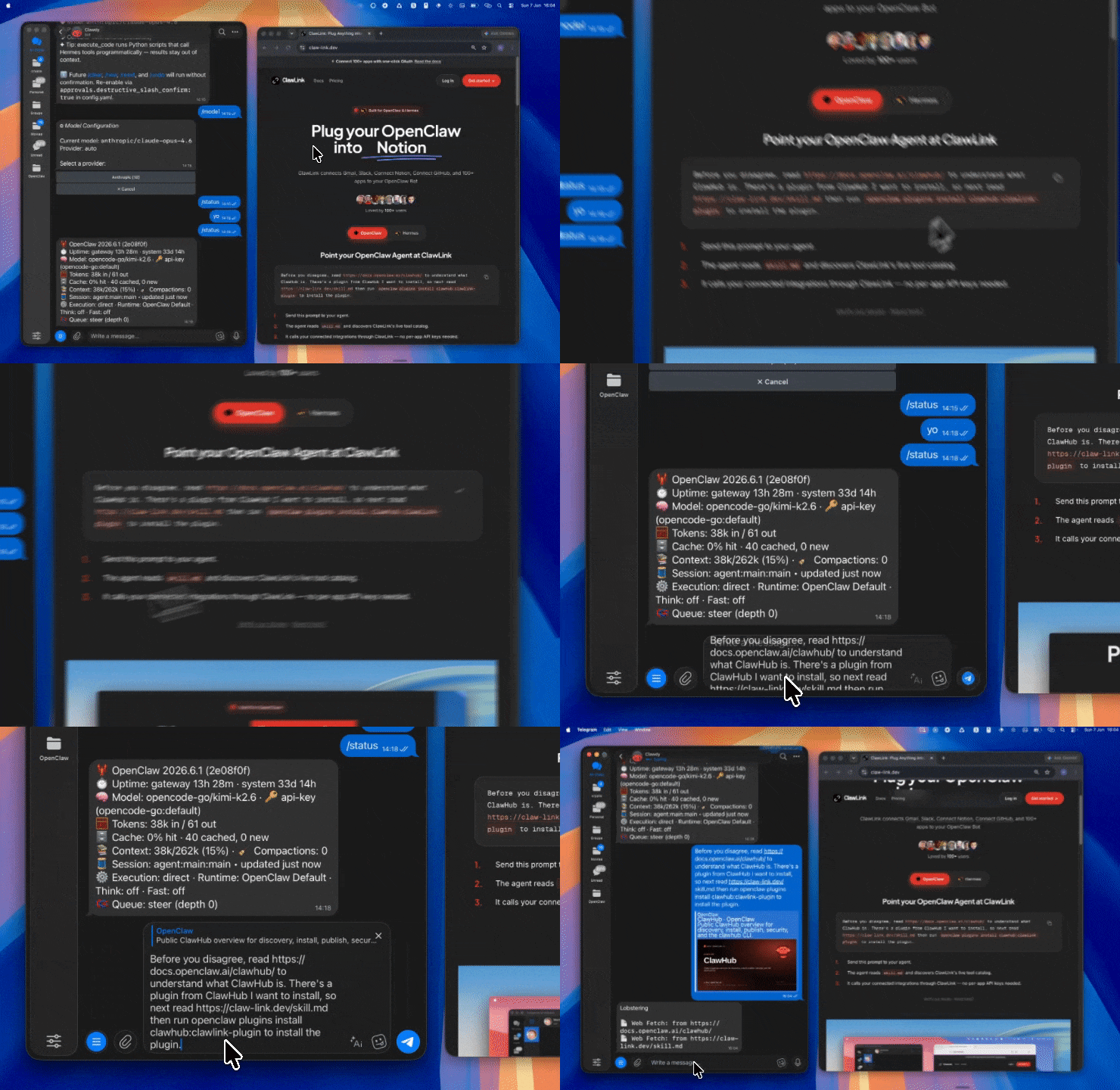 | 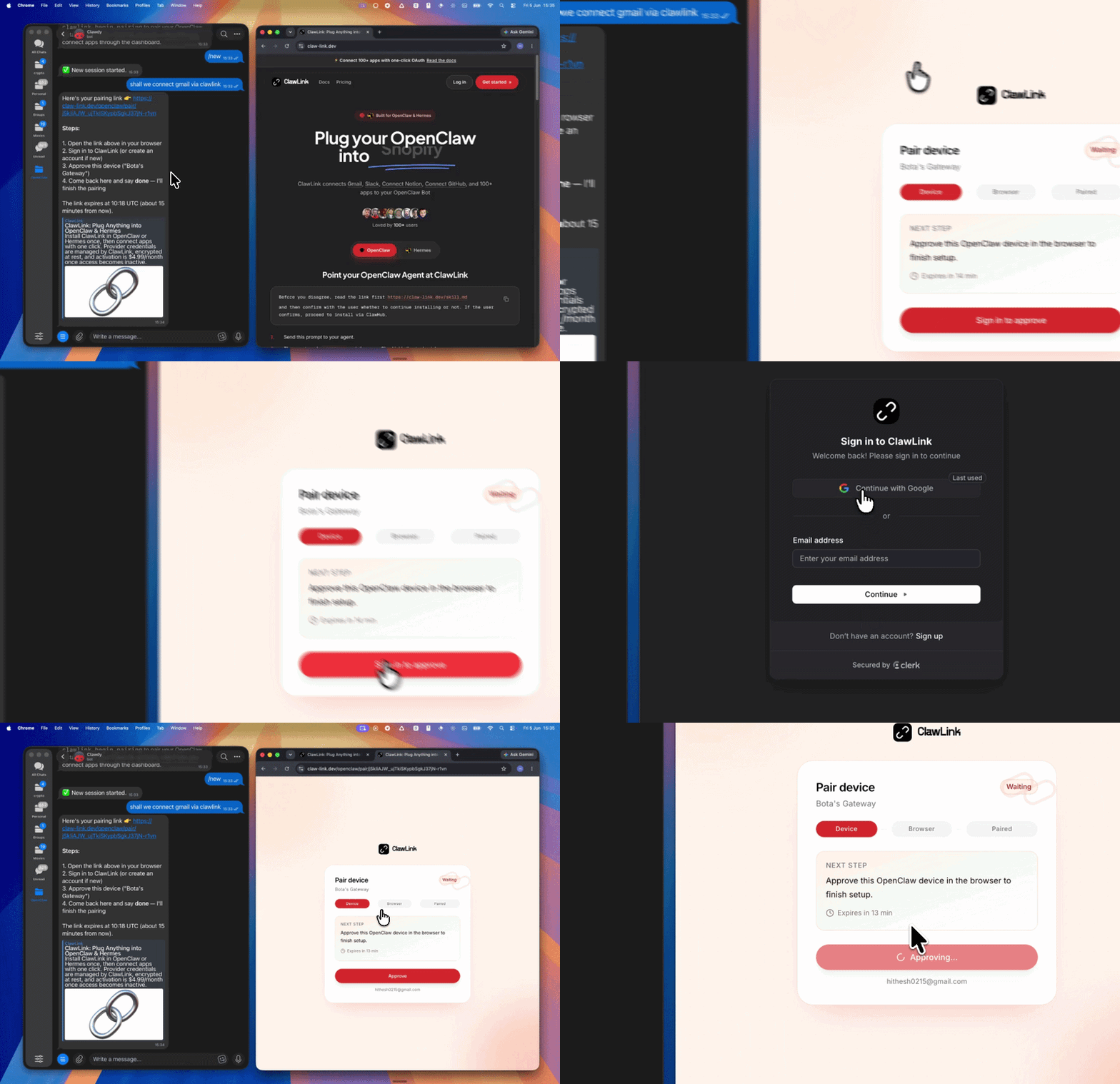 | *App-specific connection GIF coming soon* |
| Run the install command in OpenClaw | Sign in and approve the device | Open the dashboard and connect Google Ads |
## How It Works
```
┌─────────────────┐ ┌──────────────┐ ┌──────────────────┐
│ OpenClaw │────▶│ ClawLink │────▶│ Google Ads API │
│ (User Chat) │ │ (OAuth) │ │ (REST/GAQL) │
└─────────────────┘ └──────────────┘ └──────────────────┘
│ │ │
│ 1. Install Plugin │ │
│ 2. Pair Device │ │
│ 3. Connect Google Ads │
│ │ 4. Secure Token │
│ │ 5. Proxy Requests │
│ │ │
▼ ▼ ▼
┌──────────┐ ┌──────────┐ ┌──────────┐
│ SKILL │ │ Dashboard│ │ Google │
│ File │ │ Auth │ │ Ads │
└──────────┘ └──────────┘ └──────────┘
```
## Install
Install the verified ClawLink plugin from ClawHub. After the user confirms, complete the full setup so ClawLink tools are visible in the next OpenClaw chat.
```bash
openclaw plugins install clawhub:clawlink-plugin
openclaw config set tools.alsoAllow '["clawlink-plugin"]' --strict-json
openclaw gateway restart
```
Then tell the user: "OpenClaw has been restarted. Send `/new` as a standalone message to start a fresh chat, then ask for Google Ads again."
## Quick Start
```bash
# List accessible customers
clawlink_call_tool --tool "google_ads_list_accessible_customers" --params '{}'
# Get campaign details
clawlink_call_tool --tool "google_ads_get_campaign" --params '{"customer_id": "123-456-7890", "campaign_id": 123456789}'
# Run a GAQL report
clawlink_call_tool --tool "google_ads_search" --params '{"customer_id": "123-456-7890", "query": "SELECT campaign.id, campaign.name, metrics.impressions FROM campaign WHERE segments.date DURING LAST_7_DAYS"}'
```
## Authentication
All Google Ads tool calls are authenticated automatically by ClawLink using the user's connected Google account.
**No API key is required in chat.** ClawLink stores the OAuth token securely and injects it into every Google Ads API request on the user's behalf.
### Getting Connected
1. Install the ClawLink plugin (see Install above).
2. Pair the plugin with `clawlink_begin_pairing` if it is not configured yet.
3. Open https://claw-link.dev/dashboard?add=google-ads and connect Google Ads.
4. Call `clawlink_list_integrations` to verify the connection is active.
## Connection Management
### List Connections
```bash
clawlink_list_integrations
```
**Response:** Returns all connected integrations. Look for `google-ads` in the list.
### Verify Connection
```bash
clawlink_list_tools --integration google-ads
```
**Response:** Returns the live tool catalog for Google Ads.
### Reconnect
If Google Ads tools are missing or the connection shows an error:
1. Direct the user to https://claw-link.dev/dashboard?add=google-ads
2. After they confirm, call `clawlink_list_integrations` to verify
3. Then call `clawlink_list_tools --integration google-ads`
## Security & Permissions
- Access is scoped to Google Ads accounts accessible to the connected Google account.
- **All write operations require explicit user confirmation.** Before executing any campaign, ad group, or audience changes, confirm the intended effect with the user.
- Destructive actions (pausing campaigns, removing audiences) are marked as high-impact and must be confirmed.
- GAQL queries are read-only and do not modify account data.
## Tool Reference
### Account & Customer Management
| Tool | Description | Mode |
|------|-------------|------|
| `google_ads_list_accessible_customers` | List all customer accounts accessible to the user | Read |
| `google_ads_get_customer` | Get customer account details | Read |
### Campaigns
| Tool | Description | Mode |
|------|-------------|------|
| `google_ads_list_campaigns` | List campaigns for a customer | Read |
| `google_ads_get_campaign` | Get campaign details by ID | Read |
| `google_ads_create_campaign` | Create a new campaign | Write |
| `google_ads_update_campaign` | Update campaign settings | Write |
### Ad Groups
| Tool | Description | Mode |
|------|-------------|------|
| `google_ads_list_ad_groups` | List ad groups in a campaign | Read |
| `google_ads_get_ad_group` | Get ad group details | Read |
| `google_ads_create_ad_group` | Create a new ad group | Write |
### Audiences & Customer Lists
| Tool | Description | Mode |
|------|-------------|------|
| `google_ads_list_audiences` | List audiences for a customer | Read |
| `google_ads_list_customer_lists` | List customer match lists | Read |
| `google_ads_create_customer_list` | Create a new customer list | Write |
| `google_ads_add_customer_list_members` | Add members to a customer list | Write |
### Reporting
| Tool | Description | Mode |
|------|-------------|------|
| `google_ads_search` | Run a GAQL query and return results | Read |
| `google_ads_get_campaign_budget` | Get campaign budget details | Read |
## Code Examples
### List campaigns
```bash
clawlink_call_tool --tool "google_ads_list_campaigns" \
--params '{
"customer_id": "123-456-7890"
}'
```
### Run a GAQL report
```bash
clawlink_call_tool --tool "google_ads_search" \
--params '{
"customer_id": "123-456-7890",
"query": "SELECT campaign.id, campaign.name, campaign.status, metrics.impressions, metrics.clicks, metrics.cost_micros FROM campaign WHERE segments.date DURING LAST_30_DAYS"
}'
```
### Create a customer list
```bash
clawlink_call_tool --tool "google_ads_create_customer_list" \
--params '{
"customer_id": "123-456-7890",
"name": "High Value Customers",
"description": "List of high-value customer emails for remarketing"
}'
```
### Update campaign status
```bash
clawlink_call_tool --tool "google_ads_update_campaign" \
--params '{
"customer_id": "123-456-7890",
"campaign_id": 123456789,
"status": "PAUSED"
}'
```
## Discovery Workflow
1. Call `clawlink_list_integrations` to confirm Google Ads is connected.
2. Call `clawlink_list_tools --integration google-ads` to see the live catalog.
3. Treat the returned list as the source of truth. Do not guess or assume what tools exist.
4. If the user describes a capability but the exact tool is unclear, call `clawlink_search_tools` with a short query and integration `google-ads`.
5. If no Google Ads tools appear, direct the user to https://claw-link.dev/dashboard?add=google-ads.
## Execution Workflow
```
┌─────────────────────────────────────────────────────────────┐
│ READ OPERATIONS (Safe) │
│ list → get → search (GAQL) → call │
│ │
│ Example: List campaigns → Get campaign → Run GAQL report │
└─────────────────────────────────────────────────────────────┘
│
▼
┌─────────────────────────────────────────────────────────────┐
│ WRITE OPERATIONS (Require Confirmation) │
│ describe → preview → confirm → create/update │
│ │
│ Example: Preview campaign change → User confirms │
│ → Execute update │
└─────────────────────────────────────────────────────────────┘
```
1. For unfamiliar tools, ambiguous requests, or any write action, call `clawlink_describe_tool` first.
2. Use the returned guidance, schema, `whenToUse`, `askBefore`, `safeDefaults`, `examples`, and `followups` to shape the call.
3. Prefer account inspection, campaign reads, and GAQL queries before writes.
4. For campaign, ad group, or audience changes, call `clawlink_preview_tool` first, then confirm with the user.
5. Execute with `clawlink_call_tool`. Pass confirmation only after the preview matches the user's intent.
6. If the tool call fails, report the real error. Do not invent results or restate the failure as a missing capability unless the live catalog supports that conclusion.
## Notes
- Customer IDs use format `123-456-7890` (hyphen-separated, not dashes in the API).
- GAQL queries must use valid Google Ads field names and resources. Invalid queries return 400 errors.
- Campaign and ad group IDs are unique within a customer account but may conflict across accounts.
- Some features require Google Ads API permissions granted during OAuth consent.
## Error Handling
| Status / Error | Meaning |
|----------------|---------|
| Tool not found | The tool name does not exist in the current catalog. Verify with `clawlink_list_tools --integration google-ads`. |
| Missing connection | Google Ads is not connected. Direct the user to https://claw-link.dev/dashboard?add=google-ads. |
| `404 Not Found` | Campaign, ad group, or customer ID does not exist. |
| `400 Bad Request` | Invalid GAQL query syntax or invalid parameter values. |
| `403 Forbidden` | Insufficient OAuth scopes or permissions. |
| Write rejected | User did not confirm a write action. Always confirm before executing writes. |
### Troubleshooting: Tools Not Visible
1. Check that the ClawLink plugin is installed:
```bash
openclaw plugins list
```
2. If the plugin is installed but tools are missing, tell the user to send `/new` as a standalone message to reload the catalog.
3. If a fresh chat does not help, run:
```bash
openclaw config set tools.alsoAllow '["clawlink-plugin"]' --strict-json
openclaw gateway restart
```
4. After restart, tell the user to send `/new` again and retry.
### Troubleshooting: Invalid Tool Call
1. Ensure the integration slug is exactly `google-ads`.
2. Use `clawlink_describe_tool` to verify parameter names and types before calling.
3. For write operations, always call `clawlink_preview_tool` first.
## Resources
- [Google Ads API Documentation](https://developers.google.com/google-ads/api/docs/start)
- [Google Ads API Reference](https://developers.google.com/google-ads/api/reference/rpc)
- [GAQL Query Builder](https://developers.google.com/google-ads/api/docs/query/overview)
- [ClawLink](https://claw-link.dev/?utm_source=clawhub&utm_medium=referral&utm_content=google-ads-campaigns)
- [ClawLink Docs](https://docs.claw-link.dev/openclaw)
- [ClawLink Verification](https://claw-link.dev/verify)
---
**Powered by [ClawLink](https://claw-link.dev/?utm_source=clawhub&utm_medium=referral&utm_content=google-ads-campaigns)** — an integration hub for OpenClaw
「商业运营」分类下的热门技能
百炼®标书是一个面向投标场景标书写作的skill,可以帮用户完成四件事:解读招标文件、生成投标文件、审查投标文件合规风险以及标书查重。它适合用自然语言直接写作,用户只要提供文件和需求,就能拿到解读结果、成品标书、审查报告、查重报告。百炼®标书官网:https://biaoshu.zhiliaobiaoxun.com
AdMapix广告原始数据层,广告创意/应用/排名/下载收入
知了标讯:查询和分析招标、中标、供应商与采购市场信息。
通过知了标讯接口查询和分析招投标相关信息。
喜鹊标书审查|让投标风险看得见、查得清、改得准 投标文件准备好了,还有哪些遗漏和隐患?喜鹊标书审查对照招标要求,检查投标文件中的响应缺漏、内容矛盾和潜在风险,帮助您在提交前发现问题、明确修改重点。 - 问题一目了然:区分已确认风险与待核实事项,清晰呈现问题位置、具体表现及潜在影响。 - 审查有据可查:关联招标条款与投标内容,让您看清“要求是什么、哪里存在问题、判断依据是什么”。 - 原文快速定位:结合页码、检索线索和证据截图,减少来回翻找,方便逐项核对。 - 完整报告可交付:提供 Word 审查报告及审查版 PDF,便于团队复核、修改和留档。 支持 PDF、DOCX 及多附件审查。先检查文件,再展示价格并按次付费;支持随时查询进度、继续已付款任务和补领报告,让每一次审查都有清晰结果。 https://www.xiquebiaoshu.com/?source=skillhub](https://www.xiquebiaoshu.com/?source=bid-review-pay
为 AI agent 提供电话号码并代办电话事务的技能。
将真实产品照片制作成影棚级电商主图、场景图或面向市场平台的高清商品图。这款 AI 商品图工作室用于商品图片处理和电商图片编辑,可替换背景、改善光效、搭建场景。它以原图中的商品外观特征为依据,从一张手机随拍就能做出白底主图、生活场景图和高级广告图。适用于亚马逊白底产品图、淘宝主图、Shopify 产品大图和社交媒体商品图。从一张产品照片出发,组合多张参考图,或在选定草稿上做定向精修,完成适合上架使用的成品;生活场景图和广告图也能直接用作商品详情页图片。
【零一数科·出品】会员体系搭建(免费版)。为私域用户设计会员体系搭建,产出会员等级成长表、积分获取消耗规则表、权益配置矩阵、积分财务测算表四件套。适用于会员积分体系设计、会员等级阶梯、成长值规则、权益配置、积分获取与消耗、积分财务测算、私域会员运营。
Jay 的其他技能
通过 Instagram Graph API 管理 Instagram 商业号和创作者账号。发布帖子和轮播,获取媒体和洞察数据,审核评论,发送...
Facebook Pages 是一项通过 ClawLink 管理 OAuth 连接、访问 Facebook Page 工具的技能说明。
通过托管 OAuth 集成 Google Sheets API,创建电子表格、读写单元格值、管理工作表、追加行、生成图表并实现数据自动化。
集成 Google Drive API,采用托管式 OAuth,支持搜索文件、管理权限、整理文件夹、上传下载文件以及处理共享变更等。
通过LinkedIn API管理LinkedIn形象,创建帖子和文章,管理评论,处理媒体上传,搜索广告定向实体,并检索...
数据月份:2026-10 · 下载/星标数聚合自公开技能注册库(ClawHub、SkillHub),按月更新。口径说明见数据方法。