
作者:Jay更新于 2026-06-09共 5 个版本 · 最新版本发布于 2026-06-09google-search-console-seo@clawhub_hith3sh/google-search-console-seo
数据洞察指标监控#Api Integration
据 AlphaMoat 统计,截至 2026-10,Google Search Console 累计下载 7,288 次、获 32 个星标,按累计下载量在本次参与排名的 10,914 个 AI 技能中排名第 3,847 位,在「数据分析」分类(915 个)中排名第 357 位。
列表默认按累计下载量排序,也可按星标排序;详情页排名按累计下载量计算。
| 平台 | 累计下载 | 星标 | 评论 |
|---|---|---|---|
| ClawHub ↗ | 7,288 | 32 | - |
| SkillHub ↗ | 5,425 | 32 | — |
各平台的计数口径不同,统计时间不一致。
通过托管 OAuth 集成 Google Search Console API,查询搜索表现分析、检查 URL 索引状态、审查站点地图并管理验证。
2026-09 起统计方法调整:同名技能按作者分别统计,并覆盖全部技能。图中虚线为调整前的月份,与之后的数据不直接比较,也不计算跨越调整的增长。
| 月份 | 累计下载 | 环比 | 星标 |
|---|---|---|---|
| 2026-10 | 7,288 | — | 32 |
| 2026-09 | 7,119 | — | 32 |
| 2026-08 | 6,984 | +2.4% | 32 |
| 2026-07 | 6,823 | +271.6% | 32 |
| 2026-06 | 1,836 | +59.0% | 32 |
| 2026-05 | 1,155 | — | 6 |
以下是作者发布的原始文件,按纯文本显示,本站未做修改或审核;其中的链接不可点击,命令请核实后再运行。抓取于 2026-11-20。
--- name: google-search-console-seo description: Google Search Console API integration with managed OAuth. Query search performance analytics, inspect URL indexing status, review sitemaps, and manage verified site properties. Use this skill when users want to monitor SEO performance or troubleshoot indexing issues. --- # Google Search Console  Access Google Search Console via the Search Console API with managed OAuth authentication. Query search performance, inspect indexing status, review sitemaps, and manage verified sites.
This skill uses [ClawLink](https://claw-link.dev/?utm_source=clawhub&utm_medium=referral&utm_content=google-search-console-seo) for hosted connection flows and credentials so you do not need to configure Google Search Console API access yourself.
### Setup in 3 Steps
| Step 1: Install | Step 2: Pair Account | Step 3: Connect Search Console |
|:---:|:---:|:---:|
| 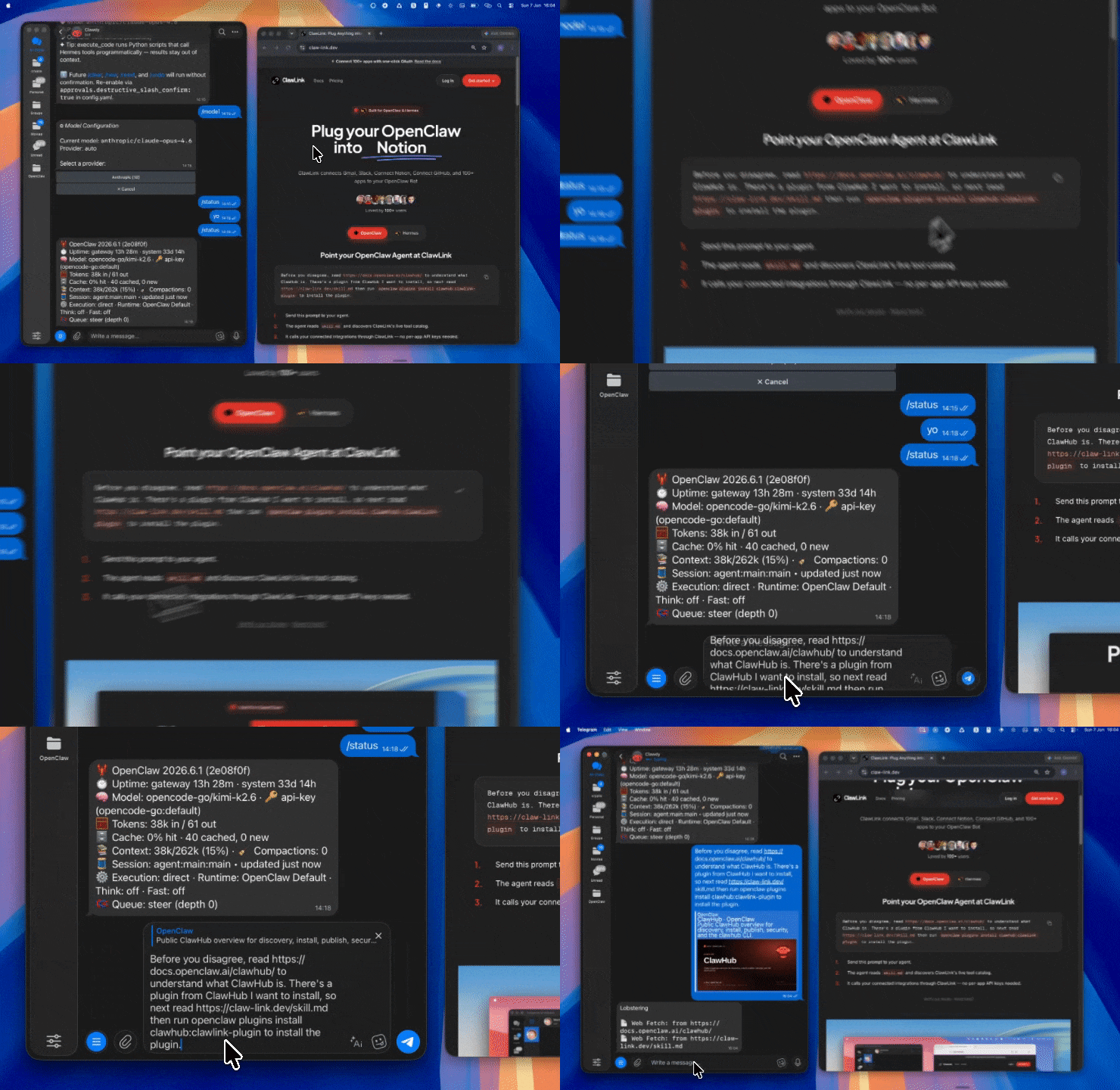 | 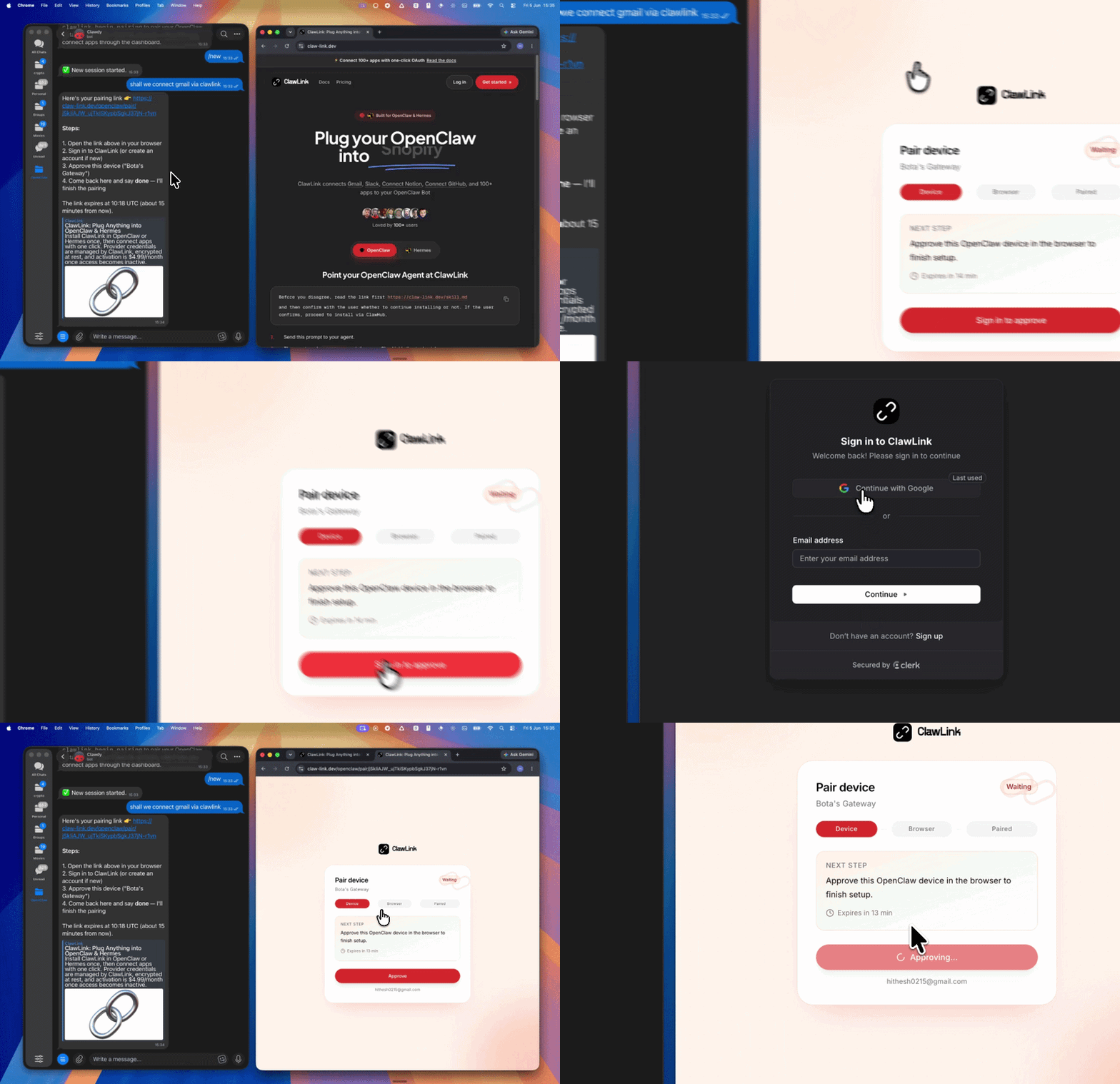 | *App-specific connection GIF coming soon* |
| Run the install command in OpenClaw | Sign in and approve the device | Open the dashboard and connect Google Search Console |
## How It Works
```
┌─────────────────┐ ┌──────────────┐ ┌──────────────────┐
│ OpenClaw │────▶│ ClawLink │────▶│ Google Search │
│ (User Chat) │ │ (OAuth) │ │ Console API │
└─────────────────┘ └──────────────┘ └──────────────────┘
│ │ │
│ 1. Install Plugin │ │
│ 2. Pair Device │ │
│ 3. Connect GSC │ │
│ │ 4. Secure Token │
│ │ 5. Proxy Requests │
│ │ │
▼ ▼ ▼
┌──────────┐ ┌──────────┐ ┌──────────┐
│ SKILL │ │ Dashboard│ │ Search │
│ File │ │ Auth │ │ Console │
└──────────┘ └──────────┘ └──────────┘
```
## Install
Install the verified ClawLink plugin from ClawHub. After the user confirms, complete the full setup so ClawLink tools are visible in the next OpenClaw chat.
```bash
openclaw plugins install clawhub:clawlink-plugin
openclaw config set tools.alsoAllow '["clawlink-plugin"]' --strict-json
openclaw gateway restart
```
Then tell the user: "OpenClaw has been restarted. Send `/new` as a standalone message to start a fresh chat, then ask for Google Search Console again."
## Quick Start
```bash
# List verified sites
clawlink_call_tool --tool "google_search_console_list_sites" --params '{}'
# Query search analytics
clawlink_call_tool --tool "google_search_console_search_analytics_query" --params '{"site_url": "https://example.com/", "start_date": "2024-01-01", "end_date": "2024-01-31"}'
# Inspect a URL
clawlink_call_tool --tool "google_search_console_inspect_url" --params '{"site_url": "https://example.com/", "inspection_url": "https://example.com/page/"}'
```
## Authentication
All Google Search Console tool calls are authenticated automatically by ClawLink using the user's connected Google account.
**No API key is required in chat.** ClawLink stores the OAuth token securely and injects it into every Search Console API request on the user's behalf.
### Getting Connected
1. Install the ClawLink plugin (see Install above).
2. Pair the plugin with `clawlink_begin_pairing` if it is not configured yet.
3. Open https://claw-link.dev/dashboard?add=google-search-console and connect Google Search Console.
4. Call `clawlink_list_integrations` to verify the connection is active.
## Connection Management
### List Connections
```bash
clawlink_list_integrations
```
**Response:** Returns all connected integrations. Look for `google-search-console` in the list.
### Verify Connection
```bash
clawlink_list_tools --integration google-search-console
```
**Response:** Returns the live tool catalog for Google Search Console.
### Reconnect
If Google Search Console tools are missing or the connection shows an error:
1. Direct the user to https://claw-link.dev/dashboard?add=google-search-console
2. After they confirm, call `clawlink_list_integrations` to verify
3. Then call `clawlink_list_tools --integration google-search-console`
## Security & Permissions
- Access is scoped to sites verified in the connected Google Search Console account.
- **All write operations require explicit user confirmation.** Before executing any site addition, removal, or sitemap submission, confirm the target and intended effect with the user.
- Destructive actions (delete site) are marked as high-impact and must be confirmed.
## Tool Reference
### Site Management
| Tool | Description | Mode |
|------|-------------|------|
| `google_search_console_list_sites` | List all verified sites (URL-prefix and domain properties) owned by the user | Read |
| `google_search_console_get_site` | Get details and permission level for a specific site | Read |
| `google_search_console_add_site` | Register a new site property in Search Console | Write |
| `google_search_console_delete_site` | Remove a site from Search Console tracking | Write |
### Search Analytics
| Tool | Description | Mode |
|------|-------------|------|
| `google_search_console_search_analytics_query` | Query clicks, impressions, CTR, and position metrics | Read |
### URL Inspection
| Tool | Description | Mode |
|------|-------------|------|
| `google_search_console_inspect_url` | Inspect a specific URL for indexing status and issues | Read |
### Sitemap Management
| Tool | Description | Mode |
|------|-------------|------|
| `google_search_console_list_sitemaps` | List all sitemaps submitted for a site | Read |
| `google_search_console_get_sitemap` | Get sitemap metadata (submitted/indexed counts, errors, timestamps) | Read |
| `google_search_console_submit_sitemap` | Submit or resubmit a sitemap for a verified property | Write |
## Code Examples
### List verified sites
```bash
clawlink_call_tool --tool "google_search_console_list_sites" \
--params '{}'
```
### Query search analytics for a date range
```bash
clawlink_call_tool --tool "google_search_console_search_analytics_query" \
--params '{
"site_url": "https://example.com/",
"start_date": "2024-01-01",
"end_date": "2024-01-31",
"dimensions": ["query", "page"]
}'
```
### Query analytics filtered by country
```bash
clawlink_call_tool --tool "google_search_console_search_analytics_query" \
--params '{
"site_url": "https://example.com/",
"start_date": "2024-01-01",
"end_date": "2024-01-31",
"dimensions": ["country"],
"row_limit": 50
}'
```
### Inspect a URL for indexing issues
```bash
clawlink_call_tool --tool "google_search_console_inspect_url" \
--params '{
"site_url": "https://example.com/",
"inspection_url": "https://example.com/important-page/"
}'
```
### Submit a sitemap
```bash
clawlink_call_tool --tool "google_search_console_submit_sitemap" \
--params '{
"site_url": "https://example.com/",
"feedpath": "/sitemap.xml"
}'
```
### Add a new site
```bash
clawlink_call_tool --tool "google_search_console_add_site" \
--params '{
"site_url": "https://newsite.example.com/"
}'
```
## Discovery Workflow
1. Call `clawlink_list_integrations` to confirm Google Search Console is connected.
2. Call `clawlink_list_tools --integration google-search-console` to see the live catalog.
3. Treat the returned list as the source of truth. Do not guess or assume what tools exist.
4. If the user describes a capability but the exact tool is unclear, call `clawlink_search_tools` with a short query and integration `google-search-console`.
5. If no Google Search Console tools appear, direct the user to https://claw-link.dev/dashboard?add=google-search-console.
## Execution Workflow
```
┌─────────────────────────────────────────────────────────────┐
│ READ OPERATIONS (Safe) │
│ list → get → query → inspect → call │
│ │
│ Example: List sites → Query analytics → Show results │
└─────────────────────────────────────────────────────────────┘
│
▼
┌─────────────────────────────────────────────────────────────┐
│ WRITE OPERATIONS (Require Confirmation) │
│ describe → preview → confirm → call │
│ │
│ Example: Describe tool → Preview → User approves │
│ → Execute sitemap submission │
└─────────────────────────────────────────────────────────────┘
```
1. For unfamiliar tools, ambiguous requests, or any write action, call `clawlink_describe_tool` first.
2. Use the returned guidance, schema, `whenToUse`, `askBefore`, `safeDefaults`, `examples`, and `followups` to shape the call.
3. Prefer listing sites, querying analytics, and inspecting URLs before writes.
4. For sitemap submissions, site additions or removals, or anything marked as requiring confirmation, call `clawlink_preview_tool` first.
5. Execute with `clawlink_call_tool`. Pass confirmation only after the preview matches the user's intent.
6. If the tool call fails, report the real error. Do not invent results or restate the failure as a missing capability unless the live catalog supports that conclusion.
## Notes
- The `site_url` parameter must exactly match the property as returned by `list_sites` — include protocol, subdomain, and trailing slash where applicable.
- `search_analytics_query` only returns URLs with at least one impression; missing rows do not confirm non-indexing.
- Position is an impression-weighted average rank across all queries.
- Sitemap metadata (`errors`, `warnings`, `submitted`, `indexed`) may be returned as strings — cast to integers before comparisons.
- Results may reflect cached data lagging real changes by several days.
- High-volume inspect_url usage can trigger 429 quota errors — limit to priority URLs.
- Numeric fields in sitemap responses can lag several days after submission.
## Error Handling
| Status / Error | Meaning |
|----------------|---------|
| Tool not found | The tool name does not exist in the current catalog. Verify with `clawlink_list_tools --integration google-search-console`. |
| Missing connection | Google Search Console is not connected. Direct the user to https://claw-link.dev/dashboard?add=google-search-console. |
| `NOT_VERIFIED` | Site is not verified in Search Console. Complete verification first. |
| `FORBIDDEN` | No permission level for the requested site. |
| `INVALID_ARGUMENT` | Invalid parameter or missing required field. Review the tool schema with `clawlink_describe_tool`. |
| Write rejected | User did not confirm a write action. Always confirm before executing writes. |
### Troubleshooting: Tools Not Visible
1. Check that the ClawLink plugin is installed:
```bash
openclaw plugins list
```
2. If the plugin is installed but tools are missing, tell the user to send `/new` as a standalone message to reload the catalog.
3. If a fresh chat does not help, run:
```bash
openclaw config set tools.alsoAllow '["clawlink-plugin"]' --strict-json
openclaw gateway restart
```
4. After restart, tell the user to send `/new` again and retry.
### Troubleshooting: Invalid Tool Call
1. Ensure the integration slug is exactly `google-search-console`.
2. Use `clawlink_describe_tool` to verify parameter names and types before calling.
3. For write operations, always call `clawlink_preview_tool` first.
## Resources
- [Search Console API Overview](https://developers.google.com/webmaster-tools/search-console-api-original)
- [Search Analytics Reference](https://developers.google.com/webmaster-tools/search-console-api-original/v3/searchanalytics)
- [Sites Reference](https://developers.google.com/webmaster-tools/search-console-api-original/v3/sites)
- [Sitemaps Reference](https://developers.google.com/webmaster-tools/search-console-api-original/v3/sitemaps)
- ClawLink: https://claw-link.dev/?utm_source=clawhub&utm_medium=referral&utm_content=google-search-console-seo
- ClawLink Docs: https://docs.claw-link.dev/openclaw
- ClawLink Verification: https://claw-link.dev/verify
---
**Powered by [ClawLink](https://claw-link.dev/?utm_source=clawhub&utm_medium=referral&utm_content=google-search-console-seo)** — an integration hub for OpenClaw
中国金融机构数据爬取与分析综合 Skill v12.0.0。2334家/43大类机构名单、60+财经媒体源舆情、 A股报告/公告/研报、60+种查询多源金融数据(自动降级+缓存)、爬取调度与网页操作增强、 实时数据中枢、24 技术指标引擎、多源证据融合、110 MCP 工具 + 10 Resource + 14 Prompt。 🆕 v12.0.0 四条线(信息获取 / 打包下载 / 数据分析 / 登录): 编排:gather_info() 一次跑完"路由→抓取→去占位→质量分→能力边界→回执→打包", 8 类意图各带问法、输入输出、典型耗时与 not_for(说清哪件事做不了)。 诚实:反爬占位条目一律剔除并记账,空结果报 E_SOURCE_EMPTY,不把假数据判成 B 级成功。 交付:包内自带 manifest.json(逐文件 sha256),verify 查得出改动/缺失/多塞, 批量下载单条失败不中断整批,失败清单可直接只重下那几条。 登录:Cookie 由用户导出或扫码接管,档案化 + 健康度四档,对外输出全脱敏(值永不回显)。 何时触发:爬取机构、舆情爬取、东方财富、公告下载、实时行情、技术指标、统一查询、 交付包、批量重下、我已经登录了、登录态还有效吗(完整触发词见下方 auto_trigger)。
大宗商品价格数据查询技能。用于查询大宗商品期现货价格、宏观经济指标、产业链供需数据、进出口库存数据、金融市场数据等。当用户询问:(1) 期货/现货价格查询,如"螺纹钢价格"、"铜期货收盘价"; (2) 历史行情或趋势分析;(3) 区域或企业价格对比;(4) 宏观经济指标,如GDP、CPI;(5) 产业链上下游数据;(6) 多市场金融数据(期权、股票、债券、外汇);(7) 结算确认单生成时触发此技能。
32种图表,3 个主题,2步生成: 1.上传数据 — 将 CSV / Excel / JSON 等格式的数据文件拖入对话框; 2.查看结果 — 交互式图表(HTML),可保存图表为图片.
AdMapix 的取数层:把广告与应用相关的查询转成接口调用,只回原始 JSON。
论文配图一键生成:一条命令从 JSON/CSV/Excel 生成顶刊级学术图表,科研绘图 与期刊配图全场景覆盖。40 种图表(森林图/KM 生存曲线(自动风险表)/竞争风险累计发生率/ROC/校准 曲线/决策曲线 DCA/列线图/RCS 非线性剂量反应/亚组分析森林图/RMST 限制平均生存时间/Galbraith 径向图/火山图/雨云图/山脊图/哑铃图/游泳图(逐例时长+里程碑)/ 肿瘤缓解瀑布图/UpSet 交集/PRISMA 流程图/漏斗/BA 一致性/PCA/热图/箱线/小提琴/ 组合图/Cox 多因素回归森林图等),9 套配色(含色盲安全 Okabe-Ito 与期刊色板),9 种期刊投稿预设, YAML 流水线一条命令出全套论文图,一次渲染多格式导出(TIFF/PNG/PDF), PDF 重叠门禁,600dpi。纯本地运行,数据不出机,中文零配置。适用:写论文/ 投稿要配图、把数据变成可投稿图表、批量重出全套图。不适用:文本润色/翻译/ 改写(请用写作类工具);商业报表/仪表盘/海报装饰;无数据支撑的纯示意图。
Intelligent chart generation and data analysis skill. Reads user-supplied data files (CSV/Excel/JSON), analyzes data characteristics with LLM assistance, auto-recommends and generates interactive ECharts visualizations. Use when the user asks to analyze data, generate charts, create visualizations, or work with tabular data files.
全球智能投研工具(stock-researcher)v13.0:多源数据 + 概率预测 + 可导出报告。 核心能力: - 多源数据路由:按市场/类别选源,逐级降级;每个结果标注来源与时效等级;源不可用时明确标 unavailable - 全资产量化:股票/ETF/场外基金/指数/期货(期限结构、基差、持仓、折溢价)多因子分析 - 概率预测:1d/5d/1M/3M/6M 经验分布 + 分位数 + 方向概率 + 区间,kNN 邻域收缩融合全局分布; 样本不足自动弃权,可按历史命中样本(同桶)做概率校准 - 证据链简报:每条结论绑定来源、时间与数据质量,冲突信号保留而不抹平 - 报告导出:Word/PPT/PDF/Markdown/JSON/纯文本,纯标准库渲染 + 可选第三方引擎 - MCP Server 24 工具,Claude Code 可直接调用;知识库 12 适配器双向同步 三条铁律: - 数据不装:拿不到就报不可用,不拿 0 价、不拿空表冒充 - 预测不装:概率来自历史相似条件的经验分布,样本不足就说不足,不硬给方向 - 评分≠盈利保证:任何结论都带免责声明
走 Tavily 检索公开网页,返回带链接与摘要的结构化结果。
通过 Instagram Graph API 管理 Instagram 商业号和创作者账号。发布帖子和轮播,获取媒体和洞察数据,审核评论,发送...
Facebook Pages 是一项通过 ClawLink 管理 OAuth 连接、访问 Facebook Page 工具的技能说明。
通过托管 OAuth 集成 Google Sheets API,创建电子表格、读写单元格值、管理工作表、追加行、生成图表并实现数据自动化。
集成 Google Drive API,采用托管式 OAuth,支持搜索文件、管理权限、整理文件夹、上传下载文件以及处理共享变更等。
通过LinkedIn API管理LinkedIn形象,创建帖子和文章,管理评论,处理媒体上传,搜索广告定向实体,并检索...
数据月份:2026-10 · 下载/星标数聚合自公开技能注册库(ClawHub、SkillHub),按月更新。口径说明见数据方法。